


A markdown convention for tracking what you're building. Plain files in your repo, one source of truth for what's active, shipped, and next. AI assistants read it natively as a bonus.
Home · Roadmap demo · Status demo · Slides · Docs · Blog post · Reference spec
Created by Yasiru Rangana, AI Architect and AI Engineer, Sydney.
A planning convention for solo devs and small teams. Every feature is a markdown file with structured frontmatter and a status banner. One STATUS.md answers "what's in flight, what's next, what just shipped". A static roadmap.html renders an interactive Gantt and dependency graph from the same data.
The primary audience is you, the person doing the work. The structure exists so you stop losing track of what you've shipped vs. what's still in flight. The fact that AI coding assistants (Claude Code, Cursor, Antigravity, Windsurf) can read your roadmap natively, because it's plain markdown with predictable shape, is a side effect, and a useful one.
The data model is plain markdown and JSON. On the script path, the instruction file (CLAUDE.md, AGENTS.md, .cursorrules) is how you tell your assistant the system exists, and it's the one thing that changes per platform. On the plugin path, no instruction-file change is needed at all, since the installed plugin is itself the assistant integration.
I built this for myself and use it daily across my own projects. It's MIT, small and readable end to end, and ships with everything you need including a Claude Code plugin, a CLI, a dashboard, and a /plans sync skill that audits your plans against your git log weekly.
Where this sits in the wider trend: AI-assisted development is shifting toward spec-driven workflows, where the spec is a first-class artifact your assistant reads and writes against. Tools like GitHub's Spec Kit handle the per-feature spec workflow. Plans is the portfolio layer that sits alongside: the multi-feature view of what's active, what shipped, what got abandoned, and what blocks what. Different layer, same shift.
- A single source of truth for "what's in flight, what's next, what just shipped"
- Persistent context across plans, for yourself, over time
- Persistent context for your AI assistant across sessions
- A shareable visual roadmap for non-technical stakeholders
- Drift detection between intent (plans) and reality (git log)
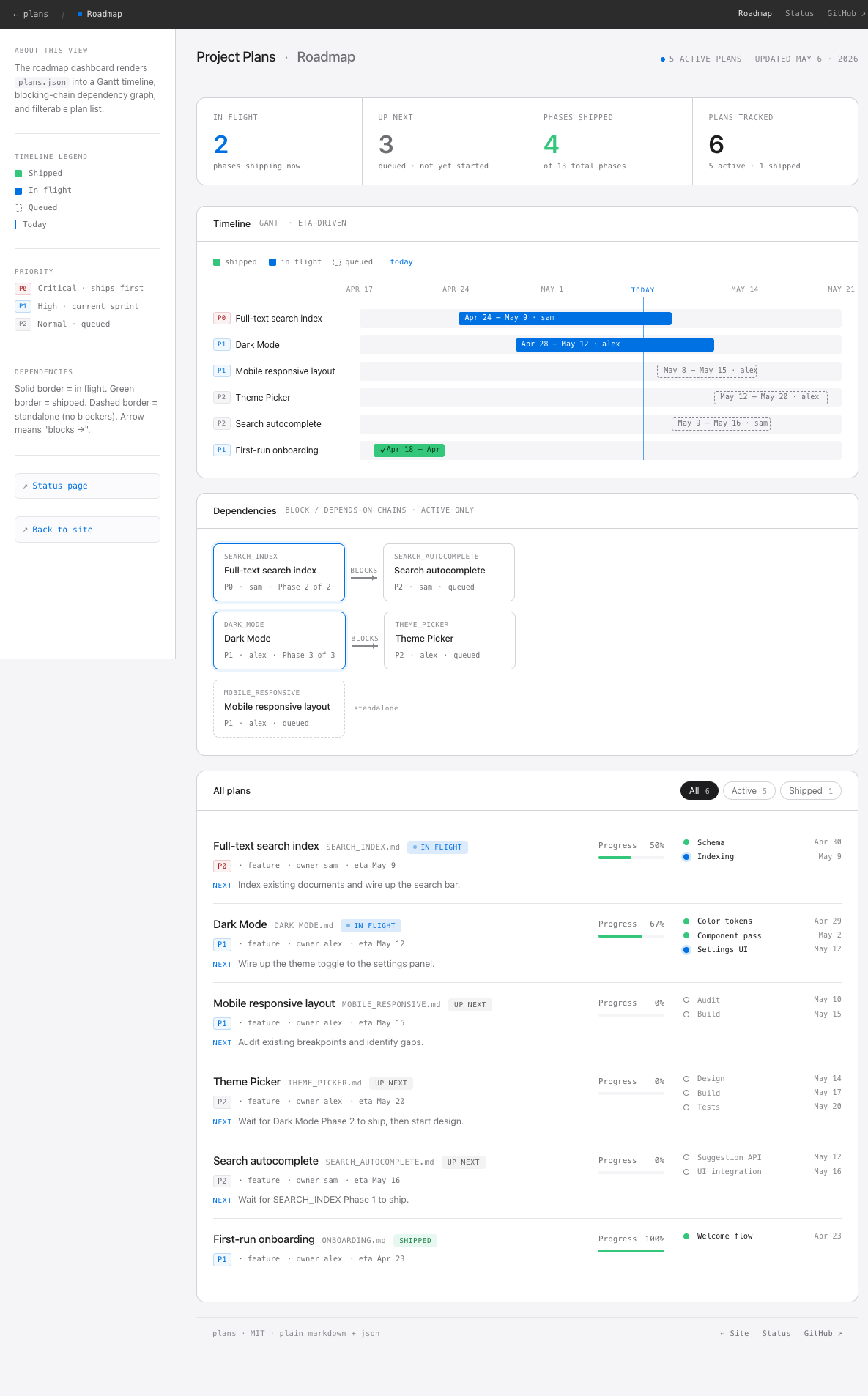
Interactive roadmap dashboard (live demo):
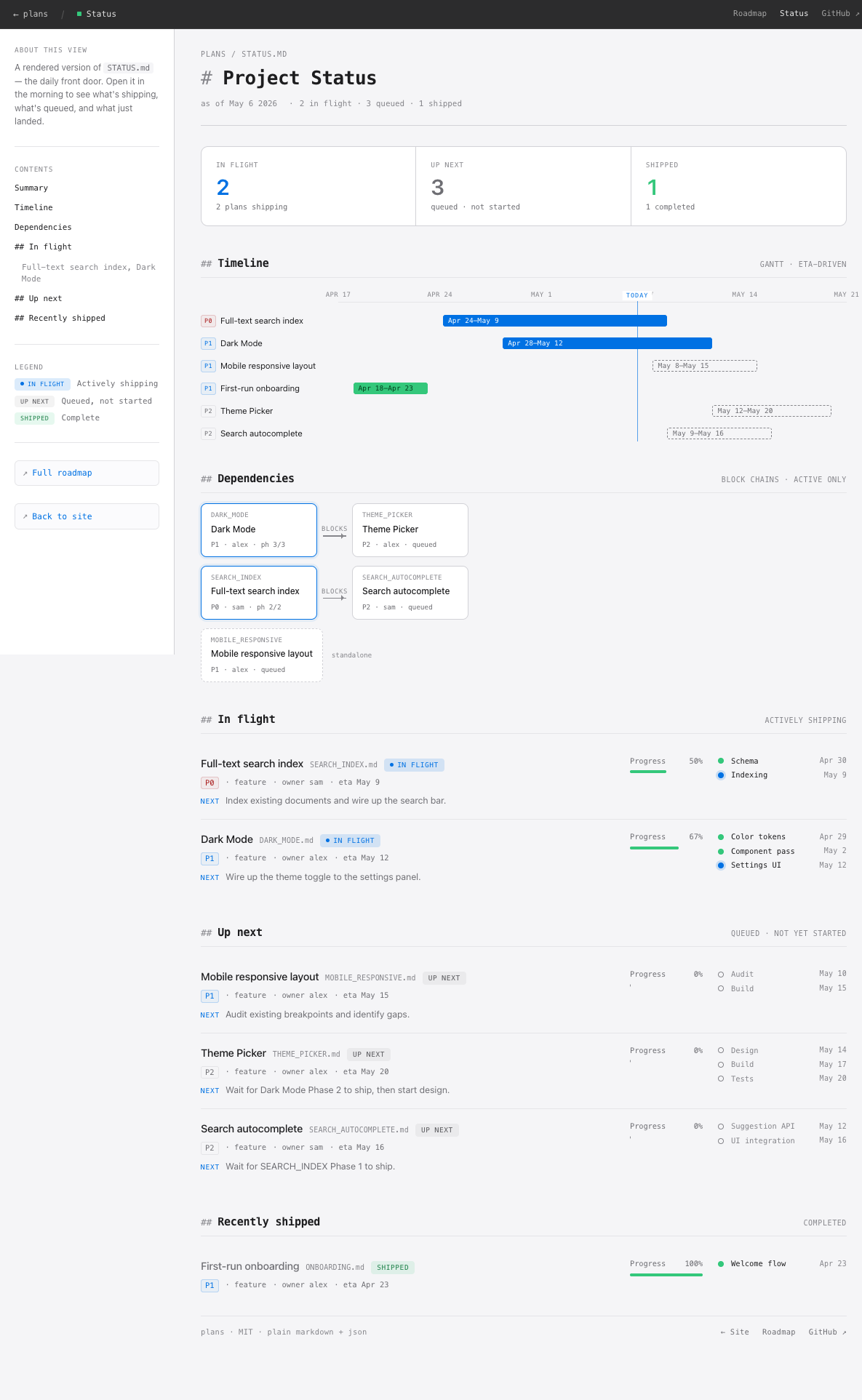
STATUS.md rendered (live demo):
Best fit:
- Solo developers and small teams (1 to 4 people) juggling multiple features in parallel
- Projects with 3+ ideas in flight where context-switching costs are real
- AI-assisted workflows where you want your assistant to know what you've already shipped
- Repos accumulating loose
*_PLAN.mdfiles at the root with no shared shape
Less useful when: you already have a working Jira/Linear/Notion setup that fits your team, you're on a single-feature project, or you need a full audit trail for compliance.
Full scope and audience details in docs/reference.md.
Plans is listed in the Anthropic Directory. Install it one of two ways, not both (two installs register the hooks twice):
From the Claude app (one click): open Settings > Plugins > Discover, search "Plans", and click Add. The plugin syncs into Claude Code on any machine signed in to the same account.
From the terminal:
/plugin marketplace add yrangana/Plans
/plugin install plans@yrangana-plans
Then bootstrap your project in Claude Code:
/plans:plans init
init creates plans/, asks whether to track it in git (default: keep it local), and points you at /plans:plans new for your first plan. Refresh project system files any time with /plans:plans update. The plugin also supplies the project's operational rules (where to write plans, when to update status) automatically via a session hook, no CLAUDE.md edit needed.
The plugin also installs a session guard: if a session changes code while a plan is in flight and no plan file is updated, it asks once per turn for the update before the session ends.
Works with Cursor, Antigravity, Windsurf, and any of the roughly 70 assistants the community skills CLI supports.
-
Install the skill:
npx skills add yrangana/Plans
-
In your assistant, bootstrap the project:
/plans initinitcreatesplans/, asks whether to track it in git (default: keep it local), and offers to append the planning rules to yourCLAUDE.md,AGENTS.md, or.cursorrules(explicit consent, never twice). -
Update the skill later with
npx skills update.
Prefer plain scripts, with no assistant session involved? The CLI path is still supported:
curl -sSL https://raw.githubusercontent.com/yrangana/Plans/main/install.sh | bash
plans-init /path/to/your/project
Read it before running it:
curl -sSLO https://raw.githubusercontent.com/yrangana/Plans/main/install.sh
less install.sh && bash install.shOpen the dashboard (any static file server from your project root, then /plans/roadmap.html):
python -m http.server 8080   # Python 3
npx serve -l 8080            # Node.js
php -S localhost:8080        # PHP
Edit your first plan: open plans/active/EXAMPLE_PLAN.md, replace it with your real first plan, and add a row to plans/STATUS.md.
How you update depends on how you installed. Plugin installs update the plugin first, then run /plans:plans update; the plans CLI updates itself and your project's system files separately.
Update the plugin where you installed it: the Update button on the Plans page in the Claude app (Settings > Plugins) for a Directory install, or /plugin for a terminal install. Then refresh your project's system files (roadmap.html, plans/README.md) any time with:
/plans:plans update
npx skills updateEither re-run the installer, or pull the repo manually:
curl -sSL https://raw.githubusercontent.com/yrangana/Plans/main/install.sh | bashplans-update /path/to/your/projectThis pulls the latest plans repo, shows a diff of system files, and asks before overwriting. User data (STATUS.md, plans.json, active/, shipped/) is never touched. Backups go to <file>.bak.
To skip the auto-pull (offline or when you have local edits in the plans repo): plans-update --no-pull /path/to/your/project.
To remove the CLI commands without deleting the plans repo:
rm ~/.local/bin/plans-init ~/.local/bin/plans-updateThe cloned repo at ~/.local/share/plans is left in place. Delete it too if you want a clean slate:
rm -rf ~/.local/share/plansAny plans/ directories in your projects are unaffected (they are local-only and git-excluded).
See CHANGELOG.md for what's changed between versions.
Five ways into the system, depending on what you want:
| Resource | Best for | Format |
|---|---|---|
| Home | Landing page with links to everything below | Web page |
| Roadmap demo | Seeing the Gantt dashboard with real data | Interactive web page |
| Status demo | Seeing what STATUS.md looks like rendered | Interactive web page |
| Slides | A 5-minute overview of the whole system | Reveal.js deck |
| Docs | Browsable docs rendered from the repo | Web page |
| Blog post | The story and motivation behind it | Long-form prose |
| Reference spec | Implementation details, every field, every rule | Technical reference |
plans/
├── docs/                    # Full guide
│   ├── reference.md         # Technical spec
│   ├── blog-post.md         # Narrative explanation
│   └── presentation.html    # Slideshow
├── template/                # What users copy into their projects
│   └── skills/
│       └── plans/           # The /plans skill (self-sufficient package)
│           ├── SKILL.md
│           ├── references/  # Per-mode logic loaded on demand
│           └── template/    # Bundled project template
│               ├── CLAUDE.md.snippet   # under skills/plans/template
│               └── plans/   # STATUS.md, plans.json, roadmap.html, active/, shipped/, superseded/
├── scripts/
│   └── init.sh              # One-command setup
├── web/                     # GitHub Pages site (deployed automatically)
│   ├── index.html           # Landing page
│   ├── roadmap.html         # Live roadmap demo
│   ├── status.html          # Live STATUS.md demo
│   ├── presentation.html    # Slides
│   └── docs.html            # Browsable docs
└── examples/                # Static assets for README
    ├── demo.svg             # Animated demo
    ├── screenshot-dashboard.png
    └── screenshot-status.png
plans/active/*.md             plans/shipped/*.md
   (frontmatter + banner)        (frontmatter + banner)
              \                  /
               \                /
                v              v
              plans/plans.json    <- machine-readable snapshot
              /              \
             v                v
   plans/STATUS.md       plans/roadmap.html
   (engineer's front     (stakeholder visual
    door)                 dashboard)
Git log is the ground truth for what shipped. Plan files are the intent layer. The /plans sync skill reconciles them weekly.
The thing that makes this convention actually hold up over time: plans describe what you intended to do, git log records what actually happened. The two drift apart constantly. /plans sync reconciles them.
It's a Claude Code slash command (with Antigravity and Cursor ports) with four modes:
/plans init: bootstrapsplans/in a project from the bundled template. Works on every install path./plans sync: weekly audit. Reads every plan's frontmatter, runsgit log, runs 13 drift rules (stale plans, missing ETAs, orphaned dependencies, frontmatter contradictions, project header gaps), and proposes fixes as a diff. You review and confirm in about 2 minutes. Regeneratesplans.jsonand the auto-managed sections ofSTATUS.md./plans new: guided creation of a new plan file with correct frontmatter, status banner, and timeline./plans update: refreshes system files (roadmap.html,plans/README.md) from the installed skill version. Works on every install path.
All four modes run the same way whether the skill was installed via the plugin, npx skills add yrangana/Plans, or the plans-init script. The plans-init and plans-update scripts remain as a no-assistant fallback for the two setup jobs. See docs/reference.md for the full drift-rule list.
| Platform | Instruction file | Skill format |
|---|---|---|
| Claude Code | CLAUDE.md |
.claude/skills/*.md |
| Antigravity | AGENTS.md |
.agents/skills/*/SKILL.md |
| Cursor | .cursorrules |
Custom slash commands |
| Windsurf | .windsurfrules |
Workflows |
The plans/ directory is identical across all platforms.
This is a small, opinionated convention. Issues and PRs welcome.
Highest-leverage contributions: skill ports to other AI assistants (Cline, Windsurf, aider), roadmap.html improvements (Mermaid export, print stylesheet), bug fixes, doc clarifications.
See CONTRIBUTING.md for specific asks, what to expect, and where the maintainer will push back. For substantive changes to the convention itself (frontmatter spec, lifecycle), open an issue first to discuss.
If Plans saves you time, a star on GitHub helps other people find it.
MIT. Fork, adapt, share. Created by Yasiru Rangana.