POSTRE: Prediction Of STRuctural variant Effects
- What is POSTRE?
- How to use POSTRE?
- How to install and run POSTRE? (New: online version available)
- Using POSTRE as an R function (alternative to usage with graphical user interface)
- Update history
- Can we help you?
Check the infographic displayed below to see a representation of POSTRE functionality. Click the image to expand it.

Watch POSTRE performance with a real patient in the following YouTube video. Reproduce it in Full Screen and High Quality (1080p) for optimal visualization. For this patient, with BOFS syndrome carrying an inversion (Laugsch et al., 2019), POSTRE successfully predicts the loss of TFAP2A expression in neural crest cells through an enhancer disconnection mechanism.

Note: For the case of structural variants happening strictly in one chromosome (deletions, inversions, duplications) the breakpoint 1 is the one associated with a smaller genomic coordinate, and the breakpoint 2 the one associated with a larger genomic coordinate. For translocations, it does not matter.
- Column 1: Chromosome for the breakpoint 1
- Column 2: Genomic coordinates (hg19) for the breakpoint 1. When not base pair resolution, provide a comma separated range, e.g. 85092268,85092269.
- Column 3: Chromosome for the breakpoint 2
- Column 4: Genomic coordinates (hg19) for the breakpoint 2. When not base pair resolution, provide a comma separated range, e.g. 85092268,85092269.
- Column 5: Structural Variant Type. Current options: Inversion, Translocation, Deletion or Duplication.
- Column 6: Comma separated list of phenotypes associated with the structural variant. Current options are: head_neck, limbs, neurodevelopmental, cardiovascular, vision_eye, liver_biliary_system or pituitary. For instance: head_neck,neurodevelopmental,cardiovascular.
- Column 7: Structural variant unique identifier e.g. (Patient1_SV3)
The data must be stored in a plain text file with column values separated by tabulations
An example file can be found here (to download it: (1) right-click the "Raw" button at the top of the file, (2) select Save Link As…, (3) choose the location on your computer where you want to save the file, and (4) select Save). Additional test files can also be downloaded from the testFiles folder.
Upon the analysis of multiple SVs two main tables are provided. The first one (Results per SV and phenotype) is a table with a pathogenic prediction for each of the SVs and associated phenotypes analyzed. The second one (Results per gene and phenotype) is an aggregation of the pathogenic predictions per gene, phenotype and pathogenic mechanism (coding, long-range). Perform a Multiple SV Submission with one of the test files and check "How to navigate through this page?" section for more details.
A tutorial video showing how to perform and interpret results for a Multiple SV Submission analysis is provided in the following video.

POSTRE can be used either online or by installing and running it on your own computer.
An online version of POSTRE is available at: postre-tool.org
The online version supports Single SV submissions. For Multiple SV submissions, POSTRE needs to be installed and run on your own computer.
The online version is primarily intended for users who have difficulties installing or running POSTRE on their own computer. If you can run POSTRE locally without any issues, we kindly encourage you to use the local version to help minimize the risk of overloading the server resources.
Even though you may not have computational skills, do not be afraid! POSTRE installation is very easy. On top of that, once POSTRE is installed, running and using it is as simple as any other desktop application, thanks to its user-friendly graphical interface.
POSTRE is built with the Shiny framework. Thus, to run POSTRE you only require R (version >=3.5.0).
To run POSTRE, R version >=3.5.0 is required.
There is plenty of information available on the internet about how to install R depending on the OS (Windows, Mac, Linux etc.). Usually upon R installation people also install RStudio, which is an integrated development environment to write R code. As a result, most tutorials explain how to install both R and RStudio. However, RStudio is not necessary to run POSTRE. If you need help installing R, different tutorials are provided here:
- Windows Youtube Tutorial
- Mac Youtube Tutorial
- Ubuntu Youtube Tutorial
- Web Tutorial for installing R and RStudio in Windows, Mac or Linux
source("https://raw.githubusercontent.com/vicsanga/Postre/main/Postre_wrapper.R")The above instruction installs and loads all the required libraries for POSTRE. If some libraries are missing, R may ask for permission to install them; please allow their installation. The first time that you run POSTRE this action will probably take more time.
If you are not sure about how to do it, you can find me initializing POSTRE from R in the video below!

If you want to use POSTRE as an R function, and not through its graphical user interface, you can do that by following the steps provided below. Importantly, if you want to use the latest version of POSTRE as an R function, you will have to repeat steps 1 and 2 each time a new version is released. To check for the latest version release date go to Update history. If you want to be notified when new major releases of the tool are available, please, send a mail to postre.radaiglesiaslab@gmail.com to be added to the notifications mail list.
Steps for using POSTRE as an R function:
- Download POSTRE repository. For instance, compressed as .zip through the: "Code" GitHub button (green button at the top of this page) and uncompress it after downloading.
- In the R script where you want to use POSTRE R function, to load it, do a source of the POSTRE_multiSV.R script (i.e. source("/PathTo/Postre_app/POSTRE_multiSV.R")). This script is located inside of the "Postre_app" folder (script + folder are downloaded in Step 1).
- POSTRE R function, named POSTRE_multiSV(), is already loaded in the R environment. To use it, it requires 2 mandatory arguments.
- SVs: Data frame with 7 columns containing the SVs information (coordinates have to be in hg19). You can use as an example, to generate the data frame, any of the test files provided in the GitHub testFiles folder (you can find it at the top of this page). More information about how to define the SVs information is given in the Analysing Multiple SVs section.
- pathTo_Postre_app_Folder: Provide the path to "Postre_app" folder (downloaded in Step 1): i.e. pathTo_Postre_app_Folder="/home/victor/Downloads/Postre-main/Postre_app/"
Regarding the output, a list with three different elements is provided.- pathogenicityPrediction_per_SV: This table provides a pathogenic prediction for each of the SVs and associated phenotypes analyzed.
- geneStats_recurrencyAndPathomech: This table contains an aggregation of the pathogenic predictions per gene, phenotype and pathogenic mechanism (coding, long-range).
- errors: Contains the ids of the SVs which produced an error (if they occur) during their interpretation.
Example:
##This is an R script

##Loading POSTRE R function
source(file = "/home/victor/Downloads/Postre-main/Postre_app/POSTRE_multiSV.R")If you want to know more details about the different parameters (mandatory and optional), and output provided by the function, run the function without arguments:
###################################################
##Getting all details about parameters and output
POSTRE_multiSV()
Here is provided a full example of how to use the function with default parameters:
##############################
## Example of function Usage
##############################

##Loading POSTRE R function (named: POSTRE_multiSV())
source(file = "/home/victor/Downloads/Postre-main/Postre_app/POSTRE_multiSV.R")

#Loading SVs patients
svs_patients<-read.delim(file = "/home/victor/Downloads/Postre-main/testFiles/Table1_LongRange_SVs.tsv",
                sep="\t",
                stringsAsFactors = FALSE,
                header = FALSE)

#Running POSTRE R function, with default parameters
res_svs<-POSTRE_multiSV(SVs = svs_patients,
                        pathTo_Postre_app_Folder = "/home/victor/Downloads/Postre-main/Postre_app/")


#Visualizing data frame with pathogenic prediction per SV and associated phenotype
View(res_svs$pathogenicityPrediction_per_SV)- 17/08/2026 Online version of POSTRE released: An online version of POSTRE is now available at postre-tool.org. The online version supports Single SV submissions. For Multiple SV submissions, POSTRE needs to be installed and run on the user's own computer. The online version is primarily intended for users who have difficulties installing or running POSTRE locally.
- 23/04/2026 Refinement of intronic variant handling: Before this update, any variant located within the gene body (between the gene TSS and gene TTS) was treated as a potentially truncating variant for the gene containing it. This rule also applied to strictly intronic variants, many of which may have no functional effect.
To reduce this potential source of false positives, this rule has now been refined. In the new version, only variants overlapping or disrupting the coding sequence of a gene are marked as potentially truncating. This refinement also makes it possible to identify intronic variants with long-range (enhancer-mediated) effects on the gene containing the variant.
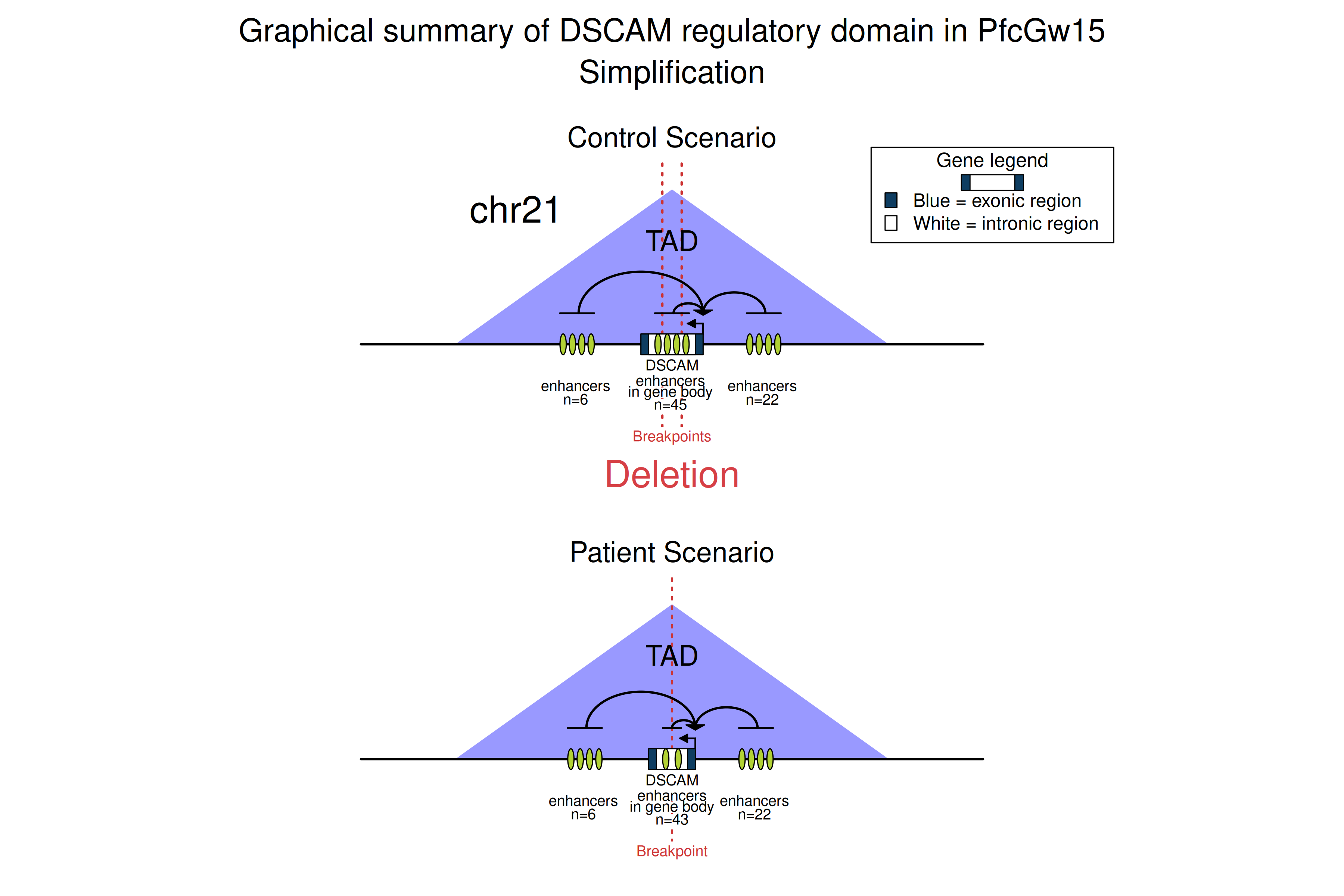
One illustrative example involves the DSCAM gene. In an autism patient, an intronic deletion identified within DSCAM was found to downregulate this gene through the deletion of several enhancers (link to manuscript). To check the POSTRE prediction for this deletion, enter the following coordinates (hg19): chr21 42016189 42030325, and select the Neurodevelopmental phenotype category. A simplified graphical abstract generated by POSTRE for this case can also be viewed here.
- 09/01/2026 Pituitary data addition: Genomic data from Adult Pituitary has been incorporated. For more information check the associated manuscript.
- 12/02/2025 Liver data addition: Genomic data from Adult Liver has been incorporated.
- 11/09/2024 Vision-Eye data addition: Genomic data from Retina and Retina pigment epithelium has been incorporated.