Before we expose a TurnKey system to a hostile Internet, we first need to initialize it. This will set passwords, install security updates, configure key applications settings and disable the "initialization fence".
This initialization process can be interactive or non-interactive depending on what works best given where and how the system is deployed. By default it is interactive.
The "initialization fence" - aka 'turnkey-init-fence' - is the mechanism which blocks access to appliance web services until initialization is complete. It uses the firewall (via iptables) to redirect attempts to access the local web services to a static web page served by inithooks/bin/simplehttpd.py.
The default web root is /usr/share/inithooks/htdocs and contains a page which explains that you need to initialize the system before you can access the web interfaces. The purpose of the fence is to prevent access to uninitialized web applications, which in some cases can pose a security risk.
The init-fence runs as a standalone service and is automatically disabled once initalization is complete.
A configuration wizard shows a short sequence of simple text dialogs that look primitive but provide a quick step-by-step process that works anywhere and requires only the bare minimum of software dependencies - a big advantage for security sensitive applications:
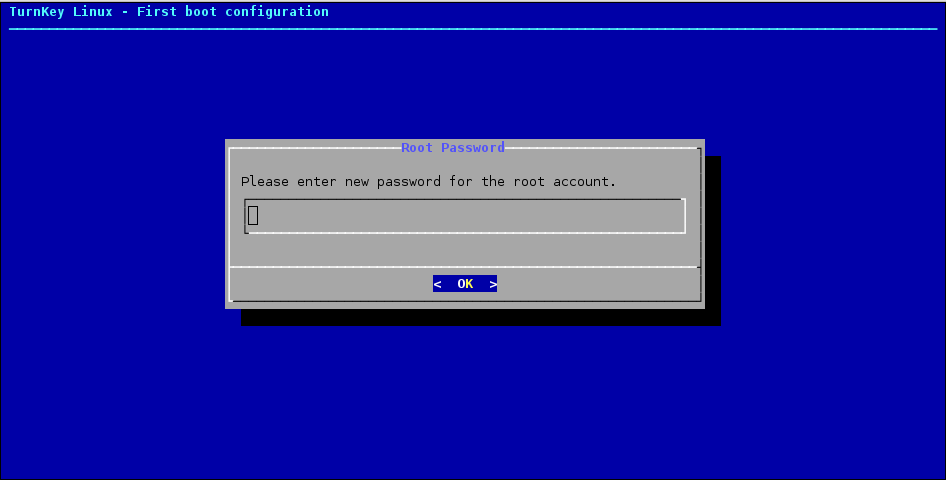
All software is potentially buggy but we can minimize the risk by intentionally favoring simplicity over fancy eye candy.
The configuration dialogs run in one of two places:
- First boot (console; usually tty1).
- On platforms where the user has direct access to a console such as bare metal (or other ISO install), LXC (Proxmox) and VM/VMDK. The interactive first boot scripts can be accessed immediately after first boot.
- First SSH login ('root' user or 'admin' on AWS Marketplace).
- Systems running on headless virtual platforms such as AWS marketplace, OpenStack and LXC (Proxmox) don't provide the option to interact with the system at boot time. In that case the interactive first boot scripts will immediately present once logged in.
The TurnKey Hub streamlines deployment by preseeding system initialization settings with values the user provides before launching an instance through the Hub's cloud deployment web app.
This means when the system boots for the first time it doesn't need to interact with the user through text dialogs.
Preseeding is well documented and may be used by other hosting providers or private clouds in a similar way to streamline deployment.
Preseeding isn't a requirement, just a bonus. Without any special integration, TurnKey images can be deployed like any other Debian or Debian-based OS and the will complete the initialization interactively. Non-interactive initialization is most likely useful for hosting providers, on private cloud infrastructure or "mass" roll out of multiple TurnKey servers.
Most TurnKey users can stop reading here. The above info should be more than enough for most TurnKey users.
The rest of this documentation is intended for:
- Appliance hackers interested in learning how TurnKey works under the hood and developing their own configuration hooks.
- Developers who wish to support a new platform that TurnKey doesn't already support.
- Expert users who want to understand how system initialization works in depth.
- Hosting providers and private cloud fullstack ninjas interested in implementing tight integration between TurnKey and custom control panels.
Those particularly interested in automated initialization will fine the Preseeding section below of particular interest.
Appliance development is out of scope for inithooks documentation, but it is worth noting that if a TurnKey appliance is not preseeded, the system must provide one of the following:
- Direct user access to a system console on first boot (e.g. tty1). The user can then go though the firstboot scripts interactively. E.g. UI provided by desktop VM software (such as VirtualBox, VMWare, Hyper-V, etc), a NoVNC window on Proxmox, a SPICE console or some similar "VNC like" access.
- Facility to set the 'root' (or 'admin'/sudo) user SSH key or password at launch time (i.e. pre first boot). Note that this is only supported OOTB by TurnKey "headless" builds. The initihooks package is pre-installed by default on all TurnKey builds but the package alone does not include the hooks script/s neccessary. "Headless" builds have the required functionality enabled at build time. Devs who wish to build TurnKey appliances which are supported on "headless" systems should use and/or consult the relevant Buildtasks scripts for more details. E.g. 'bt-container' (Proxmox/LXC), 'bt-docker', etc.
The inithooks package executes system initialization scripts which:
Regenerate secret keys: This isn't just a good idea, it's necessary to avoid man in the middle attacks. Secrets that are (re)generated at initialization include:
- SSH keys
- SSL/TLS certificates & keys
- Web app DB user passwords. E.g. The password WordPress uses to connect to the 'wordpress' MariaDB database.
- Other web app secrets, such as session secrets and password salts
Set passwords: Unique user passwords are necessary to avoid the risk of hardwired default passwords
Configure basic application settings: Many web apps in the TurnKey appliance library require settings such as admin email address, application domain. Having these set at first boot is especially useful and avoids users needing to manually consult application documentation and hunt down configuration files.
Other system pre-configuration: Such as setting/resetting an appliance hostname.
Inithooks itself is as generic and barebones as possible, leaving the bulk of functionality to specific "hook" scripts.
The inithooks top-level init script is executed early on in system initialization. This enables configuration of the system prior to most services starting. This should be taken into consideration when developing hook scripts.
The hook scripts are located in two sub-directories under /usr/lib/inithooks; firstboot.d and everyboot.d. As the names suggest, the hook scripts in these directories will run on first boot (only) and on every boot respectively. On first boot, scripts in firstboot.d run first, then the scripts in everyboot.d.
The hook scripts in each directory are executed in alphanumeric ordering. This means a script named 01foo would be executed before 20bar, which would be executed before 99baz. That's why scripts in these directories have the number prefixes.
All the TurnKey hook scripts have a 2 digit prefix but any prefix can be used in theory - although only digits and letters are recommend as the sorting of special/punctuation characters is not intuitive and may lead to unexpected results. Inithooks uses the 'sort' command to order the scripts and filenames will be sorted left to right; digits > uppercase > lowercase. E.g.:
00xxx 01xxx 991xxx 99xxx ABCxxx ZZZxxx zzzxxx
IMPORTANT
firstboot.d scripts with a prefix less than 30 should always be non-interactive. E.g. firstboot.d/29foobar should be non-interactive, but firstboot.d/30barbaz could be interactive. That is because boot log output will likely overwrite the interactive UI which may make it hard - perhaps impossible for the user to know what they need to enter.
everyboot.d scripts should always be non-interactive.
Scripts in the firstboot.d sub-directory are executed under the following conditions:
If the user executes "turnkey-init" from a root shell. This command can be used to rerun the firstboot.d inithooks interactively to reconfigure the appliance if needed. Certain scripts such as those that regenerate secret keys are skipped. If developing a hook script that is only intended to run at first boot - i.e. not when "turnkey-init" is run, check the value of the "$_TURNKEY_INIT" env var. When "turnkey-init" runs, it is set to 1 - otherwise it should be unset.
When the user logs in as root for the first time into a headless system. This triggers "turnkey-init" to run so that the user can interactively complete appliance initialization.
When a TurnKey appliance boots for the first time inithooks checks whether or not this is the first boot by checking the value of the RUN_FIRSTBOOT flag in /etc/default/inithooks. If the value is false it runs the scripts and toggles the flag to true.
The firstboot scripts may run in one of two modes, interactive or non-interactive, depending on the type of build.
Non-headless builds (e.g. installed from ISO):
For these build types unless all values are pre-seeded, the user accesses the interactive hook scripts directly via the virtual console (usually tty1). They will be displayed prior to first login and the first script the user will see is setting the root password. These are the same scripts that get executed if you run "turnkey-init" later.
Headless builds: (e.g AWS Marketplace, LXC (Proxmox), etc):
These image types can not assume direct user access to the virtual console during boot and have external mechanisms to set a root password and/or SSH keys. The first boot has to be capable of running non-interactively, otherwise we risk hanging the boot while it waits for user interaction that never happens.
So the system pre-initializes application settings with dummy defaults and sets all passwords (with the exception of the OS 'root'/'admin' user password) to a random value.
The output from the non-interactive running of the firstboot scripts is logged to /var/log/inithooks.log. Inithooks also logs to the systemd journal.
Interactive appliance configuration is delayed until the first time the user logs in as root. This is accomplished with the help of the /usr/lib/inithooks/firstboot.d/29preseed hook, which only exists on headless builds:
#!/bin/bash -e
# generic preseeding of inithooks.conf if it doesn't exist

[ -e $INITHOOKS_CONF ] && exit 0

MASTERPASS=$(mcookie | cut --bytes 1-8)

cat>$INITHOOKS_CONF<<EOF
export ROOT_PASS=$MASTERPASS
export DB_PASS=$MASTERPASS
export APP_PASS=$MASTERPASS
export APP_EMAIL=admin@example.com
export APP_DOMAIN=DEFAULT
export HUB_APIKEY=SKIP
export SEC_ALERTS=SKIP
export SEC_UPDATES=FORCE
export AUTO_RUN=TRUE
EOF

chmod +x /usr/lib/inithooks/firstboot.d/30turnkey-init-fence
Initialization fence: After the user logs in as root/admin and completes the initialization process the "initialization fence" is stopped and disabled. Users can then access applications running on the local web server.
firstboot.d/30turnkey-init-fence historically controlled the initfence, however the fence now runs by default so it's only functionality is to activate ~$USERNAME/.profile.d/turnkey-init-fence which launches a dtach session bound to a socket. This ensures that the user is presented with the interactive initialization hooks when they first log in.
what command are we running in the dtach session?
turnkey-init -> deactivate initfence (service and profile.d)
Scripts that are in the everyboot.d sub-directory run on every boot. We try to minimize the number of scripts that live here because they're basically a poor man's init script and real init scripts via systemd unit files are generally a superior option.
On headless deployments the user needs to login as root to complete the appliance initialization process, but how do you login as root?
Not a problem if you're using LXC on ProxMox or a similar system that prompts you to choose a root password before deploying a TurnKey image.
On AWS or OpenStack you can log in as root with your configured SSH keypair or retrieve the random root password from the "system log".
Other virtualization / private cloud solutions should be able to use their existing deployment scripts to set the root password, just like they already do with Debian and Ubuntu.
Another option is to "preseed" the /etc/inithooks.conf file in the appliance's filesystem before booting it for the first time. This lets you leverage inithooks to pre-configure not just the root password but also the database and application passwords, admin email, domain name, etc.
However note that using preseeding deactivates the "initilization fence". If you're using preseeding TurnKey assumes you've already interacted with the user some other way to get the preseeded configuration values.
If you wish to leave the init-fence running when preseeding, include this additional line in your preseeds file (/etc/inithooks.conf):
export AUTO_RUN=TRUE
That will leave the init-fence running, but it will then need to be manually disabled:
systemctl disable --now turnkey-init-fence
By default, when an appliance is run for the first time, the firstboot scripts will prompt the user interactively, through the virtual console, to choose various passwords and basic application configuration settings.
It is possible to bypass this interactive configuration process by creating /etc/inithooks.conf in the appliance filesystem and writing inithooks configuration variables into it before the first system boot. For example:
cat>/etc/inithooks.conf<<EOF
export ROOT_PASS=supersecretrootpass
export DB_PASS=supersecretmysqlpass
export APP_EMAIL=admin@example.com
export APP_PASS=webappadminpassword
export SEC_ALERTS=admin@example.com
export SEC_UPDATES=FORCE
export HUB_APIKEY=SKIP
EOF
This preseeding mechanism makes it relatively easy to integrate TurnKey with custom control panels, virtualization solutions, etc.
Don't worry about leaving sensitive passwords in there: after the first boot, inithooks blanks /etc/inithooks.conf out so important passwords aren't accidentally left in the clear. Although obviously if the conf file is included in an image, a malicious actor could read the file from the image.
How exactly you create /etc/inithooks.conf is up to you and the capabilities of the virtualization platform you are using. For example, many virtualization platforms provide a facility through which you can run scripts or add files to the filesystem before the first boot.
TurnKey inithooks does not currently support use with 'cloudinit' which is very common these days however it is hoped that it will be supported in the not too distant future.
Below is a list of firstboot hooks. All interactive hooks have preseeding options to support cloud deployment, hosting and ISV integration.
TurnKey makes every effort to keep this list up to date, but please note that it may become out of sync.
All of the values noted in the example inithooks.conf above are required if you desire a completely non-interactive initialization. If they are not pre-seeded, the user will be asked interactively - which may be problematic in some scenarios. With the exception of our VPN appliances when a system is pre-seeded with the above set, any other appliance specific initialization values that are not set will fall back to "sane" defaults.
Note that secupdates is automatically skipped when in live demo mode.
Most inithooks that are configurable are interactive, however not all. Non-interactive hooks that can be adjusted via preseeding are marked below with an asterisk ('*').
Initihook preseed values that are not relevant to a particular appliance or build will simply be ignored.
Note that almost all appliances have their own application specific secret-regeneration hooks which will run regardless.
Common to all appliances:
15regen-sslcert         DH_BITS                 [ 1024 | 2048 | 4096 ]
29preseed               INITFENCE               [ SKIP ]
30rootpass*             ROOT_PASS
80tklbam                HUB_APIKEY              [ SKIP ]
85secalerts             SEC_ALERTS              [ SKIP ]
95secupdates            SEC_UPDATES             [ SKIP | FORCE ]
Notes:
- DH_BITS refers to the number of bits used when generating Diffie-Hellman parameters used in TLS (i.e. HTTPS) Diffie-Hellman key exchange. It is a legacy feature as modern SSL/TLS encryption now either uses a pre-set value (TLS1.2) or does not use generated Diffie-Hellman values at all (TLS1.3).
- In LXC builds, the container root password is set via the host at creation time. As such, 30rootpass is disabled and ROOT_PASS does not apply. In other headless builds it is still enabled and can be preseeded. Even if SSH keys are preconfigured, a root password will still be asked for as it is required to log in to Webmin.
Appliance specific:
35mysqlpass             DB_PASS
35pgsqlpass             DB_PASS

40ansible               APP_PASS
40couchdb               APP_PASS
40espocrm               APP_PASS
40etherpad              APP_PASS
40githttp               APP_PASS
40icesecretset          APP_PASS
40jenkins               APP_PASS
40mediawiki             APP_PASS
40mibew                 APP_PASS
40mongodb               APP_PASS
40moodle                APP_PASS
40mumblesupw            APP_PASS
40observium             APP_PASS
40odoo                  APP_PASS
40openvas               APP_PASS
40orangehrm             APP_PASS
40otrs                  APP_PASS
40phpmumbleadmin        APP_PASS
40plone                 APP_PASS
40sugarcrm              APP_PASS
40suitecrm              APP_PASS
40torrentserver         APP_PASS
40trac                  APP_PASS
40typo3                 APP_PASS
40zoneminder            APP_PASS
40redis                 APP_PASS [, APP_IP_BIND, APP_PROTECTED]
40nextcloud             APP_PASS, APP_DOMAIN
40openldap              APP_PASS, APP_DOMAIN
40owncloud              APP_PASS, APP_DOMAIN
40zurmo                 APP_PASS, APP_DOMAIN
40domain-controller     APP_PASS, APP_DOMAIN [, APP_REALM, APP_JOIN, APP_JOIN_NS]]
40b2evolution           APP_PASS, APP_EMAIL
40collabtive            APP_PASS, APP_EMAIL
40concrete5             APP_PASS, APP_EMAIL
40django                APP_PASS, APP_EMAIL
40dokuwiki              APP_PASS, APP_EMAIL
40drupal7               APP_PASS, APP_EMAIL
40e107                  APP_PASS, APP_EMAIL
40ezplatform            APP_PASS, APP_EMAIL
40foodsoft              APP_PASS, APP_EMAIL
40gallery               APP_PASS, APP_EMAIL
40joomla                APP_PASS, APP_EMAIL
40kliqqi                APP_PASS, APP_EMAIL
40limesurvey            APP_PASS, APP_EMAIL
40mahara                APP_PASS, APP_EMAIL
40mambo                 APP_PASS, APP_EMAIL
40mantis                APP_PASS, APP_EMAIL
40mattermost            APP_PASS, APP_EMAIL
40mayan                 APP_PASS, APP_EMAIL
40moinmoin              APP_PASS, APP_EMAIL
40omeka                 APP_PASS, APP_EMAIL
40oscommerce            APP_PASS, APP_EMAIL
40phpbb                 APP_PASS, APP_EMAIL
40processmaker          APP_PASS, APP_EMAIL
40redmine               APP_PASS, APP_EMAIL
40roundup               APP_PASS, APP_EMAIL
40silverstripe          APP_PASS, APP_EMAIL
40simpleinvoices        APP_PASS, APP_EMAIL
40sitracker             APP_PASS, APP_EMAIL
40twiki                 APP_PASS, APP_EMAIL
40ushahidi              APP_PASS, APP_EMAIL
40vanilla               APP_PASS, APP_EMAIL
40vtiger                APP_PASS, APP_EMAIL
40wordpress             APP_PASS, APP_EMAIL
40xoops                 APP_PASS, APP_EMAIL
40canvas                APP_PASS, APP_EMAIL, APP_DOMAIN
40drupal8               APP_PASS, APP_EMAIL, APP_DOMAIN
40elgg                  APP_PASS, APP_EMAIL, APP_DOMAIN
40foswiki               APP_PASS, APP_EMAIL, APP_DOMAIN
40gitlab                APP_PASS, APP_EMAIL, APP_DOMAIN
40gnusocial             APP_PASS, APP_EMAIL, APP_DOMAIN
40icescrum              APP_PASS, APP_EMAIL, APP_DOMAIN
40matomo                APP_PASS, APP_EMAIL, APP_DOMAIN
40phplist               APP_PASS, APP_EMAIL, APP_DOMAIN
40opencart              APP_PASS, APP_EMAIL, APP_DOMAIN
40prestashop            APP_PASS, APP_EMAIL, APP_DOMAIN
40punbb                 APP_PASS, APP_EMAIL, APP_DOMAIN
40simplemachines        APP_PASS, APP_EMAIL, APP_DOMAIN
40zencart               APP_PASS, APP_EMAIL, APP_DOMAIN
40magento               APP_PASS, APP_EMAIL, APP_DOMAIN [, APP_PRIVKEY, APP_PUBKEY]
40bugzilla              APP_PASS, APP_EMAIL [, APP_OUTMAIL]
40ghost                 APP_PASS, APP_EMAIL, APP_DOMAIN [, APP_UNAME]
Fileserver appliance specific - LXC only:
35samba-container APP_PASS
Linux and Samba user management is separate and discrete. Previously by default Samba users were mapped 1-1 with Linux users and Samba supported syncronization of passwords between the Linux and Samba users (so essentially the difference between the 2 user management systems was hidden from the end user). However due to a significant security issue, this module has been removed. Samba4 has moved to prioritize support for AD integration (which uses a different paradigm - all Samba users are contained within a single Linux user account).
To somewhat work around this limitation, on the TurnKey Fileserver appliance, when you set the root (Linux) user password, the Samba root user password is also set. However for an LXC container, the root password is set on the host, not the guest. So this workaround is not possible. Hence the Samba root password must be set separately.
So you're creating a new appliance and want to add initialization hooks. Awesome! Here are some examples to get you going.
The following example is used in the Joomla3 appliance. It regenerates the secret, and sets a random mysql password for the joomla user:
/usr/lib/inithooks/firstboot.d/20regen-joomla-secrets

#!/bin/bash -e
# regenerate joomla secret key and mysql password

. /etc/default/inithooks

updateconf() {
    CONF=/var/www/joomla/configuration.php
    sed -i "s/var $1 = \(.*\)/var $1 = '$2';/" $CONF
}

updateconf '\$secret' $(mcookie)$(mcookie)

PASSWORD=$(mcookie)
updateconf '\$password' $PASSWORD

$INITHOOKS_PATH/bin/mysqlconf.py --user=joomla --pass="$PASSWORD"
The following example is used to set the root password in all appliances - with the exception of headless builds where the password/keys should be configured pre-launch. If ROOTPASS is not set, the user will be asked to enter a password interactively.
Note
A very basic debugging setup is present in dialog_wrapper.
If you're getting odd or unexpected output, dialogs you're expecting
to see are not present or are generally paranoid about the quality
of your code you can enable debug logging by setting the environment
variable DIALOG_DEBUG.
When set debugging output will be written to /var/log/dialog.log
/usr/lib/inithooks/firstboot.d/30rootpass

#!/bin/bash -e
# set root password

. /etc/default/inithooks

[ -e $INITHOOKS_CONF ] && . $INITHOOKS_CONF
$INITHOOKS_PATH/bin/setpasspass.py root --pass="$ROOTPASS"
/usr/lib/inithooks/bin/setpass.py

#!/usr/bin/python3
# Copyright (c) 2010 Alon Swartz <alon@turnkeylinux.org>
"""Set account password

Arguments:
    username      username of account to set password for

Options:
    -p --pass=    if not provided, will ask interactively
"""

import sys
import getopt
import subprocess
from subprocess import PIPE

from libinithooks.dialog_wrapper import Dialog

def fatal(s):
    print >> sys.stderr, "Error:", s
    sys.exit(1)

def usage(e=None):
    if e:
        print >> sys.stderr, "Error:", e
    print >> sys.stderr, "Syntax: %s <username> [options]" % sys.argv[0]
    print >> sys.stderr, __doc__
    sys.exit(1)

def main():
    try:
        opts, args = getopt.gnu_getopt(sys.argv[1:], "hp:", ['help', 'pass='])
    except getopt.GetoptError, e:
        usage(e)

    if len(args) != 1:
        usage()

    username = args[0]
    password = ""
    for opt, val in opts:
        if opt in ('-h', '--help'):
            usage()
        elif opt in ('-p', '--pass'):
            password = val

    if not password:
        d = Dialog('TurnKey GNU/Linux - First boot configuration')
        password = d.get_password(
            "%s Password" % username.capitalize(),
            "Please enter new password for the %s account." % username)

    command = ["chpasswd"]
    input = ":".join([username, password])

    p = subprocess.Popen(command, stdin=PIPE, shell=False)
    p.stdin.write(input)
    p.stdin.close()
    err = p.wait()
    if err:
        fatal(err)

if __name__ == "__main__":
    main()