


Text to pixels. A zero-dependency pixel art and sprite animation toolkit for AI agents and game developers.
Write a JSON recipe with palettes, text grids, reusable symbols and drawing operations. Get transparent PNGs, sprite sheets, animated PNGs, GIFs for sharing, numbered frames for video editors, and the metadata and player needed to use them. Inspect and edit the recipe in a local browser studio.
Zero runtime dependencies. No build step, API key, image model, network service or native graphics library. Requires Node.js 20 or newer. Works from a checkout on Windows, macOS and Linux.

Quick start · Agent setup · MCP server · Portable builds · Recipe reference · Contributing
The original Listening Hollow study demonstrates silhouette/value/native-size review, animation-aware onion skins, masked regional corrections, authored parts and attachments, guarded rebuild overlays, a small scene, PNG interchange and aligned normal/emissive passes. See the format and workflow guide for the supported boundaries. This is a self-reviewed improvement study; it does not claim Animal Well parity.

npm run review:quality
node bin/pixelforge.js preview examples/quality/skink.json
node bin/pixelforge.js inspect examples/quality/skink.json --animation run --view onion --native --diagnosticsgit clone https://github.com/skulitom/PixelForge.git
cd PixelForge
node bin/pixelforge.js previewOpen http://127.0.0.1:4747, or add --open to have your default browser opened for you. If that port is in use, a free one is taken and printed instead; --port N insists on one port and fails when it is busy. preview hero.pixel.json starts with your own recipe. Pick the forest spirit, campfire or coin; edit the JSON; inspect the animation or sprite sheet; download the asset ZIP. The studio includes playback speed, frame selection, integer zoom, a pixel grid, onion skinning, palette inspection, source save/open, a GIF download of the current animation, numbered frames for a video editor, recovery of unsaved edits and live error messages. All assets and fonts are local.
Or generate an asset without opening a browser:
node bin/pixelforge.js init hero.pixel.json
node bin/pixelforge.js validate hero.pixel.json
node bin/pixelforge.js inspect hero.pixel.json --out hero-frames.png
node bin/pixelforge.js render hero.pixel.json --out output/hero
inspect saves a contact sheet of every frame and lists each frame's timing. Add --grid to read frames back as palette-key text; --animation, --frames (names or patterns such as 'flash-*') and --region narrow the view, and --step 2 --offset 1 keeps every second cell from the second, so a strobe's A and B frames can be read apart. validate hero.pixel.json --fps 30 also lists the durations that are not whole video frames at that rate and what a video sequence would do to each animation. patch hero.pixel.json --changes fix.json previews targeted edits and reports every pixel they change; add --out to save the new recipe. gif hero.pixel.json --out hero.gif saves one animation as a GIF for sharing. Command results except help and the preview server are JSON. Errors go to stderr and exit with code 1. Use - instead of a filename to read JSON from stdin. Existing output files are protected; add --force to replace them. You can optionally run npm link for the pixelforge command. No npm install is needed.
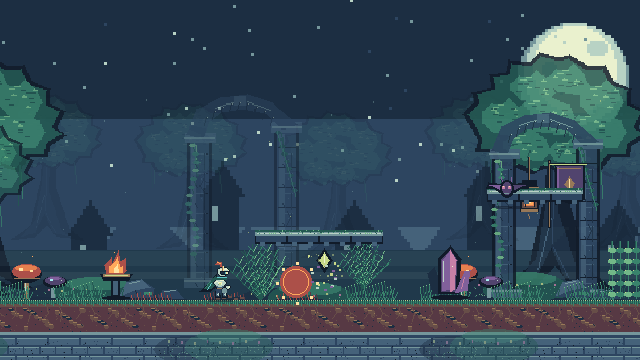
Emberfall is an original fantasy action platformer built to exercise PixelForge: 220 frames, 44 named animations, nine editable recipes, three elemental spells, reactive scenery, enemies and a boss. Its animation workshop exposes the recipes, contact sheets and complete export bundles.
npm run playOpen http://127.0.0.1:4173 and choose Begin adventure or Watch it play. The game runs entirely in the browser with no runtime dependencies. It is currently a local preview; hosting is intentionally deferred.
Demo details and controls · Stress-test findings and bug reports · PixelForge art-quality roadmap
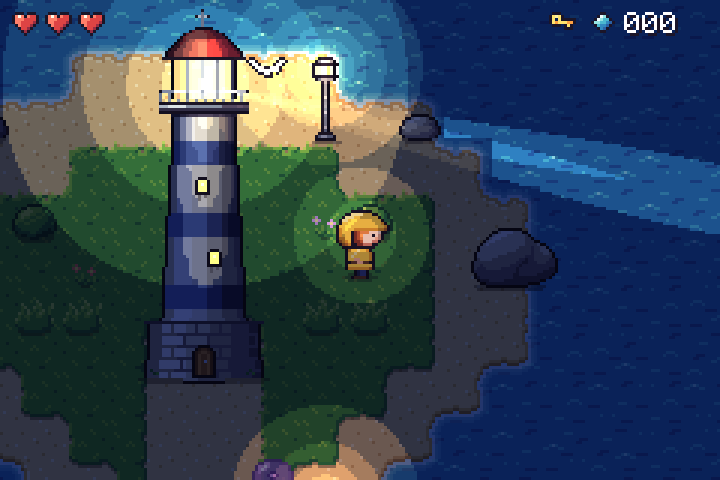
Tidewatch is a second, independent demo: a small top-down adventure in which a lighthouse keeper relights the lamp before night falls. It exercises parts of PixelForge that Emberfall did not: 47-tile blob autotiles composed from quarter symbols, palette-cycled surf, a four-facing character compiled from pose parts with sword markers driving the hitbox, a pixel font, and night lighting composited from aligned normal/emissive passes. 29 recipes, 527 frames.
npm run play:tidewatchOpen http://127.0.0.1:4180.
Showcase details · Findings report: bugs and missing features
An original 3/4 top-down dungeon room in the style of procedurally generated "floating diorama" games: 8-pixel tiles, wall caps with front faces, a sunken pool fed by a waterfall, moss, props, torches and a hero whose strike breaks a pot. The room is one recipe whose tilemap operation places walls, faces, cliffs, water and worn bricks by neighbour rules; moss is seeded value noise on the floor colour; shadows and torchlight move colours along palette ramps, so the scene keeps its 31 colours lit or re-themed.
node bin/pixelforge.js preview showcase/diorama/art/room.scene.json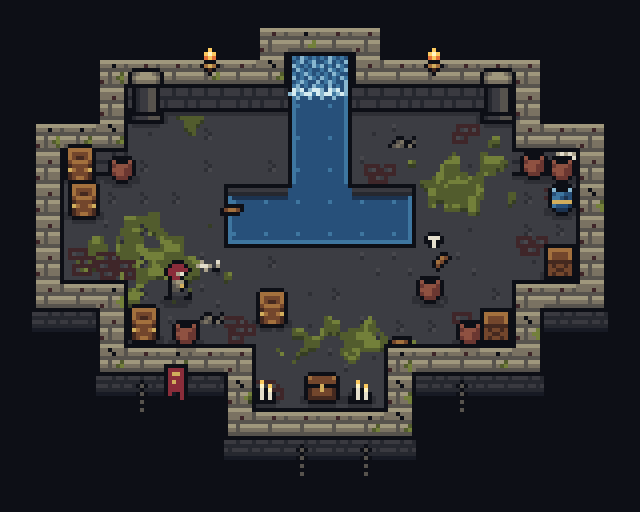
Study details · Feasibility report: what the style asked of PixelForge
Use PixelForge to create or revise pixel sprites, tiles, icons, effects and short animations from editable JSON. Choose the CLI when you have shell access or the Model Context Protocol (MCP) server when your client supports tools. Both use the same renderer and work locally.
| Entry point | Purpose |
|---|---|
| llms.txt | Compact documentation index with direct links for agents |
| Pixel art skill | Reusable authoring and visual inspection workflow |
| Authoring guide | Recipe fields, drawing operations and limits |
| JSON Schema | Machine-readable recipe structure |
| Examples | Complete forest spirit, campfire, coin and shrine recipes, a caption with pixel text, a rotated sword swing and a particle effects source |
| AGENTS.md | Instructions for agents contributing to the toolkit |
Start with the authoring guide or MCP's pixel_help. Write a recipe, validate it, inspect every frame with pixel_inspect or pixelforge inspect, revise with targeted patches, then render to a fresh output directory. Validation checks the format; image inspection checks the art.
{
  "version": 1,
  "name": "slime",
  "width": 8,
  "height": 8,
  "palette": { "g": "#72b58d", "e": "#20383f" },
  "frames": [
    {
      "name": "rest",
      "duration": 180,
      "ops": [{ "op": "grid", "x": 1, "y": 3,
        "rows": [".gggg.", "ggeegg", "gggggg", ".gggg."] }]
    },
    { "name": "up", "from": "rest", "translate": [0, -1], "duration": 180 }
  ],
  "animations": { "bounce": { "frames": ["rest", "up"] } }
}
Each text-grid character selects a palette color; . and space leave pixels untouched. Frame inheritance makes small changes cheap to describe. Rendering is deterministic and uses integer pixel coordinates.
| File | Use |
|---|---|
name.png |
RGBA PNG sprite sheet, with configurable columns, padding and integer scale, or packed by visible bounds with sheet.trim |
name.atlas.json |
TexturePacker-style JSON hash: rectangles, trim offsets, source sizes, pivots/anchors, named points, frame durations and named animations |
frames/*.png |
Each frame as a transparent PNG |
animations/*.png |
APNG for each animation, retaining transparency, frame timing and loop behavior |
name.css |
CSS animation classes; supports multi-row sheets and unequal frame durations |
player.js |
Small, dependency-free Canvas player with play, pause, resume and named animations, plus loadSpriteSheet, frameAt and drawFrame for games |
name.pixel.json |
Editable source recipe |
preview.html |
Standalone preview you can open directly in a browser |
APNG files use the .png extension intentionally. Recipes can share a palette file ("palette": { "$ref": "palette.json" }), recolor keys per frame for palette cycling or per layer for a flash that leaves the rest of the frame alone, copy rectangles from template symbols or earlier frames (with exact colour swaps), outline layers (outside, inside or both, with direction masks for rim lights and drop shadows), dither between colours with canvas-anchored Bayer, custom, seeded non-periodic noise or clumping value-noise patterns, shade along palette ramps (ramps and the shade operation) without leaving the palette, draw whole character maps with the tilemap operation (variants, weights and neighbour rules), and grow detail such as moss or cracks with seeded rewrite rules. They compile 47-tile blob or 16-tile cardinal autotile sets, optionally with shape variants, with pixelforge autotile; see the authoring guide and art workflow.
Several of these ideas come from Pixel Composer's node set, adapted to text recipes. Patches can propose De-Corner/De-Stray cleanup, and inspection diagnostics count per frame what it would change. Pose sources rotate parts by any angle into editable symbols, using RotSprite-style resampling that adds no colours, and tween eased in-betweens. Scene trajectories ease. A pixelforge-fx source compiles seeded particle emitters into an ordinary recipe with pixelforge compile. See the shrine, the swing and the effects. Lossless non-interlaced 8-bit RGB/RGBA PNG import is supported, optionally with unscaled atlas timing metadata; see interchange limits. GIF import, native Aseprite files and automatic quantization remain outside the current scope. Sources stay editable JSON.
APNG keeps full alpha and exact timing, but many chat, forum and store pages only animate GIFs and cannot scale pixels crisply. pixelforge gif writes one animation as a GIF, enlarged by a whole number (by default the largest that keeps the longer side within 256 pixels):
node bin/pixelforge.js gif hero.pixel.json --out hero.gif
node bin/pixelforge.js gif hero.pixel.json --animation blink --scale 8 --background "#17191d" --out hero-blink.gif
Colours are exact: nothing is quantized or dithered, and a frame that needs more than 256 colours is refused with an error instead of being approximated. GIF has no partial transparency, so pixels below 50% alpha become transparent and the rest opaque; --background (a palette name or opaque hex colour) blends every pixel onto one colour instead, which keeps soft shadows. Frame times are rounded to GIF's 10 ms steps with the remainder carried to the next frame, and raised to 20 ms where shorter. The JSON result's notes say which of these happened. The studio's GIF button downloads the current animation at the current zoom, and MCP pixel_render takes "gif": {}. The export bundle itself is unchanged.
pixelforge gif-frames makes a GIF from a folder of numbered PNG frames, such as a sequence folder or frames a video or effects tool wrote, by the same rules:
node bin/pixelforge.js gif-frames shots/prism --fps 25 --out prism.gif
node bin/pixelforge.js gif-frames shots/prism --fps 30 --loops 3 --background "#101828" --prefix prism_ --out prism-3x.gif
Files are read in number order (prism_0001.png, prism_0002.png …); gaps in the numbering, other PNGs in the folder and a folder holding two sequences (choose one with --prefix) are reported, never guessed around. Each frame keeps its exact colours: one with more than 256 is refused by name, and when the frames use different colours, each frame carries a colour table of its own, so a loop of 48 frames at 1080 × 1080 with about 120 colours per frame and 4,345 in all decodes back pixel for pixel, where a palette generator would shift some colours. Frame k starts at k × 1000 / fps ms rounded to GIF's centiseconds: 25 fps is 40 ms per frame, 30 fps alternates 30 and 40 ms and keeps the loop's length, and above 50 fps delays are raised to 20 ms, which the notes report with the new length. --loops is the number of plays, 0 (the default) for ever. Without transparency, each frame after the first stores only the rectangle that changed. The PNGs must be 8-bit RGB or RGBA and the same size; the loop may hold 134,217,728 pixels (115 frames at 1080 × 1080).
The text operation draws titles, captions, labels and counters in a built-in pixel font: printable ASCII, the accented letters of western European languages (À–ÿ, Œ œ Š š Ž ž Ÿ) and common symbols such as € £ © — … “ ” „ « », with capitals 7 pixels tall, proportional letters and tabular digits. The accent of a capital sits in the two rows above y.
{ "op": "text", "x": 120, "y": 8, "text": "GAME OVER\nscore 12480", "color": "ink", "align": "center" }align says whether x is the left edge, the centre or the right edge; spacing, lineHeight, scale and rotation adjust it, and outline after it gives a readable edge. Text that runs off the canvas is reported like any other clipped drawing, and a character the font lacks is an error that names it. examples/caption.json is a lower third that opens and types its title; node bin/pixelforge.js sequence examples/caption.json --fps 30 --size 1080p --align bottom --offset 0,-64 --out shots/caption turns it into 81 frames that sit across the bottom of a 1080p picture.
Video editors do not animate APNG, and GIF loses alpha and exact timing. pixelforge sequence writes what editors do read: one numbered PNG per video frame, at a constant frame rate, on a canvas of the video's size, with the alpha kept.
node bin/pixelforge.js sequence hero.pixel.json --fps 30 --size 1080p --out shots/hero
node bin/pixelforge.js sequence examples/effects.fx.json --animation sparks --fps 29.97 --size 4k --scale 16 --align bottom --offset 0,-200 --out shots/sparks
node bin/pixelforge.js sequence room.scene.json --fps 24 --size 1080p --fit cover --out shots/room- Timing. Each video frame shows the pose that is active when the frame starts.
--fpstakes 24, 25, 30, 50, 60, the NTSC rates 23.976, 29.97 and 59.94 (kept exact as 24000/1001, 30000/1001 and 60000/1001, so long clips do not drift), or a fraction.--loops nor--seconds ssets the length;--step 2animates on twos. A looping animation keeps cycling; one that plays once holds its last pose. - Size.
--sizeis720p,1080p,1440p,4k,vertical(1080×1920),squareorWIDTHxHEIGHT. The sprite is enlarged by a whole number, never resampled: the largest that fits, or--scaleup to 256.--align(top-left…center…bottom-right) and--offset x,yplace it.--fit covertakes the smallest whole number that covers the canvas instead and crops what hangs over;--alignthen chooses the part that stays, and the result'splacement.visiblesays which columns and rows of the source that is. Without--sizethe canvas is the sprite at--scale.--backgroundblends onto an opaque colour instead of keeping alpha. - Sources. A recipe (
--animationpicks one), a pose, autotile or effects source, which is compiled on the way in, or a scene, which is rendered moment by moment as a shot; moments that look the same share one PNG. A scene of 192×108, 240×135 or 320×180 pixels fills 1080p exactly at scale 10, 8 or 6. Any other scene is centred with margins in its own background colour, so the shot is still opaque from edge to edge, or fills the canvas with--fit cover. - What you get. A new folder with
name_0001.pngonwards,sequence.json(frame rate as a fraction, frame count, size, placement, loop facts and the timing of every pose) and aREADME.txtthat says how to import them. The result'snotessay what the frame grid did: which poses changed length, which are shorter than a video frame and never shown, and whether the clip ends exactly where the loop does, with the number of loops that would. - One video file. PixelForge does not encode video. The folder's README and the JSON result give the exact
ffmpegcommand for a ProRes 4444.movwith alpha, and for an H.264.mp4when there is a background. With ffmpeg 7 the ProRes command keeps the alpha exactly and the colours within 2 of 255;scripts/verify-exports.pyrepeats that check when ffmpeg is installed.
In the editor, import the files as an image sequence and set the clip's frame rate (the files carry none), then leave the clip at 100% scale: scaling there would blur the pixels. A sequence holds at most 18,000 frames and a canvas at most 4096 pixels on a side. MCP pixel_render and pixel_scene take "sequence": { "fps": 30, "size": "1080p" } with the same options.
The studio's Frames button downloads the same files for the animation on screen as one ZIP. Its dialog also shows the pixelforge sequence command and the MCP sequence argument for the chosen frame rate and size, so an agent can repeat the export without the browser.
Clone the repository first, then add the server to your agent's MCP configuration. Replace /absolute/path/to/PixelForge with your checkout's absolute path; on Windows use forward slashes, for example C:/DEV/PixelForge:
{
  "mcpServers": {
    "pixelforge": {
      "command": "node",
      "args": [
        "/absolute/path/to/PixelForge/bin/pixelforge.js",
        "mcp",
        "--out",
        "/absolute/path/to/PixelForge/output"
      ]
    }
  }
}
For clients that use TOML:
[mcp_servers.pixelforge]
command = "node"
args = ["/absolute/path/to/PixelForge/bin/pixelforge.js", "mcp", "--out", "/absolute/path/to/PixelForge/output"]
The eight tools are:
pixel_help: authoring guide, full schema and a complete sample;topicreturns the poses, scenes, autotile or fx schemas.pixel_validate: validate{ "project": ... }and save its recipe revision without exporting assets. Reports every clipped location;"fps": 30addsframeGrid, the durations off that video frame grid and what a sequence would do to each animation.pixel_inspect: contact sheets, exact regional grids, silhouette/grayscale/onion views, 3×3 tile repeats with seam evidence, native size, named layer isolation, saved-reference comparisons and advisory diagnostics.framestakes*/?patterns,step/offsetkeep every nth cell, and optional bounded samples expose omissions. Saves its recipe revision.pixel_patch: apply targetedset,insert,removeandpaintedits. For example,{ "paint": "frames[blink]", "value": [{ "x": 9, "y": 7, "color": "k" }] }corrects a pixel in final canvas coordinates after all layers;transparenterases it. Returns every frame whose pixels changed (exact pixels for small edits) and a before/after PNG. The source stays unchanged and successful edits get a new revision.pixel_render: render{ "project": ... }, return a PNG contact sheet of every frame with cell names/timing plus the output folder, its key files and frame/animation counts (listFiles: truelists everything). Add"animation": "idle"to preview a sequence in playback order. The exported APNGs and HTML preview play the animation. Add"gif": {}(or{ "scale": 8, "background": "#17191d" }) to also write every animation as a GIF ingifs/, with notes on any alpha or timing change, and"sequence": { "fps": 30, "size": "1080p" }to write one animation as numbered PNG frames for a video editor insequence/. Every call writes a fresh folder inside the configured output directory.pixel_compile: compile apixelforge-posessource (including rotated parts and tweened in-betweens), apixelforge-autotiletemplate or apixelforge-fxparticle source into a recipe revision, with a contact sheet and optional metadata.pixel_scene: render apixelforge-scenemanifest (tilemaps with autotile legends and neighbour rules, named cues, sequences, trajectories, attachments, ground sorting, shade placements, ramp or multiplied lighting, palette themes) at any time, export it, or write it as a shot of numbered PNG frames withsequence; assets may be revisions.pixel_import: import a native-resolution PNG, given as base64 or a file inside the server root, as a lossless recipe revision.
pixel_patch also supports compact grid, masked move, regional recolor and proposed cleanup of doubled corners and stray pixels, with explicit frame or inherited scope, and applies saved correction overlays (overlay). Large pixel_render previews are sampled with total/shown/omitted metadata instead of blocking a valid export; exported animations remain complete. Palette and scene file references resolve inside the server's --root (default: its working directory); requests may be up to 16 MiB, and an oversized request is answered with an error without stopping the server.
Send a recipe once. Each successful recipe-tool response includes a revision id that the other tools accept in place of project, so later calls, including patches, need not resend the recipe. Validate, inspect, patch and render save immutable snapshots in <MCP --out directory>/.revisions/; they survive restarts when you use the same directory, even before an asset export. Prefer an absolute --out path. Earlier revisions remain undo points. Older rendered revisions can be recovered from saved bundle recipes. Render also saves the recipe beside the assets.
The server implements newline-delimited stdio MCP with initialization, version negotiation, ping and tool discovery/calls. It supports protocol versions 2024-11-05, 2025-03-26, 2025-06-18 and 2025-11-25. It uses no HTTP transport or external services. See the MCP stdio specification.
An agent can also use the CLI directly. The reusable agent skill and authoring reference explain the complete format. schema.json supports editor completion and structural validation; the rasterizer additionally validates references, matching row widths and resource limits.
Serve the exported folder with your application:
<canvas id="sprite"></canvas>
<script type="module">
  import { SpritePlayer } from './assets/player.js';
  const player = await SpritePlayer.load(
    document.querySelector('#sprite'),
    './assets/forest-spirit.atlas.json',
    { scale: 4 }
  );
  player.play('idle');
  // player.pause(); player.resume(); player.destroy();
</script>
Or use CSS alone:
<link rel="stylesheet" href="assets/forest-spirit.css">
<span class="pf-forest-spirit pf-forest-spirit-idle" role="img" aria-label="Forest spirit"></span>
CSS honors reduced-motion preferences. The Canvas API leaves autoplay decisions to the application. Atlas paths in SpritePlayer.load resolve relative to the atlas URL.
A game drawing many sprites into one canvas can use the same module's helpers. drawFrame places a frame by its anchor (when the recipe declares one) and restores trimmed frames to their original offset:
<script type="module">
  import { loadSpriteSheet, frameAt, drawFrame } from './assets/player.js';
  const hero = await loadSpriteSheet('./assets/hero.atlas.json'), context = canvas.getContext('2d');
  requestAnimationFrame(function draw(time) {
    context.clearRect(0, 0, canvas.width, canvas.height);
    drawFrame(context, hero, frameAt(hero.atlas, 'walk', time), 64, 96, { scale: 3 }); // (64, 96) is where the anchor lands
    requestAnimationFrame(draw);
  });
</script>
For a game engine, use the atlas rectangles or individual PNGs. For regular-grid importers, set sheet.padding to 0 and use the exported frame dimensions. Phaser accepts the JSON-hash frame layout via load.atlas; named animation sequences are in the extra animations field. See game integration notes.
import { renderProject, inspectProject, patchRecipe, compareProjects, createBundle, writeBundle, compileEffects, animationGIF, folderGIF, frameGrid } from './src/index.js';

const project = renderProject(recipe); // RGBA buffers, durations, warnings
const view = inspectProject(project, { grid: true }); // contact sheet RGBA, palette-key grids
const { recipe: next, edits } = patchRecipe(recipe, [{ set: 'frames[idle].duration', value: 120 }]);
const report = compareProjects(project, renderProject(next)); // changed pixels, timing, before/after RGBA
const bundle = await createBundle(recipe);
await writeBundle(bundle, './output/my-sprite');
const { recipe: effects } = compileEffects(fxSource); // seeded particles baked into an ordinary recipe
const gif = animationGIF(project, 'idle', { scale: 8 }); // { data, width, height, notes, ... }
const loop = folderGIF('shots/prism', { fps: 25 }); // GIF from numbered PNG frames; framesGIF takes RGBA frames
const grid = frameGrid(project, 30); // durations off a 30 fps video frame gridsrc/core.js, src/craft.js, src/font.js, src/patch.js, src/fx.js and src/gif.js are browser-compatible and have no Node imports. The Node-only exporter uses the standard library for compression and file output. The studio shares the same renderer as the CLI and MCP server.
npm test
npm run demo
Tests cover pixels, alpha blending, inheritance, transformations, flood fill, text and the font, dither (including value noise), palette ramps and shading, outlines, rewrite rules, cleanup, rotation, tweens, particle effects, tilemaps and rule tiles, scene cues, attachments and sorting, schema alignment, packing, timing, PNG/APNG structure, GIF structure and decoding, video frame timing and placement, inspection sheets and grids, patching and comparison, revisions, overwrite protection, CLI stdin/errors, MCP calls, the Canvas runtime, the local server and the portable Windows build. node scripts/qa-studio.mjs walks the studio in a real browser (an installed Edge or Chrome, headless, with a throwaway profile; Node.js 22+): every sample, live editing, a broken recipe, the preview controls, Save, Open, Export and GIF downloads landing on disk, draft recovery, keyboard access, narrow and wide windows, and that no request leaves the computer. Optional independent checks use Pillow and Python's ZIP reader: python scripts/verify-exports.py after npm run demo; it also decodes GIFs (including ones made from PNG folders) and an image sequence and compares every pixel, delay and loop flag, and runs the sequence's ffmpeg command when ffmpeg is installed.
The studio binds to 127.0.0.1, serves an explicit asset allowlist, rejects foreign Host/Origin headers, and never writes through its HTTP API. Unsaved edits are kept as one draft in the browser's own storage for the studio's address and offered back on the next visit; nothing about them is sent to the server, and Save JSON remains the way to keep a recipe. Browser storage is per address, so a draft made on one port is not seen on another. Projects are limited to 256×256 pixels, 256 frames, 4,194,304 source pixels, 16,777,216 atlas pixels and bounded drawing/export work. This is designed for small sprites, effects and tiles.
scripts/build-studio.mjs packs the toolkit, the official Node.js 24 LTS runtime and a few small launcher scripts into one archive per system, for people who have no Node.js, git or administrator rights: a ZIP for 64-bit Windows, and a .tar.gz that keeps execute permissions for Linux (x64 and ARM64) and macOS (Apple silicon and Intel). Nothing is installed, and deleting the folder removes everything.
| Studio | Command line | Connect an agent | |
|---|---|---|---|
| Windows | double-click PixelForge Studio.cmd, or drag a recipe onto it |
pixelforge.cmd |
Connect your agent.cmd |
| macOS | double-click PixelForge Studio.command, or ./pixelforge-studio [recipe] |
./pixelforge |
Connect your agent.command or ./connect-your-agent |
| Linux | ./pixelforge-studio [recipe] |
./pixelforge |
./connect-your-agent |
The studio launcher is pixelforge preview --open: it opens the default browser on loopback port 4747, or on any free port when that one is taken (the usual port is what lets the studio's draft recovery find its draft again). The connect helper prints MCP settings for Claude Code, Claude Desktop, Codex and Cursor with that folder's paths, plus a one-line claude mcp add and codex mcp add command written for that system's shells; the helper itself never edits a configuration file.
node scripts/build-studio.mjs                       # this machine's own target, into dist/
node scripts/build-studio.mjs --target all          # win-x64, linux-x64, linux-arm64, darwin-arm64, darwin-x64
node scripts/build-studio.mjs --target all --check  # rebuild and compare with the archives in dist/
node scripts/verify-studio.mjs dist/PixelForgeStudio-<version>-<target>.zip   # or .tar.gz
Any machine can build any target; each archive comes with its .sha256 and a per-file manifest. An archive holds exactly the files npm pack ships (under app/), the runtime, and the files for its system from packaging: no demos, tests or development scripts. The runtimes are pinned in the build script by version and SHA-256, downloaded from nodejs.org on the first build (36 to 58 MB each, cached in dist/.cache; --node-archive <file> uses a copy you already have) and included unmodified; a mismatch stops the build. BUILD-INFO.txt inside names the PixelForge version, the source commit, the target and the runtime's hashes. A build refuses uncommitted changes to shipped files unless --allow-dirty marks it as a development build, and a release build takes every shipped file from the commit itself rather than the working copy. One commit gives the same file list and per-file hashes anywhere. Where a runtime is pinned for the building machine the packing runs under that runtime, and the archives then come out byte-identical whichever system builds them: every CI runner (Windows, Linux on x64 and ARM64, and macOS) builds all five and prints their hashes.
verify-studio.mjs extracts an archive with the system's own tool into a folder whose path has a space and a non-ASCII character, and runs it with no Node.js or git on PATH: the launcher (several copies, loopback only, every studio route, foreign Host and Origin refused, export, a recipe handed to it), the commands exactly as START HERE.txt gives them in two shells, the MCP server over stdio, the helper's output and its one-line commands, execute permissions and line endings, and that no process is left behind. It needs the system the archive is for; elsewhere it checks the contents only and says so. The Tests workflow builds, rebuilds and verifies each archive on a runner of its own system (the Intel Mac build through Rosetta on an Apple silicon runner), then runs the test suite on the bundled runtime and walks the extracted build's studio in the runner's browser. On the macOS runner the command line also runs with the download quarantine mark set. No runner has a person at the screen: the prompts Windows and macOS show for downloaded files, a double-click and a real browser are not exercised there.
Bug reports, recipe examples, documentation improvements and focused pull requests are welcome. Read CONTRIBUTING.md and AGENTS.md before changing the toolkit. Report reproducible bugs through GitHub Issues.
MIT licensed. Included artwork is original and covered by the same license.