
Fast CLI Git manager for multiple repositories grouped by projects, with GitHub/GitLab/Bitbucket/Gitea/Forgejo/Gerrit support.



gits runs one command across many git repositories at once. Point it at any
directory and it works immediately, no config needed:
$ gits status ~/code
    Repo  Branch  Status  Δ±  Upstream⇅  Commit    Age  Message
  + api   main     !  –   ≠1  ↑3         c1abd2ef  now  Add feature
    web   main        –                  4f2ba910  2d   Fix layout
  / tools             –                                 not cloned

○ Showing 3 repos, 1 with changes, 1 error
Group repositories into projects in a config file and address them by name:
gits status acme     # one-line status for every repository in 'acme'
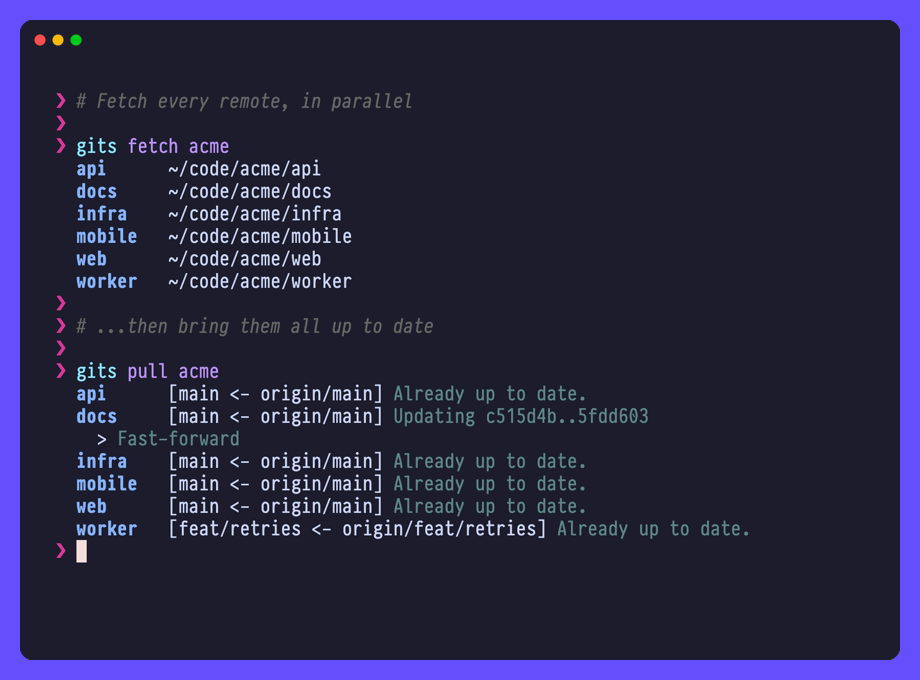
gits pull acme       # pull them all
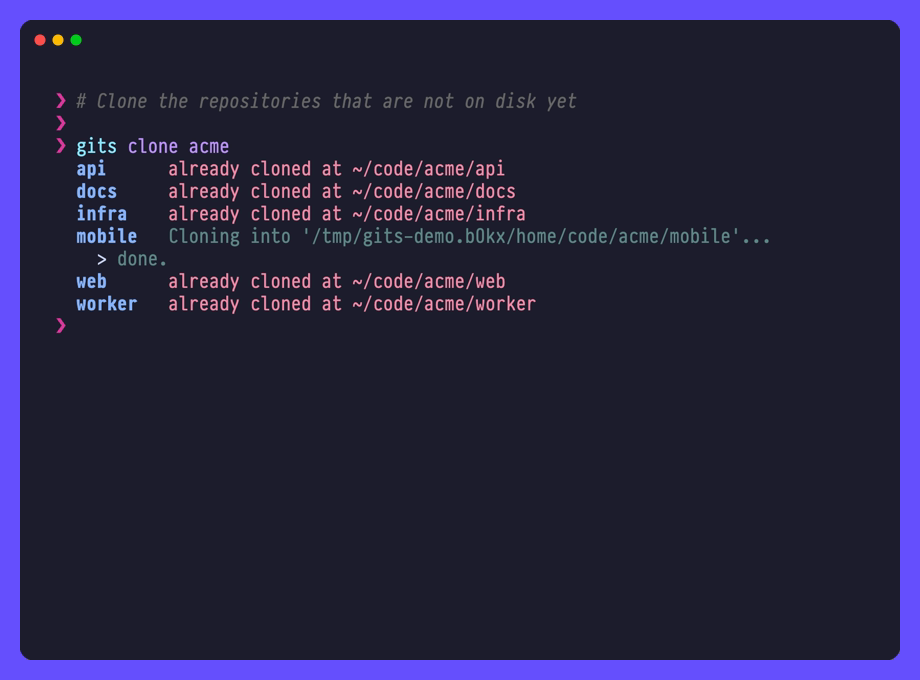
gits clone acme      # clone the ones that aren't there yet
A project is just a label for a group of repositories. It either lists them by hand or discovers them from GitHub, GitLab, Bitbucket, Gitea, Forgejo, Gerrit or a local directory - cached, so day-to-day commands never wait on the network.
Only requirement is git.
- One command, many repositories. Clone, fetch, pull, push, check status, or run an arbitrary command across a whole project, in parallel.
- A config file you never have to write.
gits discover ~/codeturns the clones you already have into projects, andgits addrecords one at a time. Both create the file and the project for you. - Your repositories, discovered for you. Point a project at a GitHub user, a
GitLab group, a Bitbucket workspace, a Gitea or Forgejo owner, a Gerrit
prefix, or a directory, and
gitsfinds the repositories. Self-hosted forges work too. Results are cached with a configurable TTL. - A status view that fits on a screen. One line per repository, with branch, staged/unstaged/untracked counts, ahead/behind, version and last commit.
- Scriptable.
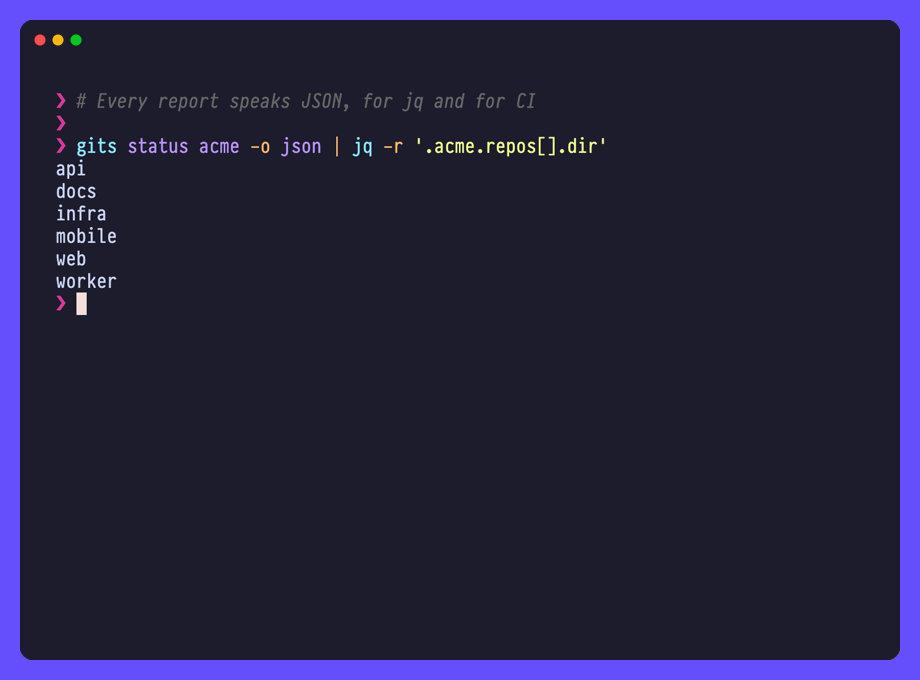
-o jsonemits one well-defined document fromlist,status, and every bulk command, so you can pipe it intojq. Results go to stdout and progress goes to stderr, so piping is always safe. - Interactive when you want it. Fuzzy-pick projects, repositories, branches
and tags;
cdgitjumps your shell straight into a repository. - Safe by default.
gits pushrefuses to reach--forceor--mirror, and skips branches it should not re-create.gits doctortells you what is wrong with your setup before it bites.
Most repo wranglers pick a lane: bulk cloner, read-only dashboard, or pull
request cannon. gits covers the first two in one binary.
- Nothing to set up. No manifest, no
init, no registering repos one by one. Point it at a directory and go. Bring a config later, if ever. - Pipe-friendly by design.
-o jsonon every command that lists or reports, clean stdout, progress on stderr. Your scripts, your CI, and your agents all get a straight answer. - Projects that nest. GitHub, GitLab, Bitbucket, and more, grouped into sub-projects and filtered down. Flat tag lists give up long before you do.
Homebrew (macOS and Linux):
brew install rafi/tap/gitsGo (1.27 or newer):
go install github.com/rafi/gits/cmd/gits@latestBinaries for Linux and macOS (amd64/arm64) are attached to each release.
| Dependency | Needed for |
|---|---|
git |
everything; gits drives your own git binary |
fzf |
interactive selection only (browse, checkout, cd, and prompts when you omit a project) |
Run gits doctor at any time to see which of these were found and where.
1. Let gits write the config for you. You already have clones on disk, so
there is nothing to type up by hand: point discover at them and it writes a
project per directory, in one command.
$ gits discover ~/code
acme ~/code/acme 6 repositories
oss ~/code/oss 3 repositories

Added 2 projects to ~/.gits.yaml.
Adding a repository one at a time is gits add, from inside the clone:
cd ~/code/acme/api && gits add acme   # the current repository joins 'acme'
gits add acme ~/work/tools            # or name directories, globs, clone URLs
Both create the config file and the project when they do not exist yet, so
there is no init step and no manifest to maintain. Run gits discover ~/code
again after cloning more, and only the new arrivals are added.
Either way you end up with ~/.gits.yaml (or
$XDG_CONFIG_HOME/gits/config.yaml), which you are free to edit, group and
point at a code forge:
---
# ~/.gits.yaml

# Discovered from GitHub.
acme:
  path: ~/code/github
  source:
    type: github
    search: rafi          # user or organization

# Discovered from a local directory, searched recursively.
vim:
  path: ~/code/vim
  desc: Vim plugins

# Listed by hand, with absolute directories.
dotfiles:
  desc: My dotfiles
  repos:
    - dir: ~/.config
      src: git@github.com:rafi/.config.git
    - dir: ~/.config/nvim
      src: git@github.com:rafi/vim-config.git
That file is examples/simple.yaml. For every setting with its default value, see examples/config.yaml.
2. Check that it is sound:
gits doctor3. Use it:
gits list              # every project
gits list acme         # every repository in project 'acme'
gits clone acme        # clone the ones not cloned yet
gits status acme       # where does everything stand?
gits pull acme         # bring them all up to date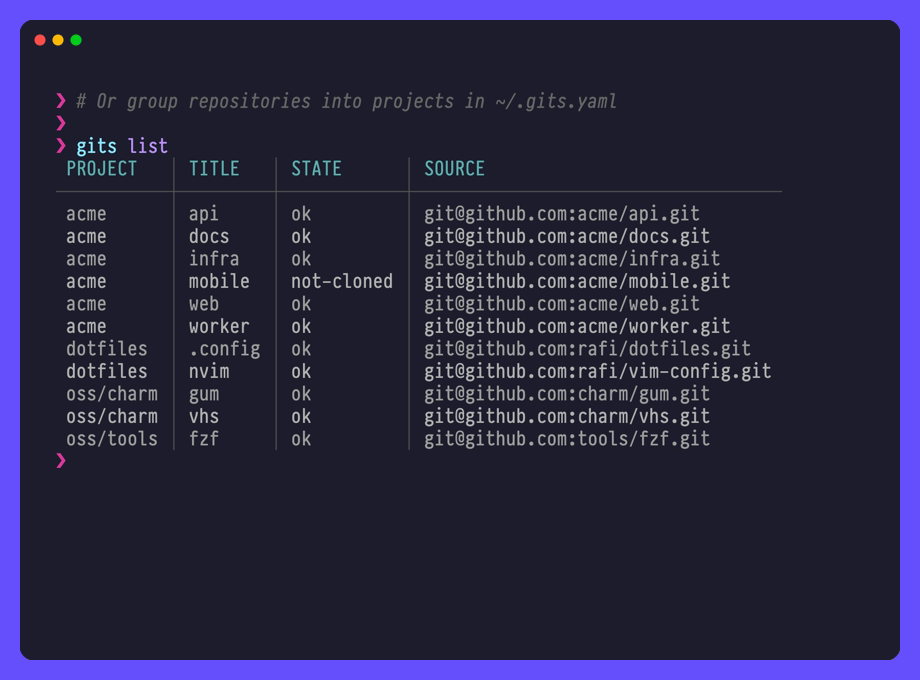
4. Or point it at a directory, with no config at all:
gits status ~/code     # every repository under a path
gits status .          # every repository under the current directory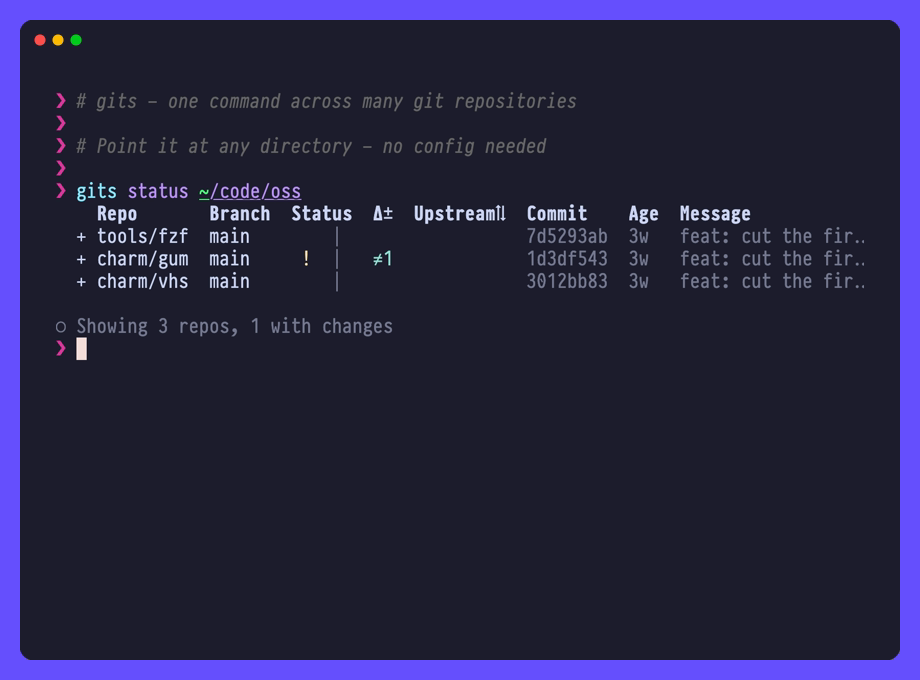
Usage: gits [command] [project] [repo] [flags]
| Command | What it does |
|---|---|
add |
Add cloned repositories to a project's list |
browse |
Browse branches and tags |
cd |
Get repository path (see cdgit) |
checkout |
Traverse repositories and optionally checkout branch |
clone |
Clone all repositories |
completion |
Generate a shell completion script |
discover |
Find groups of repositories and add them as projects |
doctor |
Report configuration and environment problems |
exec |
Run a command in every repository |
fetch |
Fetch and prune from all remotes |
list |
List project repositories |
orphan |
Find repositories on disk that no project declares |
pull |
Pull repositories |
push |
Push current branch to its upstream |
status |
Show Git repositories short status |
sync |
Synchronize project caches |
version |
Show version |
Global flags:
| Flag | Meaning |
|---|---|
-c, --config <path> |
Use a specific config file |
-C, --color <auto|always|never> |
Control colored output |
-v, --verbose |
Trace what gits did: provider pages, cache hits, git's stderr |
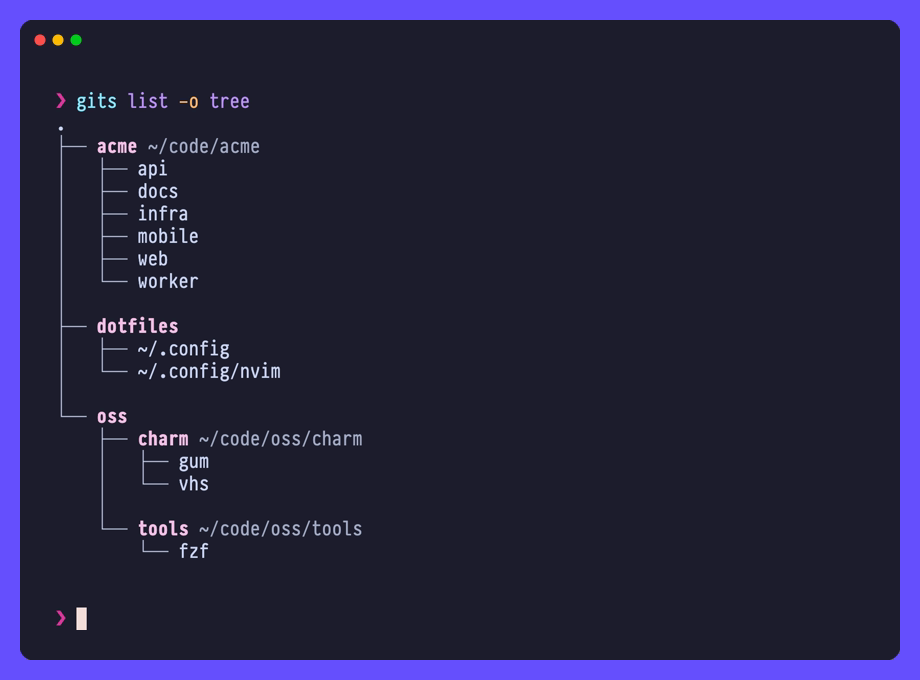
Commands that produce a report also take -o/--output. list offers
table, wide, tree, name and json; status, doctor and the bulk
commands offer table and json.
Every command that addresses repositories also takes -l/--label, which
picks them out by label instead of by project. See Labels.
Every command takes a project, and optionally one repository inside it:
gits status acme      # the whole project
gits status acme api  # one repository
gits status acme api/ # the sub-project 'api' - note the trailing slash
gits status ~/code    # a path instead of a project name
gits list acme infra  # several projects at once
Omit the project and gits asks you to pick one interactively.
A project groups repositories by where they live. A label groups them by whatever you say: the three services behind one demo, everything you rebuild after a dependency bump, the repos you actually touch this week. Label them in the config:
acme:
  path: ~/code/acme
  labels: [work]        # every repository under the project carries it
  repos:
    - dir: api
      labels: [demo, backend]
    - dir: web
      labels: [demo]
    - dir: docs
Then address them with -l, on any command that takes a project:
gits status acme -l demo          # only the repositories labeled 'demo'
gits pull acme -l demo,backend    # either label - several labels are a union
gits pull acme -l demo -l backend # the same thing, spelled out
gits exec acme -l demo -- git gc  # one command across the labeled ones
gits list -l demo                 # across every project, no project named
A repository carries its own labels plus its project's, sub-projects included,
so web above is reachable as both demo and work, and one label on a
project addresses everything in it - including repositories discovered from a
forge, which have no config entry of their own to label.
Matching is exact and case-insensitive, like include/exclude: no globs. A
label nothing carries is reported rather than silently doing nothing, so a
misspelling is visible:
$ gits pull acme -l dmeo
no repository in project "acme" carries label dmeo
gits add --label is the one place a label is written rather than selected by.
It labels what it records, and labels a repository the project already lists,
which is how an existing one gets labeled:
gits add acme ./api --label demo,backend  # record it, labeled
gits add acme ./docs --label demo         # label one already in the list
Labeling a whole project is a labels: line on the project, since gits add
always records repositories. Labels travel in -o json too, already resolved,
so jq can group by them without re-reading your config.
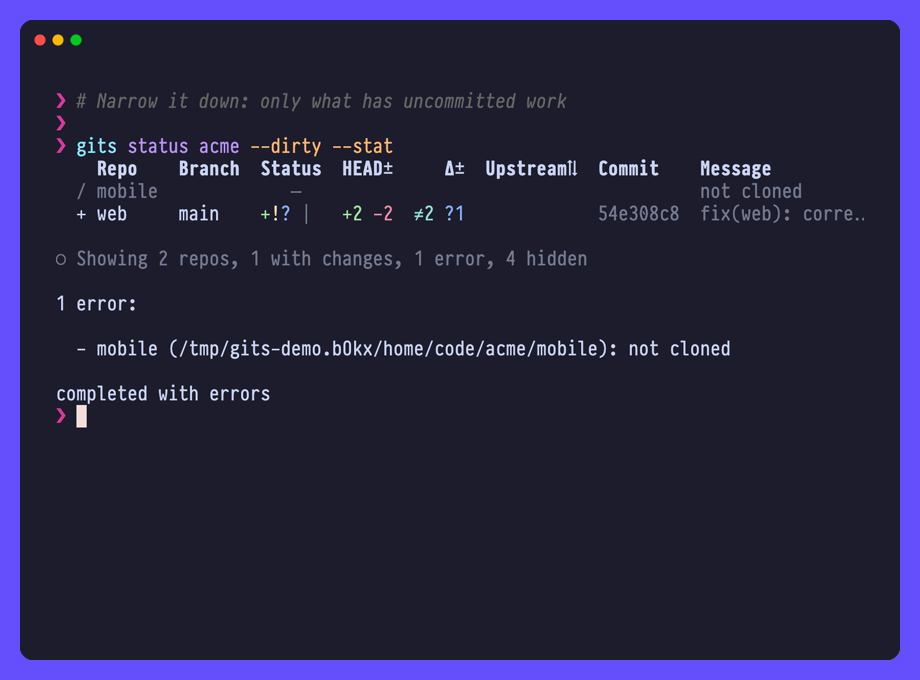
gits status prints one line per repository, with branch, change counts,
ahead/behind, version and last commit. Narrow it down with:
gits status acme --dirty     # only repositories with uncommitted changes
gits status acme --unsynced  # only repositories ahead of or behind upstream
gits status acme --stat      # add a column of uncommitted line counts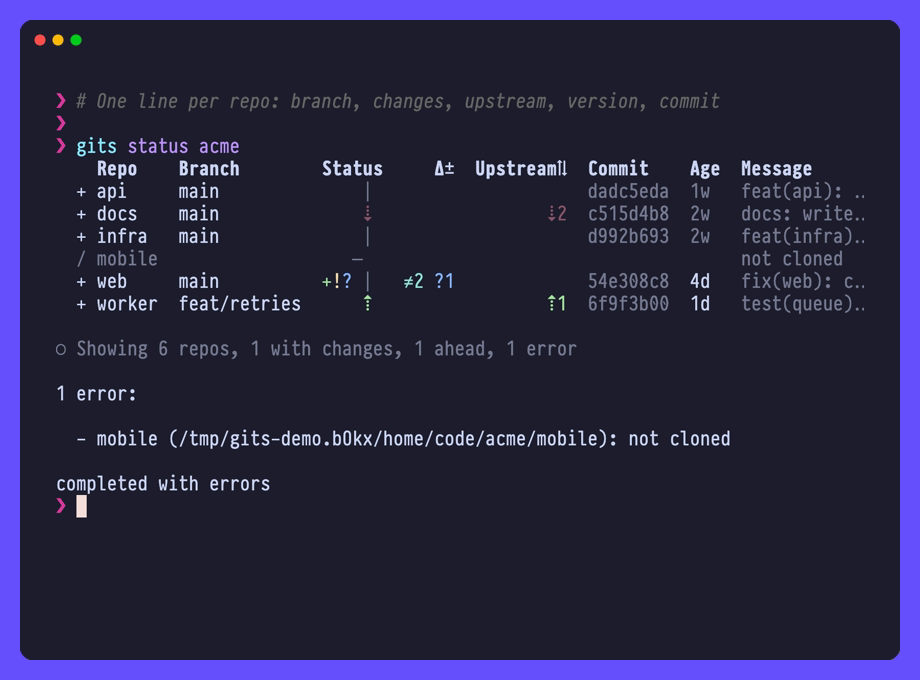
gits add writes already-cloned repositories into a project's repos: list,
creating the project if needed. Each argument is a directory, a glob, or a clone
URL:
gits add acme                              # the current directory
gits add acme ./api ../shared/tools        # directories
gits add acme 'backend*'                   # every repository matching a glob
gits add acme git@github.com:acme/api.git  # cloned into the current directory first
This is for hand-listed projects. For one backed by a source, use
gits orphan to find repositories on disk that no project declares.
Already have clones scattered on disk? gits discover writes the config for
you. Point it at a path, and every directory holding repositories becomes a
project listing exactly those repositories:
$ gits discover ~/code
code ~/code 2 repositories
project1 ~/code/project1 2 repositories
project2 ~/code/project2 2 repositories

Added 3 projects to ~/.gits.yaml.
For a ~/code like this one, with a couple of clones loose between the project
directories:
code
├── project1/{repo1,repo2}
├── repo3
├── project2/{repo4,repo5}
└── repo6
it writes:
code:
  path: ~/code
  repos:
    - dir: repo3
    - dir: repo6
project1:
  path: ~/code/project1
  repos:
    - dir: repo1
    - dir: repo2
project2:
  path: ~/code/project2
  repos:
    - dir: repo4
    - dir: repo5
Every repository lands in exactly one project, named after the directory it sits
in. Note that code claims its own two clones and none of the other four:
projects name their repositories instead of searching their path, so nothing
gets counted twice.
gits discover ~/code -n       # report what it would add, write nothing
gits discover .              # the current directory
gits discover ~/code --min 2  # skip directories holding a single repository
Clone more, run it again: only the new arrivals are added, and a name already
taken is reported rather than quietly renamed. Repositories nested inside
another one are left alone, so a vendored clone never becomes a project of its
own. Use gits orphan to hunt those down.
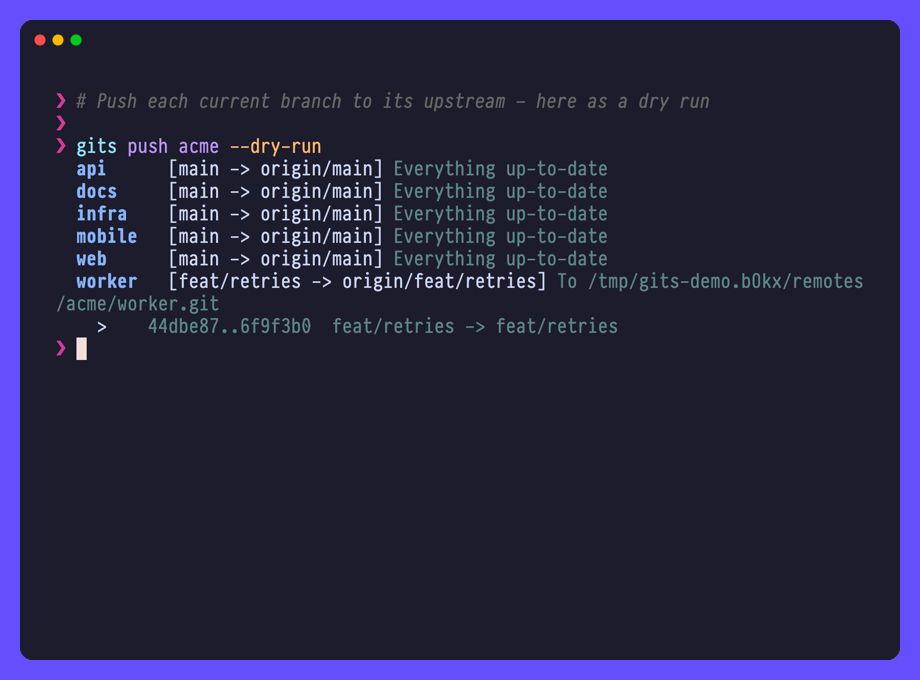
gits push pushes each repository's current branch to its upstream:
gits push acme          # push every repository in project 'acme'
gits push acme -n       # git's own --dry-run, per repository
gits push acme --tags   # push tags instead of the current branch
A branch with no upstream, or one whose upstream is gone, is skipped rather than
failed. Also supported: --all, --branches, --follow-tags, --atomic and
--prune.
--force, --force-with-lease, -u/--set-upstream and --mirror are
deliberately unreachable: one mistyped flag across forty remotes is not
recoverable the way it is against one.
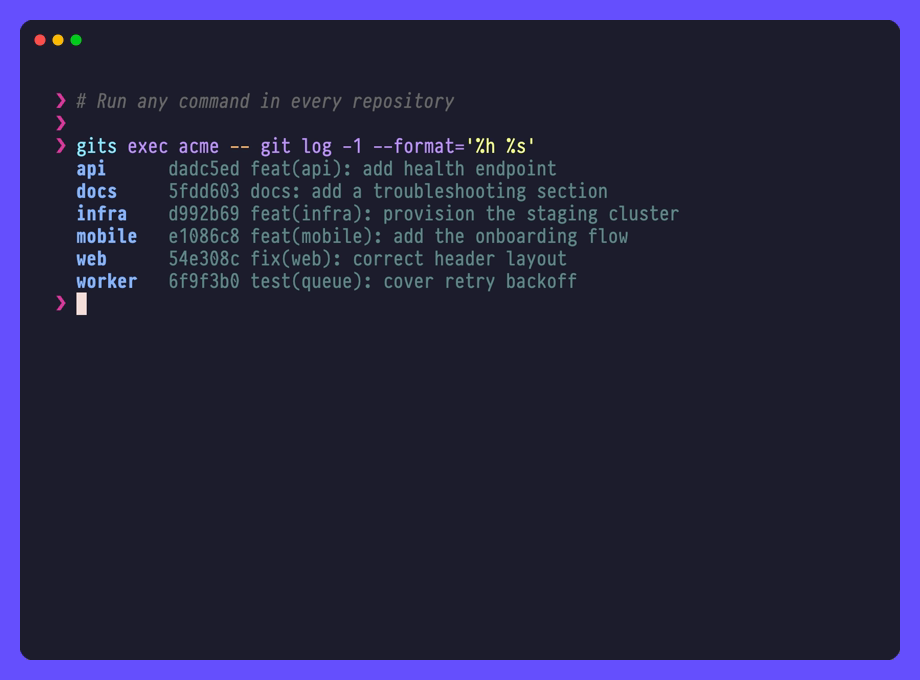
gits exec runs one command in every repository. Everything after -- is the
command:
gits exec acme -- git gc --quiet     # in every repository of 'acme'
gits exec acme api -- git log -n 1   # in one repository
gits exec acme -- sh -c 'git log -1 --format=%s | tr a-z A-Z'   # pipes need a shell
Commands run directly rather than through a shell, each in its repository, with
GITS_PROJECT, GITS_REPO and GITS_REPO_PATH exported.
gits cd prints a repository's path; a child process cannot change your shell's
directory. Source the provided function from your ~/.bashrc or ~/.zshrc
(fish users want contrib/cdgit.fish):
source /path/to/gits/contrib/cdgit.shThen:
cdgit acme api   # cd straight there
cdgit # pick a project and repository interactivelygits sync drops each project's cached repository list and refetches it from its
code forge:
$ gits sync
[1/2] acme [github:acme] flushed · ~/code/acme · 42 repositories · 2 new
  + acme/widgets
  + acme/docs
[2/2] infra [gitlab:mygroup] flushed · ~/work/infra · 17 repositories
Synchronized 2 projects, 59 repositories (2 new).
Repositories the refetch found that the dropped cache didn't have are listed
under their project, ready for gits clone. The first sync of a project has
nothing to compare with, so it lists none.
Name projects (gits sync acme infra) to sync only those. Only forge-backed
projects have a cache to refresh.
gits doctor reports what is wrong with your configuration and environment, in
one place:
$ gits doctor
info    config using ~/.gits.yaml
error   config unknown config key "acme.pth" in ~/.gits.yaml, ignored
error   acme.one no `path:` on the project and no `dir:` on the repository, so there is nowhere for it to live
warning vim `path: ~/code/vim` does not exist yet; `gits clone` will create it
info    git git version 2.55.0 (/opt/homebrew/bin/git)
info    finder 0.74.3 (Homebrew) (/opt/homebrew/bin/fzf)
info    cache directory ~/.cache/gits
warning cache.github-acme written by gits v0.10, will be refetched (cached 9d ago)
info    cache.github-rafi cached 1d ago, valid for 168h0m0s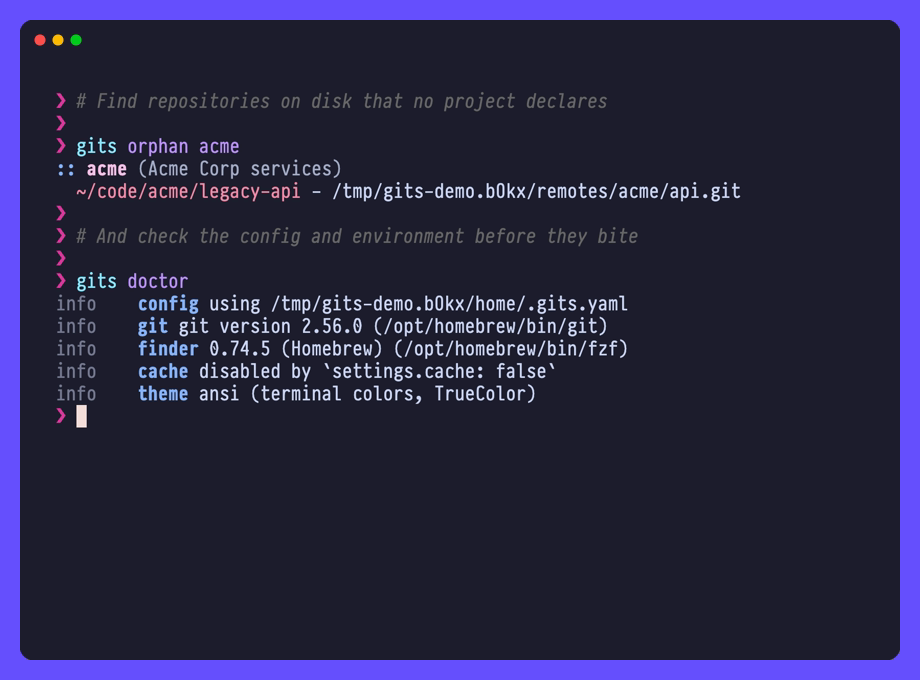
gits completion <bash|zsh|fish|powershell> prints a completion script; the
sub-command's help says where your shell expects it.
Tab completes project names, repositories, branches, and flag values. Names come from the cache, so completion never waits on the network.
The configuration file lives at ~/.gits.yaml or
$XDG_CONFIG_HOME/gits/config.yaml. JSON and TOML are supported too, so
.json, .yml and .toml extensions work at either location. Use
gits -c <path> to point at any other file.
See examples/config.yaml for a fully documented config file listing every setting with its default value, or examples/simple.yaml for a minimal one.
Warning
Each project in the config file can have either a source or a repos key,
not both.
The structure of the config file is as follows:
---
# ~/.gits.yaml

# Project definition
projectname:          # Project name
  desc: My projects   # Optional
  path: ~/code/github # Optional if 'repos' are specified and have absolute paths.
  source:             # Required if no 'repos' defined, default: filesystem
    type: github      # Required: github|gitlab|bitbucket|gitea|forgejo|gerrit|filesystem
    search: rafi      # Required search query (owner, group id, name prefix)
    url: https://...  # Self-hosted forge web address, see 'Self-hosted forges'
  repos:              # Required if no 'source' defined
    - dir: foo        # Optional, default: repository name
      src: git@...    # Optional, default: repository remote URL
      labels: [...]   # Optional, see 'Labels'
    - ...
  labels: [...]       # Optional labels every repository under it carries
  include: [...]      # Optional allowlist of repositories
  exclude: [...]      # Optional denylist of repositories
  clone: true         # Optional, set false to skip during `gits clone`
  subprojects: [...]  # Optional nested projects

anotherproject:
  ...
Note
When dir is omitted, the local directory is derived from the last path
segment of src, with only a trailing .git suffix stripped. Earlier
versions stripped everything after the last dot, so a dotted repository name
without a .git suffix (e.g. rafi.github.io) previously mapped to
rafi.github and now maps to rafi.github.io. If you cloned such a repo with
an older version, rename the directory (or set dir: explicitly) to match.
include and exclude trim what a project contributes, which is handy when the
source isn't yours to curate. Both match a repository by name, namespace, or
namespace/name - exact strings, no globs:
work:
  path: ~/code/work
  source:
    type: gitlab
    search: "12345678"
  exclude:
    - acme/legacy-api   # namespace/name
    - deprecated-tool   # name
  # include:            # when non-empty, only what it names is kept
  #   - acme/api
  #   - acme/web
exclude always wins. A non-empty include is a guest list: anything unnamed
stays home. Sub-projects get filtered too, each by its own lists.
Real orgs don't keep their repositories in one tidy pile. GitLab groups nest as
deep as you like, and sub-projects are how gits follows them down. Point a
project at a GitLab group and the whole tree comes back with its shape
intact - no flattening, no listing each subgroup by hand. Gerrit project names nest
the same way along their / segments, below the search prefix: searching
openstack/ puts openstack/nova at the top as nova, and openstack/infra/zuul
under the sub-project infra.
You can also build that tree yourself. Nest projects under subprojects, as a
list, so each carries its own name:
org:
  path: ~/code/org
  repos:
    - dir: platform
  subprojects:
    - name: frontend        # path becomes ~/code/org/frontend
      desc: Web clients
      repos:
        - dir: web
          src: git@github.com:myorg/web.git
    - name: backend
      path: ~/code/services # an explicit path wins over the default
      source:               # discovered on its own, like a top-level project
        type: github
        search: myorg-backend
A sub-project inherits what it doesn't declare: a path of
<parent path>/<name>, and its parent's source. No parent path means
nothing to inherit, so use absolute dir entries or give it a path. A project
with only subprojects is fine - it's a folder, not a freeloader.
An inherited source only says where repositories come from, so a
provider-backed one you haven't cloned reads as remote-only instead of an
error. It won't go discover anything twice. Want a sub-project fetched on its
own? Give it its own source, or just list repos.
Note
A project with a path: and no repos: is searched recursively, and that
search descends into its sub-projects' directories too. If a sub-project also
lists those repositories, they appear twice. Give such a parent an explicit
repos: list, or point the sub-projects at directories outside the parent's
path.
A trailing slash is how you say "sub-project, not repository":
gits status org frontend/   # the sub-project 'frontend'
gits status org web # the repository 'web'Built-in behavior is configured under the reserved settings: key:
settings:
  cacheTTL: 168h   # How long provider caches stay valid. Go duration
                   # syntax (e.g. "24h", "30m"). Default: 168h (7 days).
                   # Invalid or empty values fall back to the default.
  workerCount: 8   # Concurrent git workers. Default: max(NumCPU, 2).
  verbose: false   # Trace what gits did on the way to an answer - provider
                   # pages, cache hits, git's stderr - to stderr. Same as -v.
  includeArchived: false  # Include archived repositories when listing
                          # from providers. Gerrit's read-only projects
                          # count as archived. Default: false. Bitbucket
                          # Cloud has no archived flag, so the setting does
                          # not apply there.
  providerTimeout: 5m     # HTTP timeout for provider API calls. Go
                          # duration syntax. Default: 5m.
  gitTimeout: 5m          # Timeout for network git operations
                          # (clone/fetch/pull). Go duration syntax.
                          # Default: 5m.
  finder:                 # Interactive selector overrides. gits shells out
                          # to fzf; override to use a drop-in replacement or
                          # tune the invocation.
    binary: fzf           #   Executable to run. Must be on PATH.
    # args: [...]         #   Replaces the built-in default options wholesale.
    # extra: [...]        #   Appended after args, adding options.
Provider caches are written to $XDG_CACHE_HOME/gits (~/.cache/gits by
default); gits doctor prints the directory in use.
GitHub, GitLab and Bitbucket need an API token. Gitea, Forgejo and Gerrit
discover anonymously without one, which lists public repositories; give them a
token to see private ones too. Configure it per provider under settings:,
either verbatim or as a command that prints it:
settings:
  github:
    tokenCommand: pass tokens/github   # `token-cmd` is also accepted
  gitlab:
    tokenCommand: op read op://private/gitlab/token
  bitbucket:
    tokenCommand: pass tokens/bitbucket
  forgejo:
    tokenCommand: pass tokens/codeberg
For each provider the first of these wins:
token- used as-is. Keep in mind your config file is plain text.tokenCommand(aliastoken-cmd) - run through the shell, so pipes and quoting work; the first non-empty output line is the token. It runs at most once per command pergitsinvocation, so a passphrase prompt appears once even with several projects on the same provider. A failing command is an error - there is no silent fallback.- Environment:
GITHUB_TOKEN(orHOMEBREW_GITHUB_API_TOKEN),GITLAB_TOKEN,BITBUCKET_TOKEN. Only for github.com, gitlab.com and Bitbucket Cloud: a source with aurl:never reads the environment, so an ambientGITHUB_TOKENis never sent to another host. Gitea, Forgejo and Gerrit have no environment variables.
A single project can authenticate as somebody else by putting the same two
keys on its source:, which is how you keep a work account and a personal one
in one config file:
personal:
  path: ~/code/me
  source:
    type: github
    search: rafi
    tokenCommand: pass tokens/github-personal

work:
  path: ~/code/work
  source:
    type: github
    search: acme
    tokenCommand: pass tokens/github-work   # `token:` and `token-cmd:` too
Bitbucket takes an Atlassian API token in either of two forms:
settings:
  bitbucket:
    token: me@example.com:my-api-token   # Atlassian account email and token
    # token: my-api-token                # the token alone
Give it the read:repository:bitbucket and read:workspace:bitbucket scopes,
which is all discovery reads. A legacy username:app-password still works
wherever Bitbucket still honors it, but Atlassian has deprecated app passwords
in favor of API tokens, so prefer a token for anything new.
Gerrit's token is an
HTTP password
(an auth token on Gerrit 3.13 and later), and it goes with a username. The
first of these wins: username: on the source, the user in its url:
(https://rafi@review.example.com), then settings.gerrit.username:
settings:
  gerrit:
    username: rafi
    tokenCommand: pass tokens/opendev
The username also goes into SSH clone URLs, ssh://rafi@host:29418/name, at
the host and port the server advertises. Gerrit only reveals its SSH address
to a signed-in caller, so without a token repositories clone over HTTPS
instead.
Cached projects don't need a token until the cache expires or gits sync
refreshes it.
A url: on the source points it at your own host. Use the address you would
open in a browser - gits adds the API path itself:
work:
  path: ~/code/work
  source:
    type: github            # GitHub Enterprise Server
    url: https://github.corp.example
    search: platform
    tokenCommand: pass tokens/github-corp

mine:
  path: ~/code/codeberg
  source:
    type: forgejo           # or gitea
    url: https://codeberg.org
    search: rafi            # a user or an organization

opendev:
  path: ~/code/opendev
  source:
    type: gerrit
    url: https://review.opendev.org
search: openstack/ # a project name prefixgitea,forgejoandgerritrequireurl:.githubandgitlabtake it for Enterprise and self-managed hosts;https://github.comandhttps://gitlab.commean the same as leaving it out.bitbucketdoes not take it: only Bitbucket Cloud is supported.- The url may name a user,
https://rafi@host, but never a password - usetokenortokenCommand. The user is kept out of the cache and-o json. - Two projects with the same
searchon different hosts are cached apart. - A custom host never gets a token from the environment, so set one on the
source or under
settings:.
gits paces its requests to each host so a big sync does not trip a forge's
abuse limits, and tries a request up to three times when a host answers
429 Too Many Requests or 503 Service Unavailable, waiting as long as its
Retry-After asks, a minute at most. Set the pace per provider in
requests per second:
settings:
  gerrit:
    rateLimit: 5   # Default: 10. 0 turns pacing off.
Projects on one host share one pace, and two providers pointed at the same host share the slower of their two rates.
gits ships 31 color themes. The default, ansi, uses your terminal's own
16 colors. Pick another in config, per run with --theme, or with
GITS_THEME:
settings:
  theme:
    name: catppuccin-mocha
    # or follow the terminal background:
    # name: { dark: catppuccin-mocha, light: catppuccin-latte }
    styles:                       # override individual roles
      statusStaged: { fg: green, bold: true }
      statusBehind: { faint: false }
gits theme list shows every theme; gits theme show <name> renders a
sample. To browse them live:
gits theme list | fzf --preview 'gits -C always theme show {}'Colors adapt to the terminal: truecolor terminals get the exact palette,
256-color and 16-color terminals get hand-picked fallbacks. Override
colors are a palette name (fg muted subtle red green yellow blue magenta cyan orange accent), none, #rrggbb, or an ANSI index. See
examples/config.yaml for every role.
Each project in the following example is defined differently:
---
# ~/.gits.yaml

# Github source.
mygithub:
  source:
    type: github
    search: rafi

# GitLab source, note that `path` and `desc` are optional.
work:
  path: ~/code/work
  desc: My work GitLab projects
  source:
    type: gitlab
    search: "12345678"  # Make sure GitLab group id is quoted

# Bitbucket source.
mybitbucket:
  source:
    type: bitbucket
    search: rafi

# Forgejo source on Codeberg. Gitea works the same with `type: gitea`.
codeberg:
  source:
    type: forgejo
    url: https://codeberg.org
    search: forgejo-contrib

# Gerrit source, every project whose name starts with the prefix.
opendev:
  path: ~/code/opendev
  source:
    type: gerrit
    url: https://review.opendev.org
    search: openstack/oslo

# Filesystem source that will be searched recursively.
explore:
  desc: Exploring projects
  path: ~/code/explore
  source:
    type: filesystem

# Relative directory name and implicit remote source URL.
acme:
  path: ~/code/acme
  desc: Acme is a really cool app.
  repos:
  - dir: admin
  - dir: ant-design-pro
  - dir: api
  - dir: infra
  - dir: ios
  - dir: react-native
  - dir: web
  - dir: webapp

# Relative directory name and explicit remote source URL.
myapp:
  path: ~/code/myapp
  repos:
  - dir: api                             # Can be absolute or relative to path
    src: https://github.com/app/api.git  # Optional remote clone URL
  - dir: ios
    src: https://github.com/app/ios.git
  - dir: android
    src: https://github.com/app/android.git

# Absolute directories and explicit remote source URL. (No project path)
rafi:
  desc: My dotfiles
  repos:
  - dir: ~/.config
    src: git@github.com:rafi/.config.git
  - dir: ~/.config/nvim
src: git@github.com:rafi/vim-config.gitgits is written in Go and needs no code generation or vendored tools to
build:
git clone https://github.com/rafi/gits.git && cd gits
go build ./cmd/gits
go test ./...
A justfile wraps the common tasks (just
required):
just build     # build the binary into bin/release
just test      # run the test suite
just lint      # golangci-lint
just release   # cross-compile for linux/darwin, amd64/arm64
Contributions are welcome - please open an issue or pull request on GitHub.
MIT © 2018-2026 Rafael Bodill. See LICENSE.txt.