Claude Workspace Manager
Multi-project orchestrator for Claude Code



Quick Start · Commands · How It Works · Full Reference · Architecture
One command. Right account. Isolated worktree. Full context.
cw work my-app https://linear.app/team/issue/PROJ-123/fix-auth-flowCW launches Claude with the correct account, fetches the ticket from Linear, creates a worktree, and starts working — all automatically.

# Install
git clone https://github.com/avarajar/cw.git && cd cw && ./install.sh

# Setup
cw init
cw account add work
cw launch work                    # authenticate with /login
cw project register ~/code/my-app --account work

# Go
cw work my-app fix-authWorking with Claude Code across multiple projects means juggling CLAUDE_CONFIG_DIR for every project, losing context when conversations expire, dealing with branch conflicts when reviewing PRs while coding, and copy-pasting ticket descriptions manually.
CW solves all of that:
cw create "Task management SaaS" --team  →  new project + agent teams build it
cw work my-app PROJ-123                  →  worktree + Linear context + right account
cw review my-app 42                      →  isolated PR review with auto-start
cw work my-app PROJ-123                  →  resume exactly where you left off
cw work my-app PROJ-123 --done           →  cleanup worktree, archive session
cw create "Inventory management app with Next.js and Supabase"
cw create "CLI tool in Rust for monitoring" --account personal
cw create "E-commerce platform" --team                          # with agent teams
cw create "API gateway" --team "backend, infra, tests"          # custom team roles
cw create https://notion.so/team/Project-Spec --account work    # from Notion spec
Creates the directory, initializes git, registers the project, and launches Claude to build it. When done, Claude asks which GitHub account/org to push to.
cw work my-app fix-auth                                # branch name
cw work my-app fix-auth --workflow bugfix              # with bugfix workflow
cw work my-app PROJ-123 -w feature                     # feature workflow
cw work my-app https://linear.app/team/issue/PROJ-123  # Linear URL
cw work my-app https://github.com/org/repo/issues/42   # GitHub issue
cw work my-app https://notion.so/team/Auth-Redesign    # Notion page

cw work my-app fix-auth                                # resume
cw work my-app fix-auth --done                         # close + cleanup
Creates an isolated worktree, tracks the session, fetches context from URLs via MCP, and launches Claude. .env files from the project root are automatically symlinked into worktrees. Resuming picks up exactly where you left off.
The --workflow flag applies structured instructions for different types of work:
| Workflow | Use case |
|---|---|
feature |
New feature development with design-first approach |
bugfix |
Bug fixes with reproduce-first methodology |
refactor |
Safe refactoring with test-driven verification |
security-audit |
OWASP-based security review |
docs |
Documentation with audience-first approach |
Workflow templates live in ~/.cw/templates/workflows/ and are fully customizable.
All worktrees in the same project share a SHARED_CONTEXT.md file (symlinked automatically). When one worktree discovers something relevant to others (schema changes, API changes, conventions), it updates the shared context — other worktrees see it immediately.
cw work my-app big-feature --team                              # auto-split work
cw work my-app big-feature --team "backend, frontend, tests"   # specify teammates
Leverages Claude Code's agent teams for parallel work. Multiple teammates tackle different parts of the task simultaneously, coordinating through a shared task list. The arcade dashboard shows each teammate's activity in real-time.
cw createalso supports--teamfor bootstrapping new projects with agent teams.
cw plan my-app "migrate auth to OAuth2"
cw plan my-app "add payment processing with Stripe"
Launches Claude to analyze your project, break the goal into 2-6 independent sub-tasks, and optionally create worktrees for each. Each sub-task gets a suggested workflow template. Great for large features that benefit from parallel work.
cw review my-app 123                                   # by PR number
cw review my-app https://github.com/org/repo/pull/123  # by URL
cw review my-app 123                                   # re-review (checks resolved changes)
cw review my-app 123 --done                            # close
First review runs your project's review skill automatically. Follow-up reviews check if requested changes were addressed. Sessions auto-close when Claude submits the review.
cw clean                # detect and remove stale worktrees/sessions
cw clean --dry-run      # preview what would be removed
cw clean --days 14      # set custom inactivity threshold
cw clean --force        # skip confirmation prompt
Finds worktrees and sessions that have been inactive beyond a threshold and cleans them up. .env files are automatically symlinked into worktrees on task creation, so environment variables are always available.
cw doctorValidates your entire setup: git version, python3, claude CLI, account authentication, project paths, workflow templates, stale sessions, and orphaned worktrees. Run it to diagnose issues or verify a fresh install.
cw stats                # all projects
cw stats my-app         # single project
Shows productivity metrics across sessions: total/active/done tasks, average opens per session, completion rate, duration for completed tasks, and workflow usage breakdown.
cw open my-app          # open Claude in project (no worktree)
cw spaces               # list all active tasks and reviews
cw dashboard            # full workspace overview (terminal)
cw forge # launch visual dashboard (web UI)Each project maps to a Claude account. CW handles the routing automatically.
cw account add work
cw account add personal

cw project register ~/code/company-app  --account work
cw project register ~/code/side-project --account personal

cw work company-app feat-x      # → work account
cw work side-project feat-y # → personal accountcw arcade --setup # install activity hooks (once)
cw arcade # launch live dashboard in browserReal-time visual dashboard showing all Claude Code sessions, tool usage, and agent activity across accounts. Uses Server-Sent Events to stream activity as it happens — no polling.
The --setup command installs Claude Code hooks in all your accounts. New accounts created with cw account add auto-inherit the hooks.
Forge is the full web dashboard for CW. Instead of cw spaces and cw dashboard in the terminal, you get a visual UI with multi-tab terminals, filters, project info, and one-click actions.
cw forge # launch Forge dashboard in browser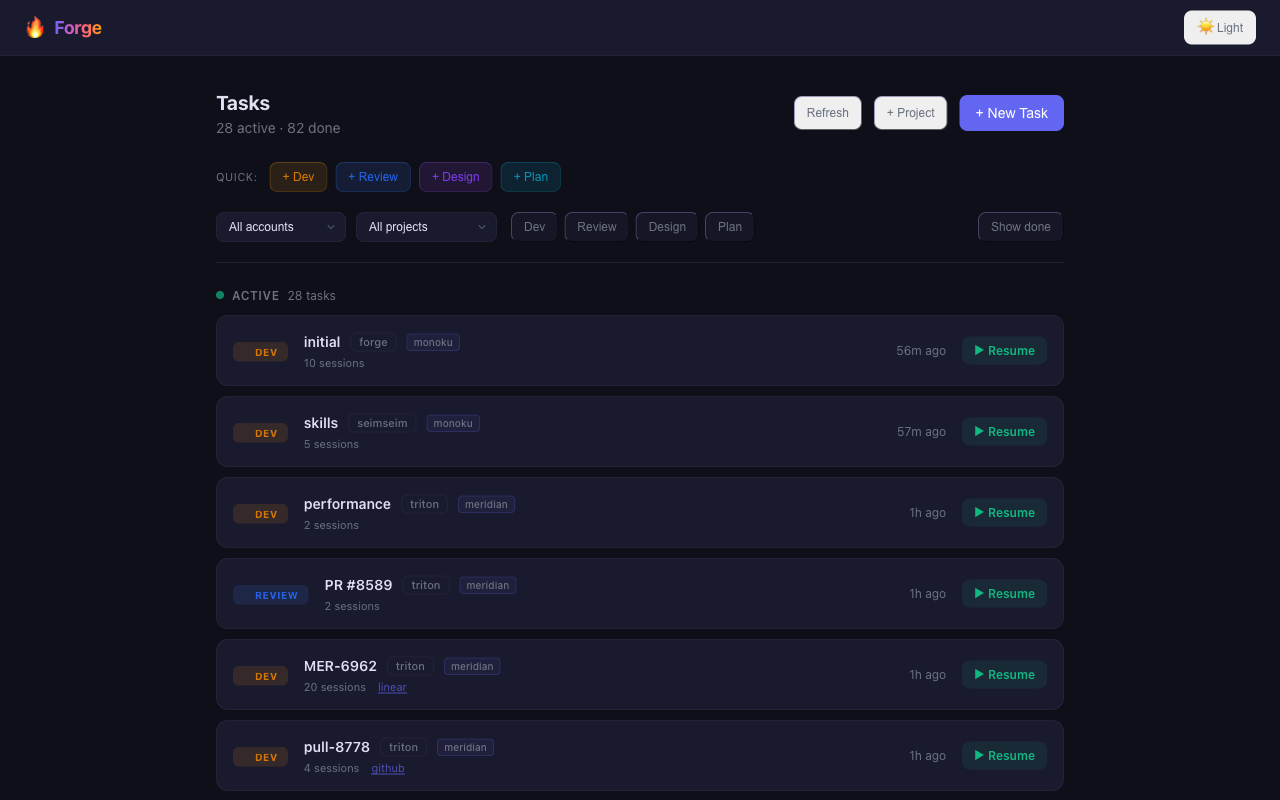
Features:
- Task list with filters by account, project, and type (dev/review/design/plan)
- Multi-tab interactive terminals — multiple Claude Code sessions side by side
- Project info — auto-detected stack, MCPs, plugins at a glance
- One-click start, resume, and done for tasks and reviews
- Keyboard shortcuts (Cmd+1..5, Cmd+W, Cmd+L)
Install:
npm i -g @forge-dev/platform    # install once
cw forge                        # launch anytime
Or without installing: npx @forge-dev/platform
See the Forge repo for full docs and screenshots.
Every task and review gets its own git worktree. No checkout conflicts, no stashing.
my-app/
├── src/                       # main branch (untouched)
├── .tasks/
│   ├── fix-auth/              # worktree → fix-auth branch
│   └── PROJ-123/              # worktree → branch from Linear
└── .reviews/
    └── pr-123/                # worktree → PR branch
Context survives conversation loss. Notes and metadata live in ~/.cw/sessions/, symlinked into worktrees:
~/.cw/sessions/my-app/
├── task-fix-auth/
│   ├── session.json           # metadata, status, opens count
│   ├── TASK_NOTES.md          # persistent context → symlinked into worktree
│   └── init_prompt.txt        # initial Claude prompt
└── review-pr-123/
    ├── session.json
    └── REVIEW_NOTES.md
When you resume, Claude uses --continue. If the conversation is lost, the notes file preserves context so you can pick up where you left off.
cw work my-app https://linear.app/.../PROJ-123
  → Parse URL, detect Linear, extract PROJ-123
  → Launch Claude with init prompt
  → Claude fetches issue + comments via MCP, creates worktree, fills TASK_NOTES.md
Works with Linear, GitHub, and Notion URLs — as long as the corresponding MCP connectors are installed in your Claude account (see MCP Integrations). Linear issues include comments for additional context.
CW finds the best review skill for each project:
| Priority | Location |
|---|---|
| 1 | .claude/skills/{code-review,review-pr,review}/SKILL.md (project) |
| 2 | ~/.claude/skills/{code-review,code-reviewer}/SKILL.md (global) |
| 3 | ~/.cw/commands/review-pr.md (CW fallback) |
| 4 | Built-in default |
- Claude Code CLI
- Git 2.15+
- Python 3.6+
- Bash 4+ or Zsh
git clone https://github.com/avarajar/cw.git
cd cw
./install.sh
The installer copies CW to ~/.cw/bin/, installs hooks, agents, and templates, and adds shell integration to .zshrc / .bashrc with tab completion and aliases.
default_account: work
skip_permissions: false     # set true to skip Claude permission prompts

tools:
  tracker: linear
  docs: notion
  chat: slack
repo: github# Per-command
cw --skip-permissions work my-app fix-auth
# Permanent (config.yaml)
skip_permissions: true
# Per-session (env)
CW_CLAUDE_FLAGS="--dangerously-skip-permissions" cw work my-app fix-authNote: URL integrations (Linear, GitHub, Notion) require the corresponding MCP connectors to be installed in your Claude account. CW doesn't ship with these connectors — it leverages MCPs that are already available in Claude Code's ecosystem. You can install them interactively with the command below, or configure them manually in your Claude account settings.
cw project setup-mcps my-app # interactive setup for GitHub, Linear, Notion, SlackThis installs MCPs directly on the project's account and shows the status of already-installed ones. Once configured, passing a Linear, GitHub, or Notion URL to cw work or cw create will automatically fetch context from that service.
After installation, these aliases are available:
| Alias | Command |
|---|---|
cww |
cw work |
cwpr |
cw review |
cwsp |
cw spaces |
cwd |
cw dashboard |
cws |
cw status |
cwl |
cw project list |
cwo |
Fuzzy project opener (requires fzf) |
cc |
cw launch |
GSD is a meta-prompting workflow for Claude Code. It installs slash commands and context files (PROJECT.md, ROADMAP.md, STATE.md) that guide Claude through structured Discuss → Plan → Execute → Verify phases.
cw gsd:init [path]   # initialize GSD in a worktree (default: current directory)
cw gsd:sync          # initialize GSD in all active worktrees that don't have it yet
Requires Node.js / npx.
claude-code-best-practice provides ready-made agents and hooks with audio notifications for Claude Code events.
Bundled in this repo and installed automatically by install.sh:
| Asset | Location | Purpose |
|---|---|---|
agents/presentation-curator.md |
~/.cw/agents/ |
Proactive slide/presentation agent |
agents/weather-agent.md |
~/.cw/agents/ |
Dubai weather fetcher via wttr.in |
hooks/scripts/hooks.py |
~/.cw/hooks/ |
Hook handler with audio notifications |
hooks/config/hooks-config.json |
~/.cw/hooks/ |
Hook event configuration |
hooks/sounds/ |
~/.cw/hooks/ |
Sound effects for Claude Code events |
CW is designed to be shared across a team. The repo contains the tool itself; personal data stays local.
| Shared (this repo) | Personal (~/.cw/) |
|---|---|
cw, install.sh |
accounts/ |
cw-shell-integration.sh |
projects.json |
templates/, docs/ |
sessions/ |
Each team member clones the repo, runs install.sh, and registers their own projects. Paths don't need to match across machines.
What happens if my Claude conversation expires?
Session notes (TASK_NOTES.md / REVIEW_NOTES.md) persist in ~/.cw/sessions/ and are symlinked into the worktree. When you resume with cw work, Claude reads the notes to restore context.
Can I use multiple accounts on the same project?
Each project is mapped to one account. To switch, re-register the project with a different --account flag.
Do I need Linear/GitHub/Notion to use CW?
No. You can use plain branch names (cw work my-app fix-auth). URL integration is optional and requires the corresponding MCP to be set up via cw project setup-mcps.
How do I remove a task worktree?
cw work my-app task-name --done closes the session and cleans up the worktree.
| Command | Description |
|---|---|
cw init |
Initialize CW directory structure |
cw create "<description>" |
Bootstrap new project from scratch |
cw work <project> <task|URL> |
Work on feature/bug in isolated worktree |
cw work <project> <task> --workflow <type> |
Work with workflow template (feature|bugfix|refactor|security-audit|docs) |
cw work <project> <task> --team |
Work with agent teams |
cw work <project> <task> --done |
Close task, cleanup worktree |
cw plan <project> "<description>" |
Plan & auto-split into sub-worktrees |
cw review <project> <PR|URL> |
Review PR in isolated worktree |
cw review <project> <PR> --done |
Close review |
cw open <project> |
Quick open (no worktree) |
cw spaces |
List active tasks and reviews |
cw dashboard |
Full workspace overview |
cw forge |
Launch Forge visual dashboard (web UI) |
cw stats [project] |
Session metrics and productivity stats |
cw doctor |
Health check — verify setup and diagnose issues |
cw arcade |
Live activity dashboard |
cw arcade --setup |
Install activity hooks |
cw account add|list|remove |
Manage accounts |
cw project register|list|info |
Manage projects |
cw project setup-mcps <name> |
Configure MCPs for a project |
cw project setup-agents <name> |
Install agents for a project |
cw launch <account> |
Launch Claude with specific account |
cw status |
Quick status overview |
cw clean |
Remove stale worktrees and sessions |
cw clean --dry-run |
Preview stale spaces without removing |
cw clean --days <n> |
Set inactivity threshold (days) |
cw gsd:init [path] |
Initialize GSD workflow |
cw gsd:sync |
Initialize GSD in all active worktrees |
cw --skip-permissions <cmd> |
Skip permission prompts |
cw version |
Show version |
cw help |
Full help |
Issues and PRs welcome. CW is a single Bash script — changes are straightforward to test:
chmod +x cw && ./cw help    # test locally
./install.sh                 # install to test full flow
See architecture.md for how the codebase is structured.