A local attention-management console for AI coding tasks. Current integrations: Claude Code, Codex/ChatGPT, and Cursor CLI.
Attend began with a simple need: add tags to tasks.
When AI coding work spreads across many sessions, finding a session by project or recency is not enough. Tags provide the first useful layer: group related tasks, build focused views, and return to the right work without reconstructing the whole workspace. From that starting point, Attend grew into a set of attention-management tools for answering the next questions: Which task is still running? Which one replied? What needs a decision? What can wait? Which side discussion deserves to become its own task?
Attend keeps those signals next to the actual conversations, so organizing work and advancing it happen in the same local interface. The server binds to 127.0.0.1 by default.
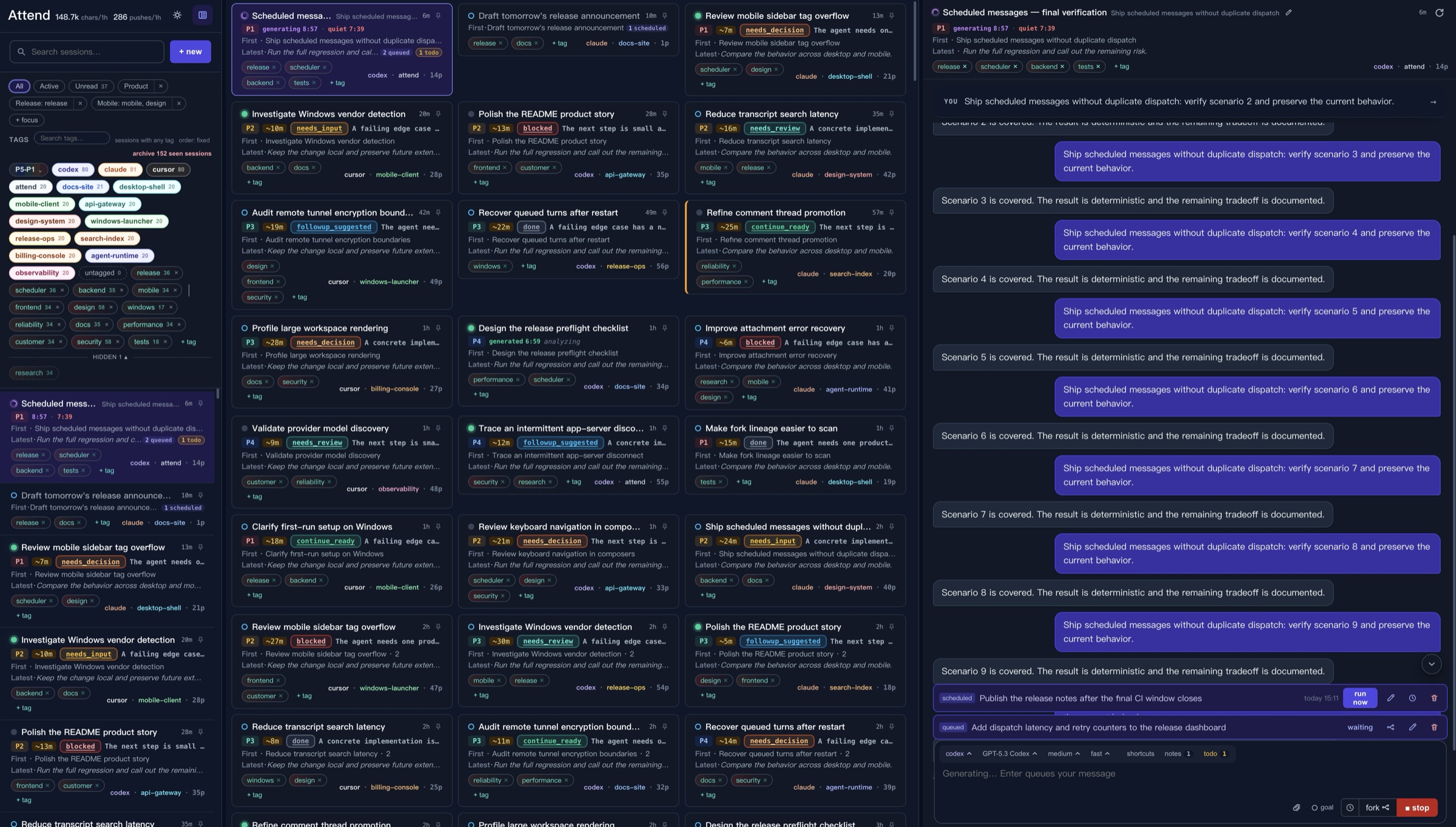
Synthetic demo vault: 240 sessions across 12 projects, with about 4,800 generated conversation turns.
- Organize sessions across projects with tags, search, and Focus views, while distinguishing work that is generating, unread, waiting for follow-up, or handled.
- Start or continue Claude Code, Codex/ChatGPT, and Cursor CLI sessions in the browser, with attachments, interactive questions, stopping, and durable message queues.
- Keep shortcuts, notes, todos, and Goals beside the composer; pin messages and use
@to carry selected context into the next turn. - Fork sessions, comment on a response, or promote a side discussion into its own task without losing its relationship to the original work.
- Edit titles and attention signals, review recent work statistics, and switch between light and dark themes.
- Attend state stays local, while original transcripts remain under each vendor CLI's management.
- Browse sessions under one or more project directories; search metadata and transcripts with
terms, phrases, exclusions,
OR, or bounded%regex%expressions. - Switch between All, Active, Unread, and saved Focus views; optionally open a filter-driven middle chats panel on desktop.
- Add, pin, hide, and reorder tags; filter by any or all selected tags and by priority.
- Track
generating,new reply,in progress, andread; change status manually or archive seen sessions in the current view. - Start or continue supported provider sessions; choose discovered model, effort, and speed settings that Attend remembers per session when available.
- Attach or paste files and images, answer provider questions and forms, stop turns, and queue, edit, send, fork, or delete durable follow-up messages.
- Schedule a one-time message, fork, comment, or new session from the same clock control in each composer. Where more than one action is available, choose Send or Fork in the time popover. Scheduled messages stay editable and reschedulable in the chat's queued area, while scheduled sessions and frozen-point forks appear as session cards immediately with their opening context. Sending from one of those cards before its due time starts it now and keeps the original opening message scheduled on the resulting session; there is no separate scheduling inbox.
- Edit a session title, state, priority, and estimated re-entry time.
- Manage machine-wide shortcuts and session notes or todos beside the composer; arm supported Goals and accept analyzer-drafted messages.
- Comment on a response, including while it is generating; continue in an isolated side session, queue replies, or promote the discussion with its parent configuration and context.
- Pin messages and reference them with
@; include a pin's text-only comment thread, exclude tool blocks, and snapshot referenced context for queued turns. - Collapse completed turns, refresh from the provider transcript, preview attachments and diagrams, and reveal referenced local paths.
- Fork from the current draft or a queued turn, keep or switch providers, preserve run settings and relevant notes or todos, and inspect the resulting fork tree.
- Review local statistics for recent sessions, prompts, conversation volume, and session breadth.
- Switch between light and dark themes; Attend-owned session metadata and UI preferences stay local.
Supported sessions created by Attend receive a short brief, state, priority, etaMin, and
reason after each turn. The analyzer may also provide two editable messages:
nextStep: predicts the most likely next user message. With an empty, focused composer, it appears as ghost text that Tab accepts.probe: questions, explains, or verifies something specific in the latest turn. It appears besidetodoand fills the composer when clicked.
The two suggestions are independent and either may be absent. They only fill a draft, never send automatically, and are discarded when the next user turn starts. Older or externally created sessions may use local heuristics instead.
Requirements:
- Node.js
>= 22.13 - At least one supported CLI installed: Claude Code, Codex/ChatGPT, or Cursor CLI (
cursor-agent)
Attend detects those system CLIs at startup and only shows vendors it can actually run. If none are
available, the picker shows every vendor with installation guidance. Claude Code must be
2.1.0 or newer; an older version is disabled with an explicit update message.
Attend does not store a separate Claude login. Claude Agent SDK subprocesses inherit the authentication environment of the Attend process.
For occasional local use, sign in through Claude Code before starting Attend:
claude auth login
claude auth status
attend "$PWD"
That is the complete setup for normal local use. Attend resolves the system claude command and
binds every Agent SDK call to that exact executable, so terminal and Attend share one version,
configuration, and login. The SDK-bundled Claude Code is never used as a default or fallback. Set
ATTEND_CLAUDE_BIN only when a managed installation explicitly needs a different executable.
claude setup-token is an optional advanced path for unattended servers and automation. In that
case, inject its output as CLAUDE_CODE_OAUTH_TOKEN through the service's secret manager and
restart Attend. Do not pass the token as a command-line option, commit it, or put it in a project
.env file.
Show sessions for the current project directory without installing Attend:
npx --package=@sinphife/attend attend "$PWD"Limit the session list to specific project roots, or use another port:
npx --package=@sinphife/attend attend ~/projects ~/work --port 5050Multiple directories are a union filter for one Attend instance; they do not create separate vaults. At startup Attend resolves symlinks, removes duplicates and descendants already covered by a parent, and derives a stable internal scopeId for the physical root set. To manage workspaces independently, run one instance per workspace on different ports:
attend ~/projects/product-a --port 5050
attend ~/projects/product-b --port 5051
The instances share Attend-owned state in ~/.attend/attend.sqlite3, while each instance only displays sessions inside its command-line scope. The database uses WAL mode and indexed event tables; smaller structured state such as titles, statuses, pins, queues, tags, and analyzer results uses transactional document rows. A multi-directory launch is only an aggregate view: it merges directory-scoped tags, Focus views, and tag-display preferences (pinned/hidden), and writes changes directly to the individual directory scopes instead of owning a separate combined scope. Legacy global JSON and older <workspace>/.attend/ state are imported idempotently and retained as migration backups. Original transcripts remain in each vendor CLI's own storage.
Retention is data-specific: activity and reconstructable telemetry expire, while queued work and explicit user preferences do not. See Storage and retention.
Or install the attend command globally:
npm install --global @sinphife/attend
attend
Run directly from GitHub:
npx github:alvinfunborn/attendAttend opens http://localhost:5050 unless --no-open is set.
attend [dirs...] [options]

  dirs                         Project roots used to scope the session list
  -p, --port <n>               Port (default: 5050)
      --host <addr>            Bind address (default: 127.0.0.1)
  -c, --config <path>          Path to attend.config.json
      --no-open                Do not open the browser
      --e2ee-passphrase <text> Encrypt browser/server API payloads
  -v, --version                Show the installed version
  -h, --help                   Help
git clone https://github.com/alvinfunborn/attend
cd attend
npm install
npm run dev
To open a large synthetic vault for screenshots and visual testing:
npm run demo:readmeIt serves the demo at http://127.0.0.1:5099 without reading or modifying your real Attend state.
Checks:
npm test
npm run typecheck
npm run lint
npm run build