

GEA: Decomposing GNN embeddings with Graph Explainable Attribution
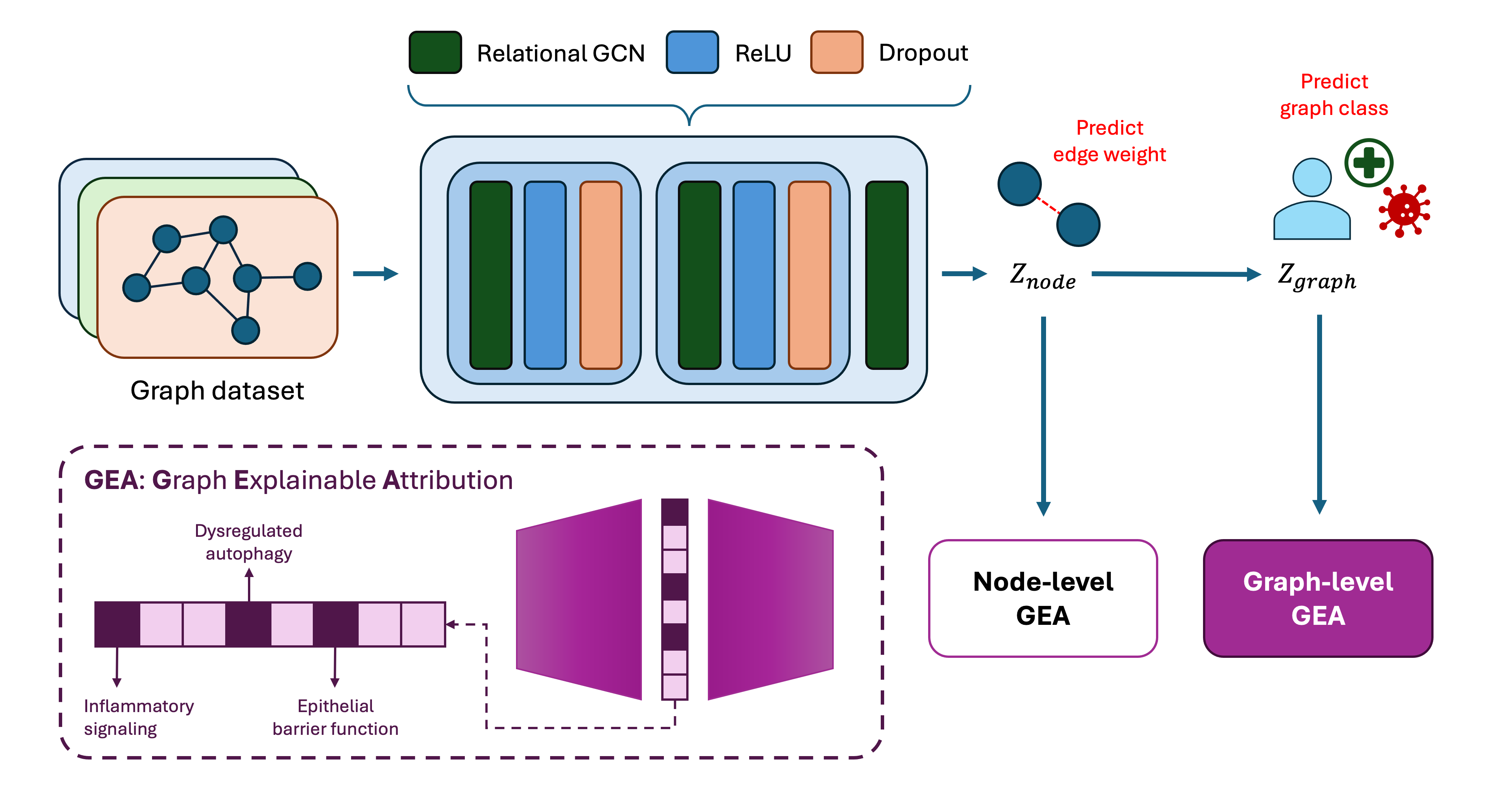
GEA is a framework for decomposing embeddings generated by a trained Graph Neural Network (GNN) model to give relevant biological insights at the node, edge and graph level. Sparse Autoencoders are employed in the framework, in which its sparse features activation can serve as actionable insights on how the internal mechanisms of the model represents information.
An overview of the workflow can be found below:
Tip
It is recommended to install GEA inside a virtual environment to manage depenendencies and avoid conflicts with existing packages. You can use the virtual environment manager of your choice, such as poetry, conda, or pipenv.
You can install the package for development by cloning this repository and running the following command:
Warning
We assume you are in the root directory of the cloned repository when running this command. Otherwise, you need to specify the path to the gea directory.
pip install -e .GEA's workflow consists of three stages:
- Train a Sparse Autoencoder (SAE) on a training set of embedding vectors (e.g., node-, edge-, or graph-level embeddings).
- Annotate the learned SAE features using a validation set and the corresponding concept annotations.
- Evaluate the learned features on an independent test set.
Annotations provide a way to associate SAE features with domain-specific concepts. The type of concepts used for annotation depends on the application domain (see GEA applied to molecules for an example based on molecular motifs).
The training script expects an .npz file containing, at a minimum, the following entries:
embeddings: a NumPy array of shape(N, D), whereNis the number of embedding vectors andDis the embedding dimension.annotations: a NumPy object array of lengthN. Each element is a dictionary mapping concept names to binary labels indicating whether the corresponding concept is present in the associated embedding.
The i-th embedding in embeddings must correspond to the i-th annotation dictionary in annotations.
Optionally, the .npz file may also contain additional metadata, such as:
entities: identifier associated with each embedding (e.g., a molecule identifier or SMILES string).prediction: model prediction associated with each embedding.target: ground-truth label associated with each embedding.
These additional fields are preserved by the dataset loader and can be used in downstream analyses, but they are not required for training the SAE.
To train an SAE, run:
python scripts/gea/train_sae.py \
    --embeddings_path node_embeddings.npz \
    --d_z 1200 \
    --epochs 50
To see all available command-line arguments, run:
python scripts/gea/train_sae.py --helpThe second and third stages of the GEA workflow—feature annotation and evaluation—can be performed using:
python scripts/gea/annotation_test.pyThis script requires the dataset splits generated during SAE training. The splits are saved by train_sae.py and are loaded from the same path by default. If a different location was used during training, the corresponding path can be provided using the appropriate command-line argument.
By default, the results are saved to:
gea_annotation_results_test.pt
A different output location can be specified using the --results_path argument.
If the default arguments were used during SAE training, the annotation and evaluation script can be run directly as shown above. To view all available command-line arguments, run:
python scripts/gea/annotation_test.py --helpGEA has been applied to embeddings obtained using a fine-tuned version of GROVER trained to predict solubility from molecular structures.
The embedding file is a Python dictionary where each key corresponds to a molecule represented as a SMILES string. Each value is a dictionary containing four types of embeddings:
atom_from_atomatom_from_bondbond_from_atombond_from_bond
These embeddings can represent different molecular entities and can subsequently be converted into the standardized .npz format required by the general GEA workflow.
Once the embeddings have been obtained, a molecular motif dictionary can be created by running:
python scripts/gea_molecules/create_motif_dict.pyBy default, the motif dictionary is saved as:
dict/motif_dictionary.pkl
This dictionary can be expanded or modified to include additional molecular concepts.
Given the embedding file and the motif dictionary, molecular embeddings can be annotated and prepared for SAE training using:
python scripts/gea_molecules/annotate_embeddings.py \
    --embeddings_path grover_embeddings.pt
This script generates the .npz files containing embeddings, annotations, and additional metadata required for the GEA workflow.
To see all available command-line arguments, run:
python scripts/gea_molecules/annotate_embeddings.py --helpOnce the data has been prepared, the general GEA workflow can be applied independently to each generated embedding file.
The code in this repository is licensed under the MIT License, allowing you to use, modify, and distribute it freely as long as you include the original copyright and license notice.