Chat with local or cloud models, search your documents, create artifacts, and run agentic tasks in isolated workspaces—all from a self-hosted interface.
Private by default · Provider-flexible · No application telemetry · Apache 2.0





Website · Documentation · Releases · Quick start
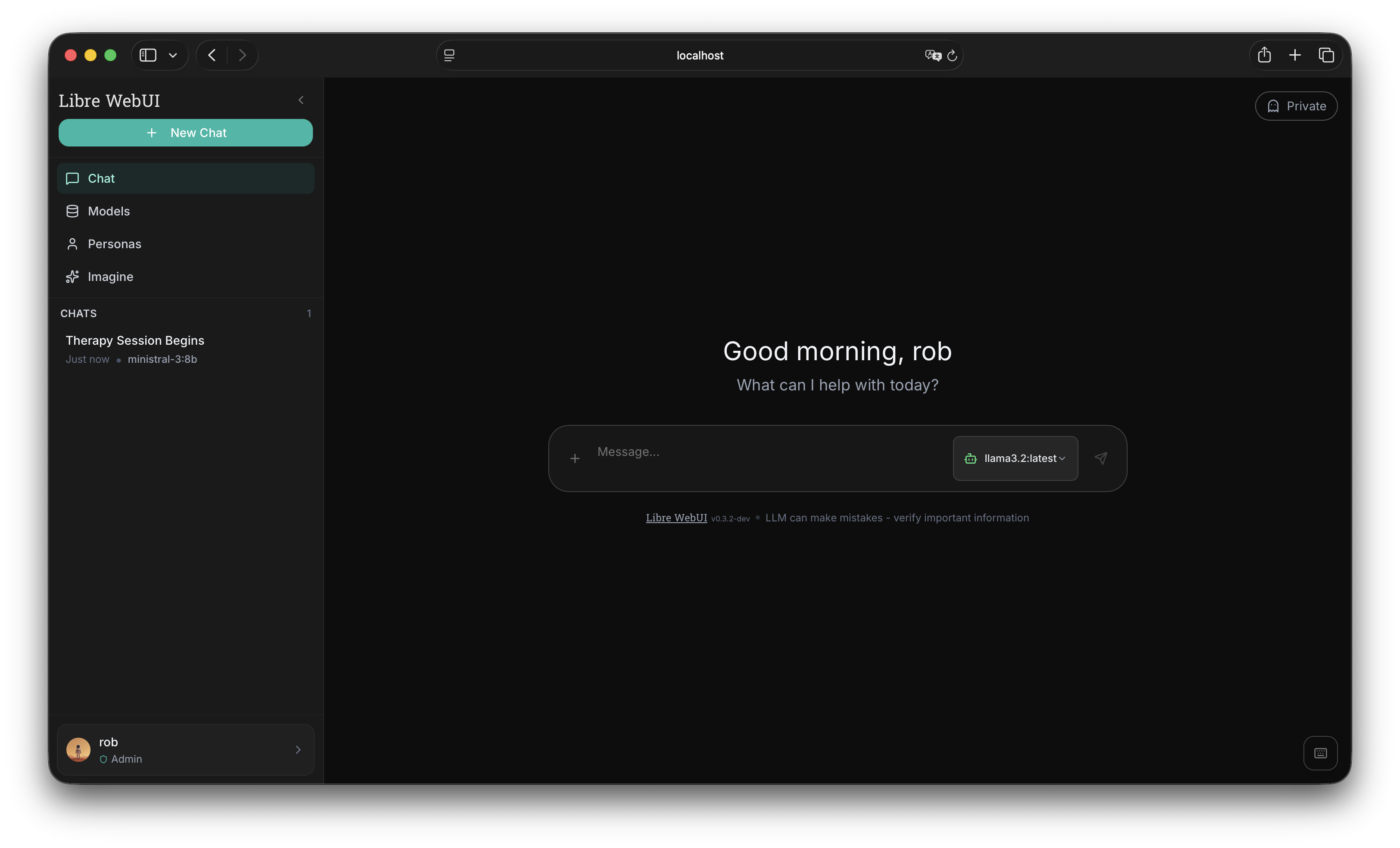
Libre WebUI is a self-hosted AI workspace for people who want control over their models, data, providers, and interface.
Use local models through Ollama, connect the providers you choose, search your own documents, create interactive artifacts, and give model-driven tasks an isolated workspace with files, tools, a terminal, and a live preview.
It runs on your machine, server, or cluster. Libre WebUI is not a hosted AI service and does not require a cloud account for local inference.
- Local-first: Use Ollama and other local inference backends.
- Provider-flexible: Connect cloud providers or OpenAI-compatible endpoints when you choose.
- Private by default: Libre WebUI ships without application telemetry or analytics.
- Built for work: Turn conversations into documents, code, websites, SVG, JSON, and other artifacts.
- Isolated tasks: Work provides a persistent project environment with sandboxed commands, files, diffs, and previews.
- Open source: Use, modify, redistribute, and fork the core project under the Apache License 2.0.
- Self-hosted: Keep the interface, conversations, and configuration on infrastructure you control.
When you use a remote provider, that provider receives the requests you send to it. Local-first does not mean that remote inference is invisible.
- Node.js 22.22 or newer
- Ollama for local models
- Docker is optional and required only for local Work sandboxes
npx libre-webui@latestOpen http://localhost:8080.
The first account created on a fresh installation becomes the administrator.
Install Ollama, then pull a model:
ollama pull gemma4:12bLibre WebUI can now use Ollama for local inference. No cloud account or API key is required.
Clone the repository and start the default stack:
git clone https://github.com/libre-webui/libre-webui.git
cd libre-webui
docker compose up -d
See the Docker deployment guide for production configuration, external Ollama, GPU support, networking, and persistent storage.
| Feature | Description |
|---|---|
| Chat | Streaming conversations with prompt queueing, multi-model comparison, and chat forking |
| Local inference | Ollama support with no required cloud account |
| Provider plugins | Chat, image, video, embedding, and speech providers through an extensible plugin layer |
| Knowledge | Chat with PDF, Office, Markdown, HTML, code, and CSV documents via hybrid retrieval with cited sources |
| Web search | Self-hosted SearXNG search for chats and Work tasks |
| Artifacts | Generate and preview HTML, SVG, JSON, code, and multi-file projects |
| Workspaces | Persistent, task-scoped environments with files, terminal, diffs, and previews |
| Work Computer | A watchable desktop with a browser for each agent — verified clicks and typing, take over for sign-ins, hear its audio, and teach it anchored tasks by demonstration |
| Channels | Public, private, and direct-message team conversations with threads, reactions, files, and @model |
| Calendar | Multiple shareable calendars with recurrence, reminders, and ICS import/export, encrypted at rest |
| Automations | Scheduled AI runs delivered as normal chat sessions |
| Notifications | Durable in-app inbox with live delivery and signed, egress-guarded outbound webhooks |
| Notes | Notebook with revision history, attachments, sharing, and reversible AI edits |
| Personas | Reusable assistant profiles with their own prompts, models, and memory |
| Media generation | Image generation and editing plus video generation, with a persistent gallery and retention controls |
| Voice | Speech-to-text dictation, text-to-speech playback, and hands-free voice mode with consent-aware voices |
| Context management | Context meter and undoable conversation compaction for long chats |
| Agents | Optional integration with installed agent CLIs and Libre Claw |
| Sharing | One grant model for chats, notes, knowledge, personas, prompts, skills, and calendars |
| Accounts | Local accounts, roles, groups, API tokens, and SSO |
| Public API | OpenAI-compatible /v1 endpoints on scoped API tokens |
| Evaluations | Feedback with topic tags, blind arena matches with an Elo leaderboard, and reproducible eval runs |
| Monitoring | System diagnostics, usage analytics with tariffs and budgets, OpenTelemetry export, and an audit log |
| Deployment | npm, Docker Compose, Kubernetes, Helm, and desktop client |
| Interface | Tabs, full-text search across chats, notes, and documents, themes, and 25 locales including Arabic RTL |
Ollama is the default local path, but Libre WebUI is designed to avoid provider lock-in.
Supported integrations include:
- Ollama and Ollama Cloud
- OpenAI
- Anthropic
- Google Gemini
- Groq
- Mistral
- OpenRouter
- Hugging Face
- GitHub Models
- Moonshot AI / Kimi Code
- ComfyUI
- ElevenLabs
- Qwen3-TTS
- Kyutai TTS
- MLX LM on Apple Silicon
- llama.cpp
- OpenAI-compatible services
Provider availability can change between releases. See the provider documentation for current configuration instructions.
Credentials can be supplied through deployment environment variables or stored in encrypted, user-scoped settings.
Work gives a model a persistent project environment where it can build, modify, and preview files.
Each task includes:
Work task
├── Persistent conversation and run history
├── Dedicated workspace volume
├── Policy-checked command sandbox
└── Files · Activity · Changes · Terminal · Preview · Screen
Work can allow a model to:
- Read, create, edit, move, delete, and search files
- Run bounded shell commands
- Start and stop a browser preview
- Drive a real desktop with a browser through screenshots and input
- Produce syntax-highlighted code
- Show file diffs
- Continue work in the same environment later
▶ Watch a real run (2:22) — a Work agent browsing NASA's galleries on its own screen, choosing photos, then building and testing an interactive Three.js gallery, unedited, from a single prompt.
libre-agent-readme-teaser.mp4
With the Work Computer enabled (one click for an administrator; the GUI image is published ready to pull), each task also gets a live virtual desktop: watch the agent browse in real time, unmute the computer's audio, take over the mouse and keyboard for sign-ins or CAPTCHAs — credentials go directly from your keyboard to the page, never through the model — and teach reusable tasks by demonstrating them once on screen. Taught playbooks name the controls that were clicked, carry the sites the demonstration actually visited as their allowed scope, and collect a worked/failed track record from your one-click reviews. The agent's own actions are verified, not assumed: typing asserts the focused field, batches stop when the screen changes underneath them, outcomes are checked against declared expectations, and repeated no-effect actions end the run asking for help instead of burning its budget. Policies decide whether takeover is allowed at all. You can message the agent while it works; it picks the message up at its next step without stopping the run.
Work is disabled for regular users by default and never falls back to executing commands directly on the host.
Containers are not virtual machines. Work tasks have outbound internet access by design, and administrators should review the deployment model before enabling agentic execution.
The default Docker Compose setup mounts the Docker socket so Work can create task containers. This gives the application root-equivalent control of the host. Every Libre WebUI administrator should therefore be treated as a host administrator when using that configuration.
For stronger isolation, use:
- The Docker socket proxy configuration
- Kubernetes-based Work sandboxes
- A separate host or cluster dedicated to Libre WebUI
Read the complete Work security documentation before enabling it for untrusted users.
Libre WebUI ships without application telemetry or analytics.
When using a local provider such as Ollama, prompts and responses remain on the infrastructure where that provider runs. When using a remote provider, prompts, responses, documents, and tool results may be sent to that provider as part of the request.
For multi-user deployments, Libre WebUI supports:
- Local accounts, roles, and groups
- Per-resource sharing with access grants
- bcrypt password hashing
- JWT sessions and scoped API tokens (which also drive the OpenAI-compatible
/v1API) - Login and signup rate limits
- Optional Cloudflare Turnstile
- Optional GitHub and Hugging Face OAuth, plus generic OIDC single sign-on
- An admin-facing security audit log
- AES-256-GCM encryption for sensitive application values
- Persistent SQLite storage, or PostgreSQL with S3 blobs and pgvector for the multi-replica team profile
- Configurable data directories
Application-layer encryption is not full-disk encryption or end-to-end encryption. For production deployments, use HTTPS, stable secrets, access-controlled storage, backups, and disk encryption where appropriate.
Libre WebUI can expose installed Claude Code or Codex CLIs as chat models when they are configured on the server.
This uses the credentials available to the Libre WebUI server user. Treat this as equivalent to granting the selected agent shell access on that system.
Disable this feature with:
AGENT_CLI_MODELS_ENABLED=falseFor broader automation, the optional Libre Claw integration provides a separate agent runtime for workflows involving files, shell, Git, browsers, HTTP, web search, MCP, memory, approvals, and schedules.
| Deployment | Command or link | Use case |
|---|---|---|
| npm | npx libre-webui@latest |
Fast local start |
| Docker Compose | docker compose up -d |
Persistent self-hosted deployment |
| External Ollama | docker compose -f docker-compose.external-ollama.yml up -d |
Use an existing Ollama instance |
| NVIDIA Docker | docker compose -f docker-compose.gpu.yml up -d |
GPU-enabled local inference |
| Kubernetes | helm install libre-webui oci://ghcr.io/libre-webui/charts/libre-webui |
Cluster deployment |
| Team profile | docker compose -f docker-compose.team.yml up -d |
Multi-replica PostgreSQL + S3 deployment |
| Desktop client | GitHub Releases | Desktop interface over a managed backend |
| Source | npm install && npm run dev |
Development |
For production deployments:
- Set stable
JWT_SECRETandENCRYPTION_KEYvalues. - Persist the application data directory.
- Back up the database and encryption key together.
- Use HTTPS through a trusted reverse proxy.
- Review the Docker socket and Work security model.
- Disable public signup unless it is explicitly required.
See the deployment documentation for details.
- Quick start
- Docker deployment
- Kubernetes deployment
- Working with models
- Provider connections
- Work workspaces
- Document chat
- Channels
- Notifications
- Sharing
- Calendar
- Public API
- Plugin architecture
- Capability contracts
- Authentication
- Data portability
- Platform foundation
- Speech to text
- Environment variables
- Troubleshooting
Contributions are welcome, including:
- Bug fixes
- Tests
- Documentation
- Translations
- Provider integrations
- UI improvements
- Security reviews
git clone https://github.com/libre-webui/libre-webui.git
cd libre-webui
git checkout dev
npm install
npm run dev
Create a branch, make your changes, add tests and documentation where
appropriate, and open a pull request against dev.
Please read:
Report security vulnerabilities privately rather than through public issues.
Libre WebUI is licensed under the Apache License 2.0.
You may use, modify, redistribute, and fork the project under the terms of that license.
Kroonen AI funds development and provides optional deployment, integration, security review, training, customization, and support services. Commercial services do not change the Apache 2.0 license of the core project.
The project’s independence and community commitments are described in the Community & Ethical Charter.
- Website: librewebui.org
- Documentation: docs.librewebui.org
- GitHub: github.com/libre-webui/libre-webui
- Releases: GitHub Releases
- Docker Hub: librewebui/libre-webui
- Forgejo mirror: git.kroonen.ai/libre-webui/libre-webui
- Hugging Face: huggingface.co/libre-webui
- Sponsor: GitHub Sponsors

