

Enhance your CKAN experience with our extension that enables seamless previews of various archive formats, ensuring easy access and efficient data management.
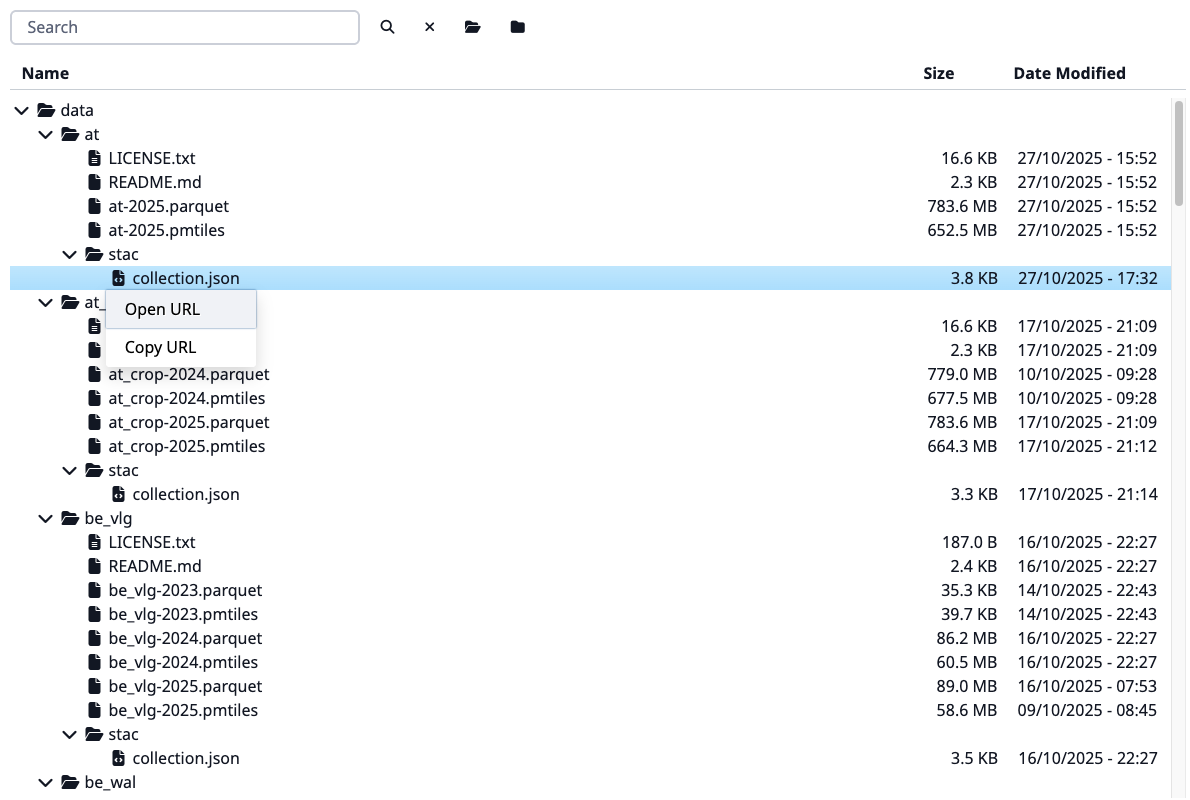
Features:
- Represents an archive as a file tree
- Supports the following archive formats: ZIP, ZIPX, JAR, RAR, CBR, 7Z, TAR, TAR.XZ, TAR.GZ, TAR.BZ2, DEB, RPM, A, AR, LIB
- Password-protected archives support for RAR format
- Caching the file tree for faster access
- File and folder search
- Support local and remote files
- Support for large archives
CKAN >= 2.11
Python >= 3.10
Redis (for caching)
Archives are only ever listed, never extracted, so RAR support needs no
unrar/unar/bsdtar binary on the host. A RAR archive with encrypted
filenames (not just encrypted file contents) is the one exception: listing
it needs a crypto backend, which the cryptography dependency provides
automatically.
ckan.plugins = unfold
ckan.views.default_views = unfold_viewSee the config declaration file.
The listing is built once per resource and cached in Redis as a folder index
(one hash per resource, one field per folder), for ckanext.unfold.cache_ttl
seconds. Staleness is checked on every read against a fingerprint of the
resource's url, format, metadata_modified and the view's archive_pass.
How the listing reaches the browser depends on ckanext.unfold.expand_nodes_threshold:
- At most the threshold (2000 entries by default): the whole tree is sent in one request and shown expanded.
- Above it: only the root folder is sent; each folder is requested when the
user opens it,
ckanext.unfold.page_sizeentries at a time with a "Show more" row for the rest. Search runs on the server and shows a flat list of the first 200 matching paths, since matches may sit in folders that are not loaded. The widget shows the total entry count and, for a search, how many entries matched. "Expand all" is disabled for these archives.
Fetching and parsing an archive can take a minute, so an archive that is not
cached yet is read by a CKAN background job
and not by the web request that asked for it. The widget shows a "processing"
notice and polls get_archive_status (a Redis lookup, so a web worker is never
held up) until the listing is ready. The job is also queued as soon as
something invalidates the cache: an Unfold view is added, its archive_pass
changes, or the resource is updated. Usually nobody has to wait.
This needs a worker: ckan jobs worker. Without one, Unfold notices that
nothing is listening on the queue and reads the archive inside the request.
The same happens with ckanext.unfold.enable_cache = false
(the job hands its result over through the cache) or
ckanext.unfold.build_in_background = false. In that mode, keep
ckanext.unfold.request_timeout below your web server's request limit (uWSGI
harakiri, gunicorn --timeout), or a slow origin gets the worker killed
instead of a readable error. A job has ckanext.unfold.job_timeout seconds.
Remote ZIP archives are read through HTTP Range requests, so only the central
directory is transferred. A multi-gigabyte ZIP referenced by URL previews in a
few requests as long as the hosting server honours Range. Tar archives
(.tar, .tar.gz, .tar.xz, .tar.bz2) have no index to jump to, so they are
streamed into the parser as they download, without a temporary file; the
transfer stops as soon as ckanext.unfold.max_entries is reached. Other formats
are downloaded in full. Both are subject to ckanext.unfold.max_file_size.
get_archive_structure(id, optionalview_id,parent,limit): returns{"mode": "full" | "lazy", "total": n, "nodes": [...]}. In lazy modenodesare the firstlimitdirect children ofparent(default#), withchildren_totalandhas_more.search_archive_structure(id, optionalview_id,q, optionallimit): returns{"results": [{id, text, icon, is_dir, size, modified_at}, ...], "ids": [...folders to open...], "matches": n, "truncated": bool}.get_archive_status(id, optionalview_id): where the listing stands, as{"status": "ready" | "processing" | "failed" | "missing"}.failedcomes with theerrordescribed below;missingmeans nothing is cached and nothing is running, and askingget_archive_structurestarts a job.rebuild_archive_index(id, optionalview_id; POST, needsresource_updateon the resource): drops the cached listing and any failure recorded for it, queues a new job, and returns the samestatusasget_archive_status. A failure such asunreadableis otherwise served untilckanext.unfold.cache_ttlruns out; the widget offers it as a "Rebuild" button to people who can edit the resource.
get_archive_structure and search_archive_structure answer
{"status": "processing"} instead of a listing while a job is reading the
archive. Both actions return {"error": {"code": "...", "message": "..."}} with HTTP
200 when the archive itself cannot be listed. message is translated and meant
for people; code is stable and is one of password_required,
password_incorrect, too_large, fetch_failed, unsupported_format,
unreadable, or error when nothing more specific applies. Every such failure
is also logged at WARNING with the resource id. A view_id that belongs to
another resource is a caller mistake and raises a ValidationError instead.
The extension provides the following signals for customization and extension:
unfold:register_format_adapters: Register custom adapters for specific file formats.unfold:get_adapter_for_resource: Get a custom adapter for a specific resource.
You can register your own adapter for a specific file format by using the unfold:register_format_adapters signal.
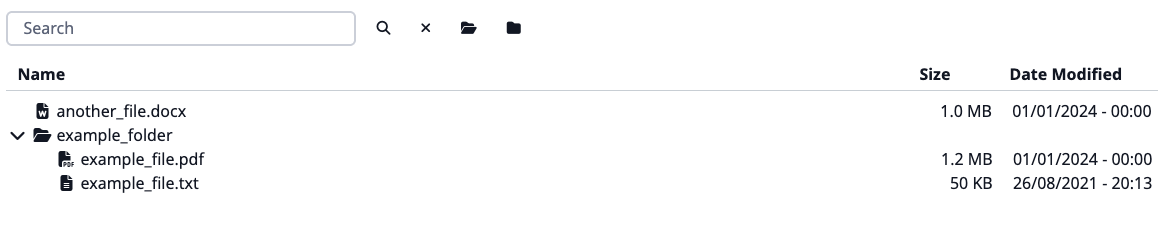
In fact, it doesn't have to be an archive format — you can register an adapter for any file format that makes sense to be represented as a file tree. To create your own adapter, you need to inherit from adapters.BaseAdapter and implement the required methods.
We're providing a simple example adapter below. The node list generation is up to the developer.
from ckanext.unfold.adapters import BaseAdapter
from ckanext.unfold.types import Node


class ExampleAdapter(BaseAdapter):
    def get_node_list(self) -> list[Node]:
        """Return list of nodes representing the archive structure.

        Ensure that your implementation handles both local and remote files:
        `self.is_upload` is `True` for a local upload and `False` for a
        remote URL.
        """
        return self.get_mock_node_list()

    def get_mock_node_list(self) -> list[Node]:
        return [
            Node(
                id="example_folder/",
                text="example_folder",
                icon="fa fa-folder",
                parent="#",
            ),
            Node(
                id="example_folder/example_file.txt",
                text="example_file.txt",
                icon="fa fa-file-text",
                parent="example_folder/",
                a_attr={
                    "href": "http://example.com/example_file.txt",
                    "target": "_blank",
                },
                data={
                    "type": "file",
                    "size": "50 KB",
                    "modified_at": "26/08/2021 - 20:13",
                },
            ),
            Node(
                id="example_folder/example_file.pdf",
                text="example_file.pdf",
                icon="fa fa-file-pdf",
                parent="example_folder/",
                data={
                    "type": "file",
                    "size": "1.2 MB",
                    "modified_at": "01/01/2024 - 00:00",
                },
            ),
            Node(
                id="another_file.docx",
                text="another_file.docx",
                icon="fa fa-file-word",
                parent="#",
                data={
                    "type": "file",
                    "size": "1.0 MB",
                    "modified_at": "01/01/2024 - 00:00",
                },
            ),
        ]
Then, you need to register your adapter using the signal. Each adapter registration function should accept a single argument: the adapter registry instance (not the class - the signal sends ckanext.unfold.adapters.adapter_registry itself, so mutating adapters here changes that shared registry).
class ExamplePlugin(p.SingletonPlugin):
    ...

    p.implements(p.ISignal)

    # ISignal
    def get_signal_subscriptions(self) -> types.SignalMapping:
        return {
            tk.signals.ckanext.signal("unfold:register_format_adapters"): [
                self._register_format_adapters
            ],
        }

    @classmethod
    def _register_format_adapters(cls, adapters: unf_adapters.Registry) -> None:
        adapters.register("my.format", ExampleAdapter)
Each adapter is responsible for handling a specific file format. The key in the registry dictionary is the file format, and the value is the adapter class.
Note
- You can register multiple adapters for different file formats.
- This way, you can replace existing adapters by registering your own adapter for the same format.
The result preview will look like this:
Sometimes, you may want to provide a custom adapter for a specific resource based on some criteria, such as resource metadata or other attributes - or you may want to prevent certain resources from being previewed at all. You can do this by listening to the unfold:get_adapter_for_resource signal and returning the appropriate value when the criteria are met.
...

from ckanext.unfold.utils import NO_PREVIEW, NoPreview


class ExamplePlugin(p.SingletonPlugin):
    ...

    p.implements(p.ISignal)

    # ISignal
    def get_signal_subscriptions(self) -> types.SignalMapping:
        return {
            tk.signals.ckanext.signal("unfold:get_adapter_for_resource"): [
                self._get_adapter_for_resource
            ],
        }

    @classmethod
    def _get_adapter_for_resource(
        cls, resource: dict[str, str]
    ) -> type[BaseAdapter] | None | bool | NoPreview:
        res_format = resource.get("format", "").lower()

        if res_format == "my.format":
            return ExampleAdapter

        if resource.get("private_notes"):
            return NO_PREVIEW

        return None
get_adapter_for_resource_signal.send() always calls every connected subscriber - blinker signals have no way to short-circuit that - so the following is about which result wins, not about skipping a call:
- Return an adapter class if you want to provide a custom adapter for the resource. It wins outright: no later result or the default registry is consulted.
- If you return
None, this subscriber has no opinion: the next result (or, if none is left, the default registry lookup by the resource'sformat) decides instead. - Return
NO_PREVIEW(from ckanext.unfold.utils import NO_PREVIEW) to force "never preview this resource". It wins outright like an adapter class does, except the resource gets no adapter at all - not even the default one for its format - socan_viewreportsFalse. - If you return
False, no later result is consulted either - but unlikeNO_PREVIEW, the default registry lookup byformatstill runs afterwards. This only suppresses a later custom adapter, not the built-in one for that format; it does not make the resource unpreviewable.
Working with different archive formats requires different tools:
It depends on unrar command-line utility to do the actual decompression. Note that by default it expect it to be in PATH.
If unrar launching fails, you need to fix this.
Alternatively, rarfile can also use either unar from TheUnarchiver or
bsdtar from libarchive as
decompression backend. From those unar is preferred as bsdtar has very limited support for RAR archives.
It depends on cryptography or PyCryptodome modules to process archives with password-protected headers.
We are using py7zr library.
The py7zr depends on several external libraries. You should install these libraries with py7zr.
There are PyCryptodome, PyZstd, PyPPMd, bcj-cffi, texttable, and multivolumefile.
These packages are automatically installed when installing with pip command.
For extra information, please visit the official documentation, especially the dependencies section.
We are using built-in library zipfile. Please consider referring to the official documentation for more information.
We are using built-in library tarfile. Please consider referring to the official documentation for more information.
We are using rpmfile library.
If you want to use rpmfile with zstd compressed rpms, you'll need to install the zstandard module.
We are using ar library. Please consider referring to the official documentation for more information.