You signed in with another tab or window. Reload to refresh your session.You signed out in another tab or window. Reload to refresh your session.You switched accounts on another tab or window. Reload to refresh your session.Dismiss alert
{{ message }}
Repository navigation
[BUG] StatusBarBehavior causes Android modal (DialogFragment) content to render behind the status bar - #3354
This PR updates Android modal status-bar handling to align with host-window edge-to-edge behavior and refreshes the demonstration sample. Fixes the modal (DialogFragment) path of #2351.
PR #3189 fixed the host-window path (StatusBar.android.cs), however a ContentPage shown modally (Navigation.PushModalAsync) is hosted in a separate DialogFragment window configured by DialogFragmentService.android.cs. This PR fixes that specific scenario.
I verified sample app on-device on Android API 26, 33, and 36.1 emulators
The StatusBarBehavior sample is also polished and turned into a regression test for #2351:
BrokenTitleViewShell / OverflowingTitleViewPage are renamed to EdgeToEdgeTitleViewShell / EdgeToEdgeTitleViewPage
The demo now shows content drawn edge-to-edge under a custom Shell.TitleView, with a toggle to switch the status bar color (blue ↔ red) to confirm the styling, and a Back button to return to the demo.
Hey @Pastajello! Could you review this PR and test it out on an Android Emulator or two when you get a chance? It builds on top of the work you did in #3189, fixing the modal (DialogFragment) path of #2351.
I verified this PR on-device on Android API 26, 33, and 36.1 emulators, and it all looks good!
The Sample now has one demo for each fixed path, both opened from the
StatusBarBehavior page (Android only). Each demo says on screen what to
check and what the correct result looks like.

- MauiProgram enables SetShouldUseStatusBarBehaviorOnAndroidModalPage in
  the Debug and Release setup. It is off by default, so the modal demo
  never reached DialogFragmentService before.
- EdgeToEdgeModalPage is the DialogFragment demo (#3353). It has amber
  bars at the very top and bottom of the page, so a status bar or
  navigation bar that covers them is obvious. The page has no
  StatusBarBehavior of its own, because a behavior re-applies the window
  flags once the modal is visible and hides the bug. The launcher first
  resets the host status bar to exactly Colors.Transparent, since a
  modal copies the status bar of the window it opens from. A switch
  changes the status bar to solid red.
- EdgeToEdgeTitleViewShell is the host window demo (#2351): a Shell with
  a StatusBarBehavior, a TitleView and a TabBar, which restores the
  reproduction that BrokenTitleViewShell had. Both tabs share one view
  model, so the status bar color is the same on both.
- On Android the Shell demo runs in its own Activity, with its own
  Window from App.CreateWindow. Application.OpenWindow opens nothing
  there because MainActivity is SingleTask. Closing the Activity returns
  to the untouched AppShell.
- The TabBar colors are set on the demo Shell, because the Sample's
  Shell style makes the selected tab label almost white on white.

Co-Authored-By: Claude Opus 5.5 <noreply@anthropic.com>
Closing a modal runs StatusBarBehaviorPage.OnNavigatedTo, which applies
the slider color with full alpha, so the status bar turns opaque black.
The demo button then sets the sliders to 0 again, but they are already
0, so nothing applies a transparent color and the modal copies an
opaque status bar. With main's DialogFragmentService the bug therefore
only showed the first time the demo was opened (API 28: top bar at
y=0, then y=24 on every later open).

The button now also sets the status bar to Colors.Transparent before it
pushes the modal.

Co-Authored-By: Claude Opus 5.5 <noreply@anthropic.com>
On Android the Toolbar leaves its first 16dp empty, so the amber TitleView
of the Shell demo started 16dp from the left edge and the Shell's blue
toolbar background showed in that strip (seen on an API 33 emulator).

The Shell demo's Activity now uses its own theme, whose toolbar style sets
the start content inset to 0. Only that Activity uses the theme, so the
toolbar of the AppShell keeps its default insets. The theme derives from
Maui.MainTheme.NoActionBar instead of Maui.SplashTheme, because MAUI
replaces the splash theme with the main theme in OnCreate, which would
drop the toolbar style.

Co-Authored-By: Claude Opus 5.5 <noreply@anthropic.com>
The style's name and its zero start insets already say why it exists.
The theme's comment stays, because deriving that theme from
Maui.SplashTheme would silently undo the TitleView fix.

Co-Authored-By: Claude Opus 5.5 <noreply@anthropic.com>
On API 35 and higher, a modal (DialogFragment) did not get the status bar
color of the page that opened it:
- StatusBar.SetColor draws its color in an overlay view on API 35+, not in
  Window.StatusBarColor. So main copied only the theme's color (#141414 in
  the Sample) and this PR copied nothing: a modal opened from a solid red
  status bar showed #141414 (targetSdkVersion 34) or the page background
  (targetSdkVersion 36), on API 35 and API 36 emulators.
- Android still honors Window.SetStatusBarColor on API 35+ for apps that
  target API 34 or lower, and this PR had stopped calling it there. A
  status bar color that such an app sets on its own window was lost: blue
  with main's code, #141414 with this PR's.

The API 35+ path now reads the host window's overlay color through a new
internal StatusBar helper. Apps that target API 34 or lower get that color,
composited over the host window's own status bar color, through
SetStatusBarColor. Apps that target API 35 or higher get the same overlay
as the host, drawn by StatusBar's own code. The paths below API 35 and the
copied light/dark icon appearance are unchanged.

Co-Authored-By: Claude Opus 5.5 <noreply@anthropic.com>
…with

The modal demo only checked the status bar color after its switch, and the
switch calls StatusBar.SetColor on the modal itself, so the demo could not
show whether a modal gets the color of the page that opened it.

A second button, "Modal page demo from a solid red status bar", makes this
page's status bar solid red and opens the same modal. The modal page now
says that its status bar must open with the color of the StatusBarBehavior
page, and its switch starts in that state. The switch is subscribed only
after its initial state is set, so opening the modal never sets the color
itself.

Co-Authored-By: Claude Opus 5.5 <noreply@anthropic.com>
…under it

53011c1 gave a modal the status bar color of the page that opened it on
API 35+, but two cases went wrong:
- Apps that target API 34 or lower got the host's overlay color baked into
  the modal window's own status bar color. StatusBar.SetColor on the modal
  draws its overlay on top of that color, so a transparent color showed the
  host's color: the solid red demo stayed red after its switch was turned
  off, where f000bc1 showed the window color (#141414).
- The fragment also starts each time the app returns to the foreground, and
  each start copied the host's overlay color over the modal's own. With the
  Sample's targetSdkVersion 36 on API 36, a modal switched to red went back
  to transparent after Home and back, and one switched to transparent went
  back to red. f000bc1 kept the modal's color.

The modal now gets the host window's status bar color and, as an overlay of
its own, the host's overlay color, the same two layers the host page draws.
Android ignores the window color for apps that target API 35 or higher, so
no target SDK check is needed. The overlay is only added when the modal has
none yet, and it is posted: a new window adds the view that draws its own
status bar color on its first layout, and an overlay added before that view
is drawn under it (without the post, a modal opened from the solid red demo
showed #141414 on API 35 with targetSdkVersion 34).

Co-Authored-By: Claude Opus 5.5 <noreply@anthropic.com>
DialogFragmentService handles every DialogFragment, not only modal pages,
and since 53011c1 it added the host's status bar overlay to all of them on
API 35+. A floating DialogFragment, like a Material date or time picker,
does not reach the status bar, so the overlay was drawn at the top of its
own content instead: a solid red demo host gave a floating AlertDialog
fragment a red band over its title, 66 px high on API 35 (the status bar
height resource) and 3 px on API 36 (the window's status bar inset).

Floating dialogs no longer get the overlay, as Android draws no status bar
color for floating windows either. Checked with a scratch floating
DialogFragment that was not committed.

Co-Authored-By: Claude Opus 5.5 <noreply@anthropic.com>
On API 35+, this always copies the activity's overlay, even when another modal opens the new modal. StatusBar.SetColor updates the visible dialog through GetCurrentWindow, leaving the activity's overlay unchanged. For example, open the existing “Try StatusBarBehavior on Modal Page” sample, then launch its solid-red modal demo: the new modal inherits the activity's old color instead of red. Resolve the source from the underlying modal, excluding the dialog being started, and fall back to the activity window.
The reason will be displayed to describe this comment to others. Learn more.
I tested this PR on emulators (API 33 and API 36). Each scenario was run twice: once with this PR, and once with the same app but with DialogFragmentService.android.cs and StatusBar.android.cs taken from main. In every scenario the opening page sets a solid red status bar first. The test page is here if you want to reproduce it. No scenario crashed.
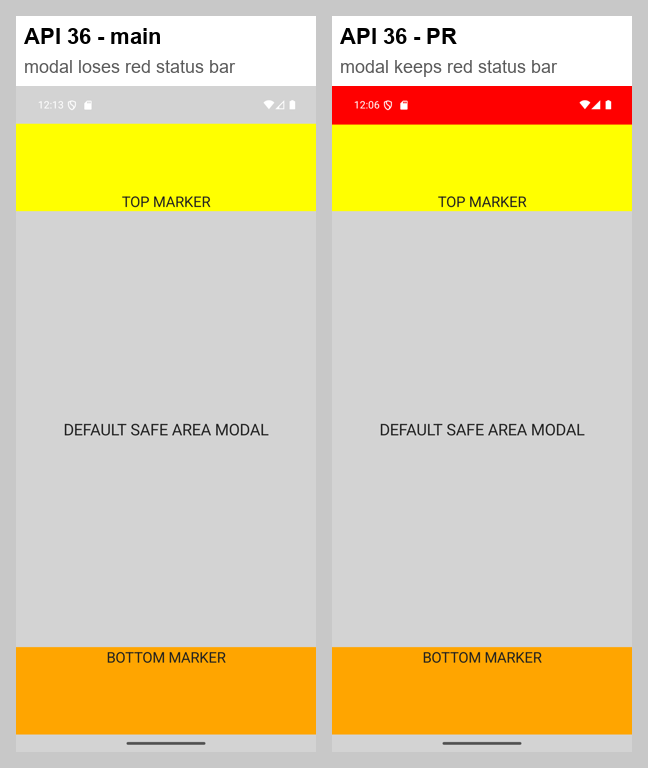
The fix works: on API 36 a modal page now keeps the opening page's status bar color, and its content stays below the status bar. I found one bug and two behavior changes worth deciding on purpose.
✅ The fix works (API 36)
On main the modal page loses the red status bar. With this PR it keeps it, and the top marker stays below the bar.
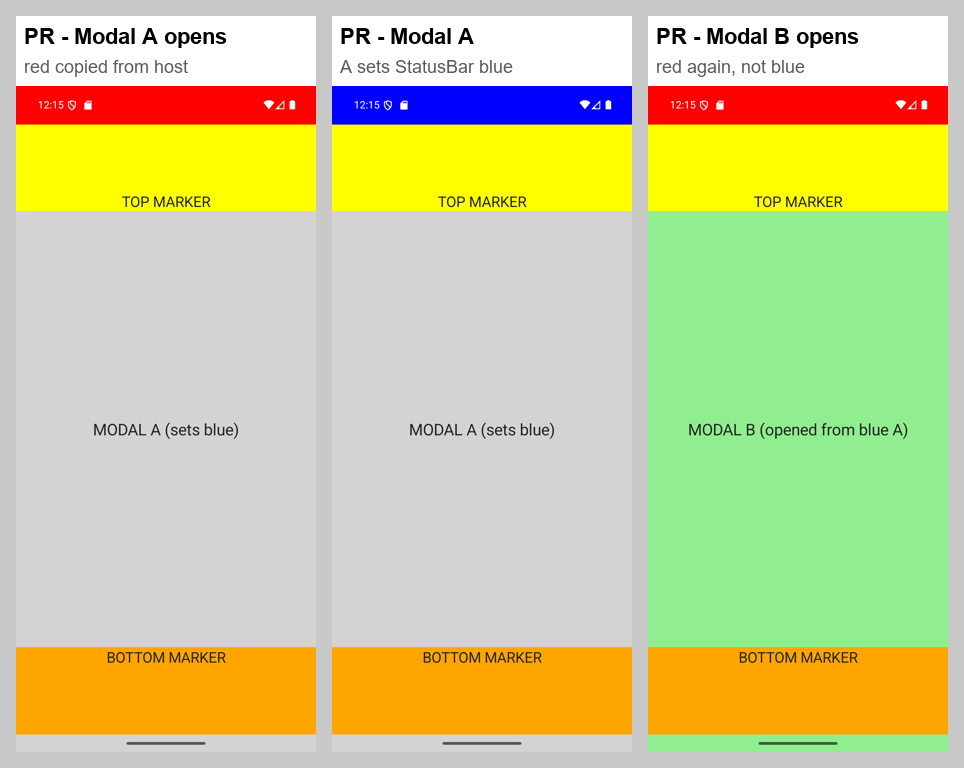
🐛 1. A nested modal copies the main window's color, not the modal it was opened from (API 35+)
StatusBar.TryGetOverlayColor(hostWindow, ...) always reads activity.Window. Modal A opens red (correct), then sets the status bar to blue. Modal B, pushed from A, opens red, not blue. That contradicts the sample's own rule that a modal "opens with the color of the page that opened it". The fix would be to read the overlay color from the window below the new dialog (the topmost other visible DialogFragment, falling back to activity.Window).
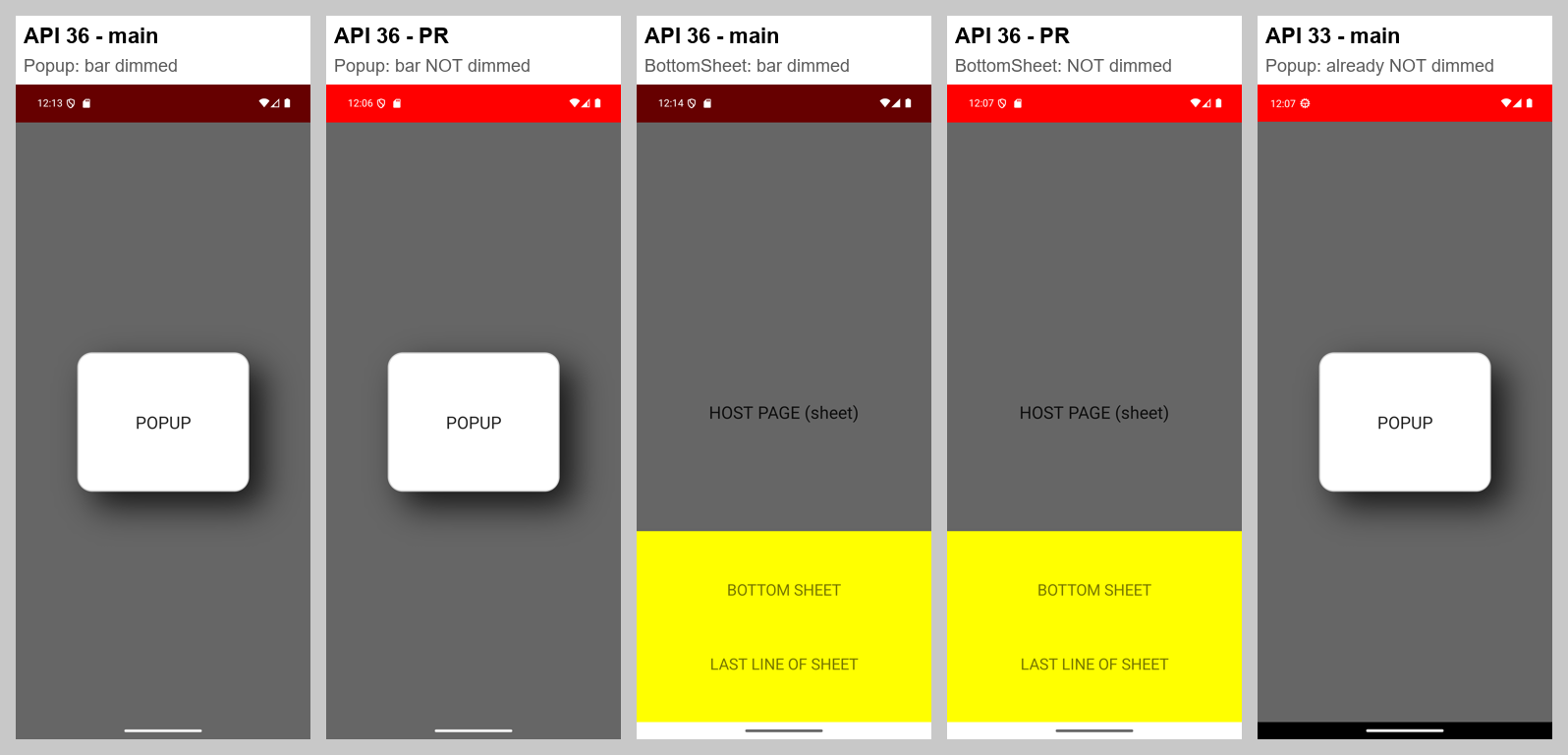
⚠️ 2. Popups and bottom sheets: the status bar is no longer dimmed (API 35+)
Toolkit Popups are modal pages, so they also get the copied overlay. The overlay is added on top of the popup's dim layer, so on API 36 the status bar stays full red while the rest of the screen dims. On main it dims with the screen. The same happens with a Material BottomSheetDialogFragment, because the service handles every non-floating DialogFragment in the app. In fairness, API 33 on main already behaves this way (last screenshot), so this makes API 35+ match older Android. But it is a visible change for API 35+ users, so please make it on purpose and document it. The IsFloating check works: a floating AlertDialog is dimmed correctly with this PR.
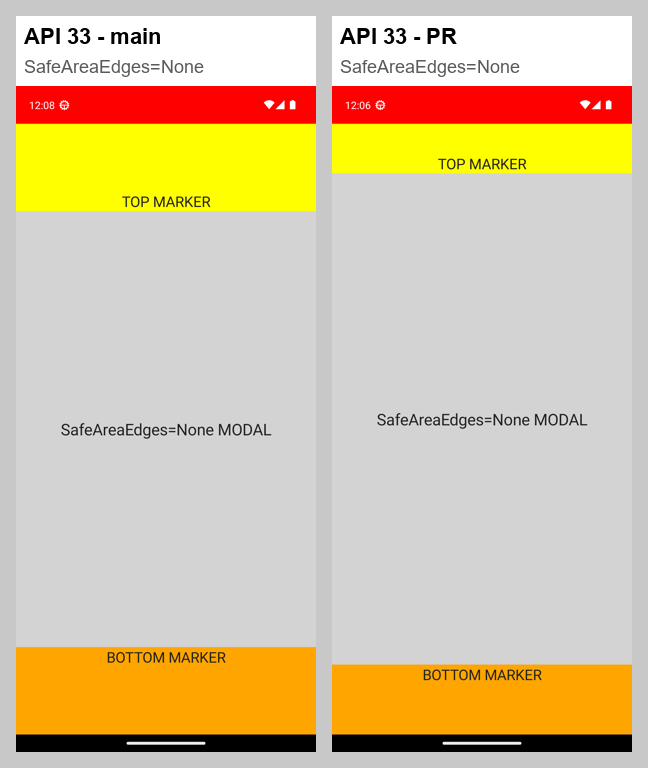
⚠️ 3. API 30–34: a SafeAreaEdges=None modal now draws under an opaque status bar
SetDecorFitsSystemWindows used to be !isColorTransparent and is now always false. A modal page with default safe areas looks identical before and after this PR. But a modal with SafeAreaEdges="None" used to be kept below an opaque status bar, and now its top is drawn under it. This matches API 35+, but it is a behavior change on API 30–34 that is worth a line in the docs or release notes. It also applies to third-party DialogFragments, because the API 30–34 and below-30 paths have no IsFloating check.
Smaller things
The two new unit tests only check that a behavior added to a page is in Behaviors and that its default color is Transparent. Neither one runs DialogFragmentService or the overlay code, so the real regression check is the manual sample.
The reason will be displayed to describe this comment to others. Learn more.
hostWindow is always activity.Window, so a modal pushed from another modal copies the activity's overlay color, not the color of the modal underneath it (see screenshot 4 in the review summary). Consider reading the overlay color from the window below this dialog: the topmost other visible DialogFragment, falling back to activity.Window.
This line also adds the copied overlay to Toolkit Popups and to non-MAUI full-screen DialogFragments such as bottom sheets. The overlay draws on top of their dim layer, so the status bar is no longer dimmed (screenshot 2).
The reason will be displayed to describe this comment to others. Learn more.
This used to be SetDecorFitsSystemWindows(!isColorTransparent). With an opaque color, a modal page with SafeAreaEdges=None now draws its top under the status bar on API 30–34 (screenshot 3 in the review summary). That is consistent with API 35+, but it is a behavior change, and it applies to every DialogFragment in the app because this path has no IsFloating check.
The reason will be displayed to describe this comment to others. Learn more.
Nit: this branch can never run, because the minimum is API 21. If it ever did, it would throw from inside a fragment lifecycle callback and crash the app. Consider removing the API 21 check, or returning instead of throwing.
The reason will be displayed to describe this comment to others. Learn more.
Nit: this runs in a posted callback, and ApplyStatusBarOverlay creates the view with new View(Activity), which throws if CurrentActivity is null by then. That would be an unhandled crash, though I couldn't trigger it. Using the dialog's own context (window.Context) would avoid relying on that global value.
The reason will be displayed to describe this comment to others. Learn more.
PushModalAsync isn't awaited here. Also, neither new test runs DialogFragmentService; they check a behavior's default property values. Fine as smoke tests, but they don't cover #3353.
The reason will be displayed to describe this comment to others. Learn more.
Requesting changes based on my review above, which has screenshots for each point:
Please fix: a modal pushed from another modal copies the main window's status bar color instead of the color of the modal it was opened from (API 35+, DialogFragmentService.android.cs line 169).
Please decide and document: with this PR, Toolkit Popups (and other full-screen DialogFragments) no longer dim the status bar on API 35+. If that's intended, a note in the docs is enough. If not, the overlay should not be added to the popup's window, or it should go under the dim layer.
The API 30–34 SafeAreaEdges=None change and the smaller items are not blocking.
This file contains hidden or bidirectional Unicode text that may be interpreted or compiled differently than what appears below. To review, open the file in an editor that reveals hidden Unicode characters.
Learn more about bidirectional Unicode characters
Add this suggestion to a batch that can be applied as a single commit.This suggestion is invalid because no changes were made to the code.Suggestions cannot be applied while the pull request is closed.Suggestions cannot be applied while viewing a subset of changes.Only one suggestion per line can be applied in a batch.Add this suggestion to a batch that can be applied as a single commit.Applying suggestions on deleted lines is not supported.You must change the existing code in this line in order to create a valid suggestion.Outdated suggestions cannot be applied.This suggestion has been applied or marked resolved.Suggestions cannot be applied from pending reviews.Suggestions cannot be applied on multi-line comments.Suggestions cannot be applied while the pull request is queued to merge.Suggestion cannot be applied right now. Please check back later.


 ne0rrmatrix
left a comment
ne0rrmatrix
left a comment


Description of Change
This PR updates Android modal status-bar handling to align with host-window edge-to-edge behavior and refreshes the demonstration sample. Fixes the modal (DialogFragment) path of #2351.
PR #3189 fixed the host-window path (
StatusBar.android.cs), however aContentPageshown modally (Navigation.PushModalAsync) is hosted in a separateDialogFragmentwindow configured byDialogFragmentService.android.cs. This PR fixes that specific scenario.Linked Issues
PR Checklist
approved(bug) orChampioned(feature/proposal)mainat time of PRAdditional information
I verified sample app on-device on Android API 26, 33, and 36.1 emulators
The StatusBarBehavior sample is also polished and turned into a regression test for #2351:
BrokenTitleViewShell/OverflowingTitleViewPageare renamed toEdgeToEdgeTitleViewShell/EdgeToEdgeTitleViewPageShell.TitleView, with a toggle to switch the status bar color (blue ↔ red) to confirm the styling, and a Back button to return to the demo.